
In the current data-driven business landscape, efficient Salesforce Data Archival serves as a cornerstone for regulatory compliance, financial efficiency, and optimal CRM functionality. Organizations using Salesforce face mounting challenges managing large volumes of legacy data over time—particularly amid rising regulatory demands, increasing storage costs, and system slowdowns driven by excessive data growth. This challenge highlights Salesforce Data Archive Solutions in 2026: a creative, secure, and cost-effective way to preserve essential customer information for extended periods without overwhelming your CRM infrastructure.
For companies merging Salesforce organizations, migrating to alternative CRM systems, or seeking cost-effective ways to maintain access to legacy data while meeting compliance standards, Salesforce Data Archival from LST Consultancy eliminates the expensive, ongoing Salesforce licensing and storage costs while keeping data completely connected.
What is Salesforce Data Archival?
Salesforce Data Archival is the process of archiving historical Salesforce data (such as Accounts, Contacts, Opportunities, Cases, Leads, and custom objects, along with their related data, such as field history and chatter feeds) that you no longer use frequently to an external storage system, so it is not lost.
Unlike conventional backups designed for rapid restoration, data archival prioritizes maintaining data accessibility and accuracy over extended periods to satisfy regulatory standards, support compliance reviews, and manage expenses by reducing the active data volume in your Salesforce organization. Through LST Consultancy’s data archival services, all data associations, references, and connections remain intact, allowing straightforward access without needing active Salesforce licenses or storage capacity.
Why Your Business Needs Salesforce Data Archival
Meet Regulatory and Audit Requirements
SaaS, manufacturing, retail, healthcare & finance are highly regulated industries that require companies to retain and store 5 years (or more) of historical data. Data Archival for Salesforce: Remain Compliant with a Click. Stay compliant. Intrusion into your peace of mind and retrospective discovery of missing records during a compliance check are due to the past.
Lower Spend on Salesforce Licenses and Storage
Salesforce storage isn’t free, and it isn’t cheap. Old history is still taking up valuable space and affecting your licensing classes. The archiving process relocates old data from your active company environment while keeping it accessible, resulting in a 50-80% cost reduction that often pays for itself within the first year.
Enhance System Speed
Inactive historical records slow SOQL queries, dashboards, and list views, and delay reports. By moving old records to an archive, you free up system resources, potentially accelerating performance by up to 60% in your Salesforce environment.
Enable CRM Migrations
Considering org consolidation, platform migration, or retiring legacy Salesforce systems? Archiving ensures business continuity by preserving historical customer journeys and transaction records after the migration.
Streamline M&A Review Processes
Confidentially transmit targeted history to third parties during acquisition activities without sharing access to your customer base or granting org-wide permissions.
LST Consultancy’s Salesforce Data Archival Advantages
With LST Consultancy’s solutions for Salesforce data archive in 2026, businesses have an option that is technically advanced enough to satisfy an enterprise-level of requirements:
- Improve Cost: Access Archived Data at a fraction of Salesforce’s storage price.
- Fast Fetch: React-vie UI for instant searching and filtering
- Data Integrity: Complete conservation of Lookups, Links, and Metadata
- Instant Export: Get one record or a thousand right away
- Scalable Cloud Infrastructure: Petabyte-scale data is hosted on AWS/Azure/GCP hosting
- Corporate Security: AES-256 encryption, Role-based access control, SOC 2 Type II compliance
How Our Salesforce Data Archival Happens
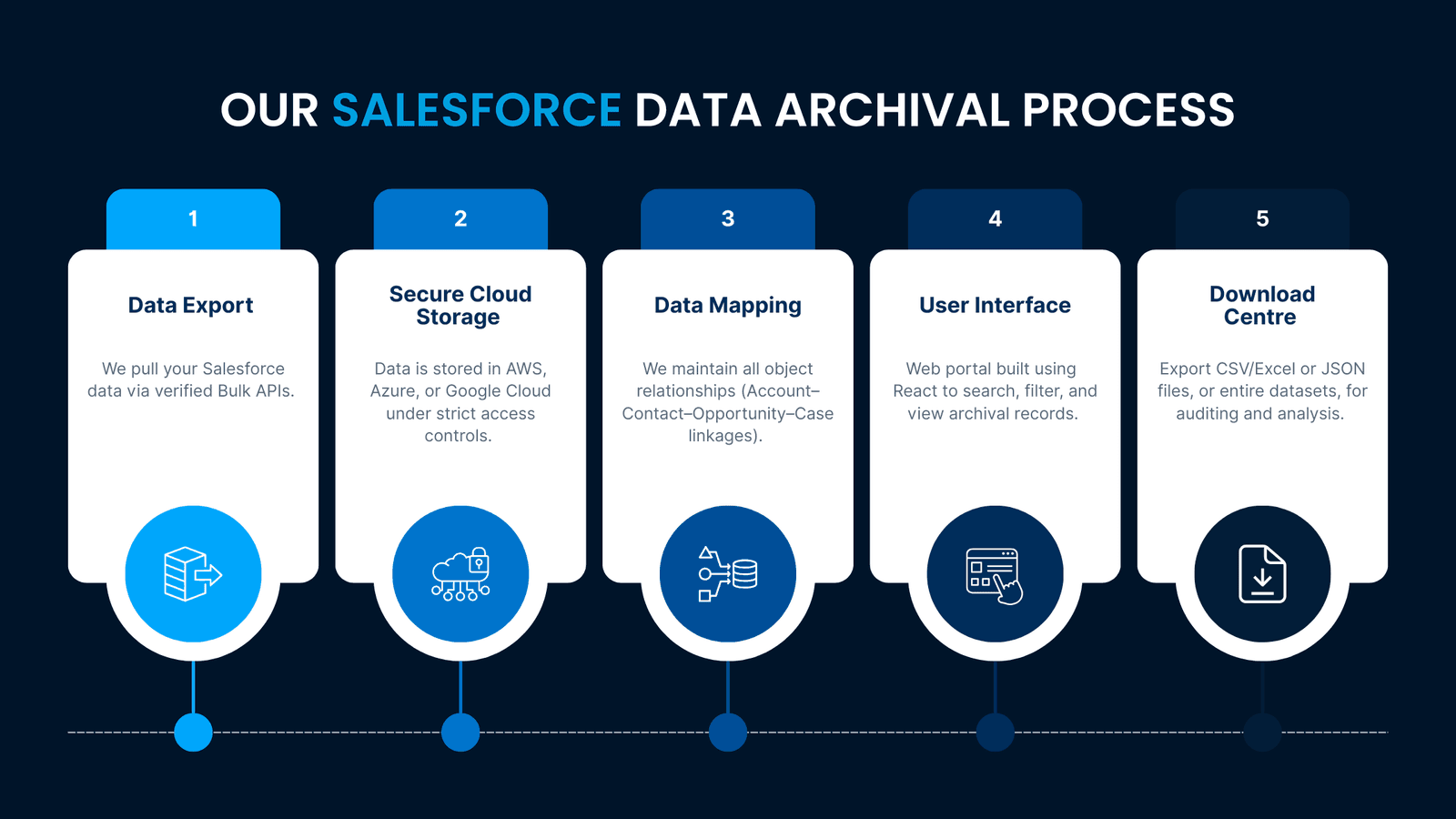
- 1.Data ExportWe pull your Salesforce data via verified Bulk APIs.
- 2.Secure Cloud StorageData is stored in AWS, Azure, or Google Cloud under strict access controls.
- 3.Data MappingWe maintain all object relationships (Account–Contact–Opportunity–Case linkages).
- 4.User InterfaceWeb portal built using React to search, filter, and view archival records.
- 5.Download CentreExport CSV/Excel or JSON files, or entire datasets, for auditing and analysis.
Typical Scenarios for Archiving Salesforce Data
- CRM Consolidation: Archive acquired companies or legacy organizations out of the primary production CRM.
- Performance Optimization: Remove 5+ Years Old Records to Speed Up the Live Org
- Audit Readiness: Premier overview of prior compliance data pieces
- Platform Migration: Preserve Salesforce history when migrating to Dynamics/HubSpot
- GDPR Compliance: Store Archive with “right to be forgotten” requests
2026 Technology Stack: Future-Proof Archival
- Frontend: React 19 TypeScript, sub-second search for millions of records
- Backend: Node.js 22 with PostgreSQL for relational data integrity
- Cloud: Multi-cloud (AWS S3, Azure Blob, Google Cloud Storage)
- Security: AES-256 encryption, multi-factor authentication (MFA), Okta SSO integration, SOC 2 Type II
- Search: Elasticsearch for full-text search of all objects and attachments
What Makes LST Consultancy the Right Choice for Salesforce Data Archival?
- Proven Performance: With over 500 CRM archival implementations delivered
- Ready-Made Solutions: Specialized frameworks for finance, healthcare, and manufacturing industries
- Guaranteed ROI: Achieve savings within 12 months, or our fee is waived
- Continuous Support: Dedicated professionals on standby 24/7 for deployment to ensure continuity of support and innovative improvement
- Flexible Infrastructure: The choice between public cloud, private cloud, hybrid, or dedicated environments
Real Results: Customer Success Stories
- Global Financial Technology Company: Retained 8 years’ worth of transaction data; was able to cut 45% in costs from Salesforce apps, and met the SOX essential safety requirements
- Medical Services Organization: Successfully stored 12 million patient records in a HIPAA-compliant way, increased reporting speed by 70%
- SaaS Business: Consolidated 5 Salesforce instances, saved $180K in license fees annually
Project Timeline: 6-8 Weeks to Value Realization
- Weeks 1–2: Analysis and data scrubbing
- Weeks 3–4: Configuration of the system and quality assurance
- Weeks 5-6: Transfer of data between sites and verification
- Weeks 7–8: Start-up, user education & performance tuning
Ready to Transform Your Salesforce Data Management?
More than just cost savings, Salesforce Data Archiving is an investment that thoughtfully and strategically lifts your business. Data is king in modern enterprises. Scale with peace of mind by tailoring your active environment for growth while maintaining all history, ensuring access, compliance, and audit.
Schedule Your Free Consultation Now to find out more about how LST Consultancy’s Salesforce Data Archiving Solutions 2026 offer a fast return on investment and future-proof your CRM system.
Your historical Salesforce data deserves better than expensive storage and slow performance. Let LST Consultancy bring out the full business potential.
Frequently Asked Questions (FAQs)
What is Salesforce Data Archival, and why is it so important in 2026?
Salesforce Data Archival is the process of storing older Salesforce data in a safe (compliance, legal, and scalable storage) place to reduce your primary data storage usage. By 2026, this will become crucial for reducing storage costs, complying with regulatory requirements, and maintaining effective CRM operations.
Why is Salesforce Data Archival not like a typical backup?
Salesforce Data Archival focuses on long-term data storage, compliance, and cost savings, while backup systems help you recover data. Salesforce data archiving solutions in 2026 maintain the searchable, retrievable state of information for many years without using active storage capacity in Salesforce.
Will Salesforce Data Archival help reduce licensing and storage costs?
Indeed, by removing unused and obsolete records from live Salesforce orgs, Data Archival reduces the need for costly storage and licenses, resulting in 30-60% savings for companies within a year.
What Salesforce data can be archived?
Our tool supports all standard and custom objects, including Accounts, Contacts, Opportunities, Cases, Leads, file attachments, documents, Chatter data, and various other related metadata, without losing any relationships.
Is it possible to make the archived Salesforce data accessible for audit purposes?
In 2026, Salesforce data archiving solutions offer instant, audit-ready access via secure web applications and advanced search and filter options, including exports – without the associated cost of a Salesforce license.
Can I send the archived records back to Salesforce, if needed?
Yes. With Salesforce Data Archival, an entire collection of records or a single record can be restored to Salesforce, maintaining complete relational integrity and data accuracy.
How does Salesforce Data Archival comply with data protection regulations?
Yes. Modern archive solutions for Salesforce data in 2026 include compliance with GDPR, HIPAA, SOX, and other regulations via encryption, permission-based access controls, audit trail functionality, and broad retention policy support.
Is Salesforce Data Archival useful during CRM migration or company mergers?
Salesforce Data Archival is a good fit for CRM changes and M&A. It preserves historical data from previous companies, enabling business operations without the overhead of maintaining additional Salesforce instances.
How long do companies typically wait to see ROI for Salesforce Data Archiving?
Companies see an ROI of 6–12+ months by saving on storage, licenses, performance, and enablement for compliance monitoring with Salesforce Data Archival.
Why is Salesforce data storage so expensive?
Salesforce data storage is expensive because each org gets a fixed storage allocation, and extra capacity is bought as an add-on at a premium over general cloud storage. Records, history tables, attachments and files all draw on that allocation, so years of inactive data keep growing the bill. Archiving older records to external storage frees space without deleting history.
What happens when you exceed your Salesforce data storage limit?
When an org exceeds its Salesforce data storage limit, Salesforce warns administrators, and depending on how far over the limit the org is, users can be blocked from creating new records until space is freed. The usual fixes are buying extra storage, deleting data or archiving older records. Archiving keeps the history while bringing usage back under the limit.
What is a good Salesforce data archiving strategy?
A good Salesforce data archiving strategy starts by finding the objects that use the most storage and setting age-based rules for each, such as closed Cases or Opportunities older than a set number of years. Agree on retention periods with legal and compliance teams, preserve parent-child relationships during export, test retrieval before removing anything, and run the archive on a regular schedule.
Does Salesforce have its own archiving tool?
Yes. Salesforce offers a native product called Salesforce Archive, and AppExchange and third-party vendors also provide archiving solutions. Native and third-party options differ in where archived data is stored, how it is searched, whether users need Salesforce licenses to view it and how it is priced. Compare these points against your retention, audit and budget requirements before choosing.
Which Salesforce objects should you archive first?
Start with the objects that take the most storage and are rarely opened: closed Cases, closed-lost or closed-won Opportunities past your reporting window, old Tasks and Activities, Email Messages, field history and large file attachments. Check Storage Usage in Setup to see which objects use the most space, then confirm with business owners which records are still needed day to day.
Get expert help with Salesforce
LST Consultancy's certified consultants can assess your setup and give you a clear, fixed-scope plan. Tell us what you need and we'll take it from there.