
Quick answer
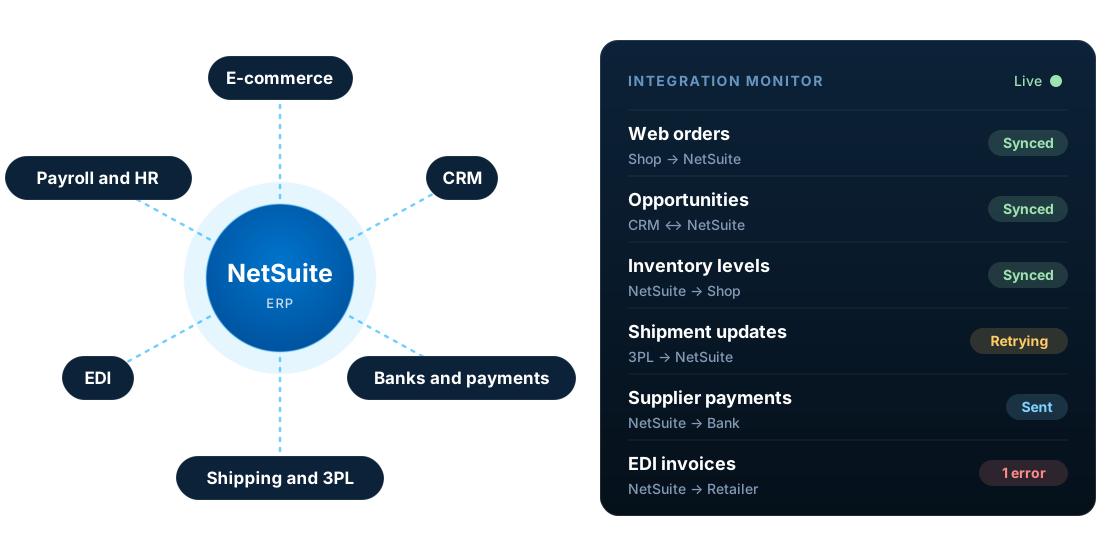
NetSuite integrates with other systems in four main ways: pre-built connectors, integration platforms (iPaaS) such as Celigo, Boomi or Oracle's NetSuite Integration Platform, custom APIs built on SuiteTalk REST web services, RESTlets and SuiteQL, and file-based transfers. The right choice depends on data volume, timing, complexity and who will support it. Successful integrations are planned around data ownership, error handling and monitoring, not just the connection itself.
Key facts
- NetSuite exposes SuiteTalk REST and SOAP web services, plus custom RESTlet endpoints written in SuiteScript.
- Oracle says new integrations should use REST web services with OAuth 2.0. SOAP web services are due to be removed in NetSuite 2028.2.
- SuiteQL lets integrations query NetSuite data with SQL-like syntax.
- Concurrent requests are capped per account: a base of 5 to 20 depending on the service tier, plus 10 for each SuiteCloud Plus licence.
- Most integration problems come from unclear data ownership and weak error handling, not from the API itself.
What is NetSuite integration?
NetSuite integration is the automated exchange of data between NetSuite and other business systems, such as e-commerce platforms, CRM, banks, logistics providers and trading partners, so that information is entered once and stays consistent everywhere it is used.
Without integration, teams re-key orders, export spreadsheets and reconcile figures by hand. Each of those steps adds delay and error. With well-designed integrations, NetSuite becomes the reliable financial and operational record, and every other system works from the same data.
What does NetSuite integrate with?
Almost any system with an API or a file export can be integrated with NetSuite. These are the categories UK and European businesses connect most often.
E-commerce
Shopify, Adobe Commerce (Magento), BigCommerce, WooCommerce and Amazon: orders, customers, items, prices, stock and fulfilments.
CRM
Salesforce, HubSpot and Zoho: accounts, contacts, opportunities, quotes and order or invoice status.
Banks and payments
Bank statements, supplier payment files, card processors such as Stripe, and direct debit providers.
Shipping, 3PL and WMS
Carriers, third-party logistics providers and external warehouse systems: shipments, tracking and stock.
EDI
Purchase orders, advance shipping notices and invoices exchanged with retailers and distributors.
Payroll, HR and expenses
Payroll journals, employee records and expense claims from tools such as ADP, BambooHR, Concur or Expensify.
Tax
Tax calculation and compliance services, such as Avalara, for sales tax and VAT.
Reporting and BI
Power BI, Snowflake and other analytics tools that read NetSuite data for reporting.
Trading partners that exchange orders and invoices electronically need EDI; see our guide to NetSuite EDI integration for how it works.
NetSuite integration methods compared
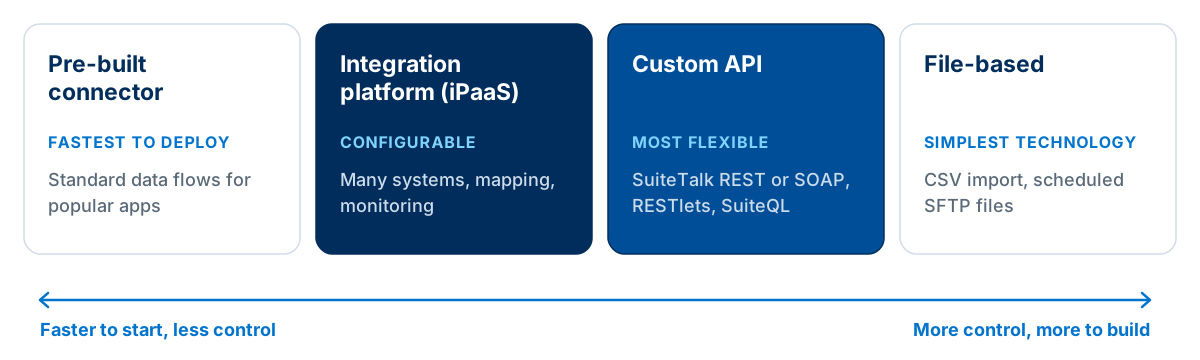
There is no single best way to integrate NetSuite. Most businesses use a mix, choosing the method for each data flow.
| Method | How it works | Best for | Watch for |
|---|---|---|---|
| Pre-built connector | A packaged integration for a specific app, such as Oracle's NetSuite Connector, configured rather than coded | Standard flows with popular platforms | Limited flexibility when your process is not standard |
| Integration platform (iPaaS) | Celigo, Boomi, MuleSoft, Workato or Oracle's NetSuite Integration Platform move and map data between systems | Several systems, complex mapping, central monitoring | Platform licence and the skills to maintain flows |
| Custom API | SuiteTalk REST web services, RESTlets and SuiteQL, called by custom code | Unique processes, performance-sensitive or bespoke systems | You own the code, monitoring and support |
| File-based | CSV imports or scheduled SFTP file exchange | Banks, legacy systems and simple daily batches | Delays, file format changes and manual exceptions |
| Analytics connector | Read-only SQL access through SuiteAnalytics Connect (ODBC or JDBC) | Feeding data warehouses and BI tools | Read-only, so not for writing data back |
Oracle launched its own NetSuite Integration Platform in February 2026: a low-code, AI-assisted integration service built on Oracle Cloud Infrastructure. It is one more iPaaS option to weigh against Celigo, Boomi and others on connectors, monitoring, skills and licence cost.
Custom endpoints such as RESTlets are written in SuiteScript. For when code is the right choice, see our guide to when to customise NetSuite with SuiteScript.
NetSuite APIs: REST web services, SOAP and RESTlets
Every NetSuite integration, whether a connector, an iPaaS or custom code, ultimately talks to NetSuite through one of these interfaces.
| Interface | What it is | Use it for |
|---|---|---|
| SuiteTalk REST web services | Standard REST endpoints for NetSuite records, with SuiteQL queries | The default for new integrations |
| RESTlets | Custom REST endpoints written in SuiteScript and deployed in NetSuite | Custom logic, several records in one call, or data REST web services do not expose |
| SuiteQL | SQL-like queries run through REST web services | Efficient reads, joins and lookups |
| SuiteTalk SOAP web services | The older XML-based web services | Existing integrations only; plan the move to REST |
| SuiteAnalytics Connect | Read-only ODBC, JDBC and ADO.NET access | Data warehouses and BI tools |
The SOAP to REST deadline
Oracle is retiring SOAP web services. Any integration still on SOAP, including older connectors, needs a plan to move to REST web services before the 2028.2 release.
- 2025.2The last planned SOAP endpoint.
- 2026.1Oracle says all newly built integrations should use REST web services with OAuth 2.0.
- 2027.1New integrations can no longer use token-based authentication (TBA), which SOAP requires, so no new SOAP integrations can be built.
- 2027.2Only the latest SOAP endpoint is supported; older endpoints keep working without support.
- 2028.2All SOAP endpoints are disabled and SOAP-based integrations stop working.
Source: Oracle's SOAP removal plans FAQ. Oracle also notes that REST will not reach 100% parity with SOAP, so check each operation before migrating. For the authentication side, see OAuth 2.0 vs OAuth 1.0 for NetSuite.
Concurrency limits
NetSuite caps how many web service and RESTlet requests an account processes at once. Requests over the limit are rejected, so high-volume integrations must queue and retry rather than fire everything in parallel.
| Service tier (contracts since June 2020) | Base concurrent requests |
|---|---|
| Standard | 5 |
| Premium | 15 |
| Enterprise | 20 |
| Ultimate | 20 |
Each SuiteCloud Plus licence adds 10 to the base, while development and partner accounts stay at 5. Older contracts use legacy tiers with similar values; see Oracle's concurrency governance table. You can check your own limit under Setup > Integration > Integration Management > Integration Governance.
Real-time vs batch integration
Real-time
Data moves as events happen. Use it where delay costs money or customers notice, such as stock levels on a busy store, payment status or order confirmation.
Batch
Data moves on a schedule, such as hourly or nightly. Use it for high volumes or where a short delay is fine, such as payroll journals, bank statements or reporting extracts.
Real-time is not automatically better. It uses more of your concurrency and governance capacity, and it is harder to troubleshoot. Choose the slowest timing the business can accept.
Decide data ownership before you build
Every data object needs one master system. When two systems both believe they own a field, integrations overwrite each other and users stop trusting the data. A typical ownership model looks like this:
| Data | Usual master | Note |
|---|---|---|
| Customers | CRM for prospects, NetSuite for billing details | Agree which fields each system owns |
| Items and prices | NetSuite | Push to e-commerce and CRM |
| Web orders | E-commerce platform | Created in NetSuite as sales orders |
| Inventory | NetSuite or the WMS | Only one system should calculate availability |
| Shipments | WMS, 3PL or carrier | Fulfilments and tracking returned to NetSuite |
| Invoices and payments | NetSuite | Status shared back to CRM or the customer portal |
How to plan a NetSuite integration
Define the scope
List every system, data object and business event that needs to move, and what success looks like.
Agree data ownership
Decide which system is the master for each object and field, so updates never fight each other.
Map the data
Map fields, IDs, units, tax codes and statuses between systems, including how records are matched.
Choose timing and direction
Decide what must be real-time, what can run in batches and which flows are one-way or two-way.
Choose the method
Pick a connector, iPaaS, custom API or file transfer for each flow, based on volume and complexity.
Design for failure
Plan validation, retries, alerts, duplicate prevention and how failed records are fixed and replayed.
Secure it
Use REST web services with OAuth 2.0 for new integrations, and a dedicated integration role with only the permissions it needs.
Test, then monitor
Test in a sandbox with realistic volumes and edge cases, then monitor in production with a named owner.
NetSuite integration error handling and monitoring
Every integration fails eventually: a supplier changes a file format, a field is left blank, a carrier API times out. What matters is what happens next.
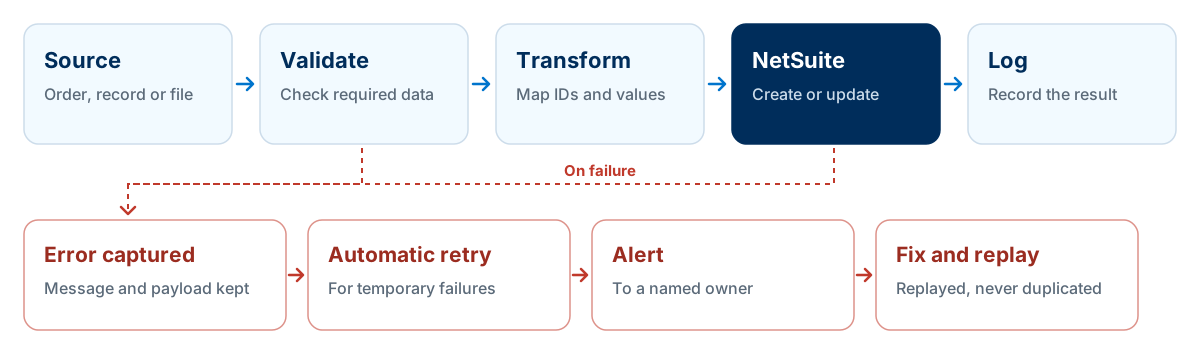
Validation before NetSuite
Reject or quarantine records with missing or invalid data before they reach NetSuite.
Idempotency
Use external IDs so a retried record updates the original instead of creating a duplicate.
Retries with limits
Retry temporary failures, such as timeouts or concurrency limits, but stop and alert after a set number.
Readable error logs
Keep the payload and a clear message so a business user can understand what failed.
Alerts to an owner
Send failures to a named person or team, not a shared inbox nobody reads.
Reconciliation
Compare counts and totals between systems daily, so silent gaps are caught early.
Salesforce and NetSuite integration
Salesforce and NetSuite are one of the most common pairings: sales works in Salesforce, finance and operations in NetSuite. A typical integration covers:
- Accounts and contacts, with agreed ownership of billing details
- Closed-won opportunities or quotes becoming sales orders
- Items and price books pushed from NetSuite
- Order, fulfilment, invoice and payment status returned to Salesforce
The key design decision is where quoting happens. If quotes and pricing live in Salesforce, NetSuite must receive them accurately. If they live in NetSuite, sales needs reliable visibility in Salesforce. Decide this before choosing a connector.
For the benefits, options and setup in more depth, read our complete guide to NetSuite Salesforce integration.
HubSpot and NetSuite integration
HubSpot is the CRM of choice for many growing businesses that run NetSuite. The pattern is similar to Salesforce, usually with a simpler quote-to-cash process. A typical integration covers:
- Companies and contacts, matched on a shared ID rather than name or email alone
- Closed-won deals creating customers and sales orders in NetSuite
- Products and prices from NetSuite available on HubSpot deals and quotes
- Invoice, payment and order status visible to sales in HubSpot
The most common problem is duplicate customers. Decide when a HubSpot company becomes a NetSuite customer, usually at closed-won, and store each system's ID on the other record so later updates match reliably.
Shopify and e-commerce integration with NetSuite
E-commerce integrations carry the highest volumes and the least tolerance for delay. A Shopify to NetSuite integration typically covers:
- Orders and customers into NetSuite as sales orders
- Items, prices and stock levels out to the store
- Fulfilments and tracking numbers back to Shopify
- Refunds and returns reflected in both systems
The same pattern applies to Adobe Commerce (Magento), BigCommerce, WooCommerce and marketplaces such as Amazon. Test discounts, gift cards, partial refunds, multi-currency orders and peak volumes, which is where e-commerce integrations most often break.
See five common Shopify NetSuite integration issues and how to solve them before you go live.
UK and European integration considerations
Bank payments and statements
Supplier payment runs in Bacs or other bank formats, and statement imports for reconciliation.
VAT and Making Tax Digital
Tax codes must map correctly between systems so VAT returns built in NetSuite are accurate.
UK carriers and marketplaces
Carrier labels and tracking, plus marketplace and multichannel tools commonly used by UK sellers.
Direct debit and card payments
Payment provider settlements and fees reconciled against invoices in NetSuite.
GDPR
Only move the personal data each system needs, and know where an integration platform stores it.
Currencies
EUR and USD orders and payments need consistent exchange rates and rounding across systems.
Common NetSuite integration mistakes
- Integrating before agreeing data ownership
- Two systems updating the same field leads to endless overwrites and mistrust in the data.
- Ignoring error handling
- If failures are not captured and alerted, orders and payments go missing silently.
- Testing only the happy path
- Partial shipments, refunds, cancellations and duplicates are where integrations break.
- Underestimating volume
- Peak periods can hit concurrency limits and governance that never appear in testing.
- Building new integrations on SOAP
- SOAP web services are being removed in 2028.2. New builds should use REST web services and OAuth 2.0.
- Over-privileged integration users
- An integration with administrator access is a security risk. Use a dedicated, limited role.
- No owner after go-live
- Integrations need someone accountable for monitoring, fixes and changes in connected systems.
What does a NetSuite integration cost?
Integration cost depends on scope. The main drivers are:
- Number of systems and data flows
- Real-time versus batch requirements
- Data volumes and peak loads
- Complexity of mapping and business rules
- Connector or iPaaS licence fees
- Error handling, monitoring and alerting
- Testing and data migration
- Ongoing support and change management
Integrations are often the largest variable in a NetSuite budget. For the wider picture, see NetSuite implementation cost in the UK.
Frequently asked questions
What is NetSuite integration?
NetSuite integration is the connection of NetSuite to other business systems, such as e-commerce, CRM, banks, 3PLs and EDI, so data flows automatically between them instead of being re-keyed. It can use pre-built connectors, integration platforms, custom APIs or file transfers.
What are the main NetSuite integration methods?
There are four main methods: pre-built connectors for popular apps, integration platforms (iPaaS) such as Celigo, Boomi or Oracle's NetSuite Integration Platform, custom integrations built on SuiteTalk REST web services and RESTlets, and file-based transfers such as CSV imports or SFTP. Read-only reporting can also use SuiteAnalytics Connect. Most businesses use a mix, choosing per data flow.
Does NetSuite integrate with Salesforce?
Yes. NetSuite and Salesforce are commonly integrated so that customers, opportunities, quotes, orders and invoice status stay aligned. The connection can use a connector, an integration platform or custom APIs, depending on how much of the quote-to-cash process each system owns.
Does NetSuite integrate with HubSpot?
Yes. HubSpot can be integrated with NetSuite to share companies, contacts, deals, products and order or invoice information, using a connector, an integration platform or a custom build. Agree which system owns each field before connecting them.
Does NetSuite integrate with Shopify?
Yes. Shopify integrations typically send orders and customers to NetSuite and return items, prices, stock levels and fulfilments to Shopify. Options include Oracle's NetSuite Connector, integration platforms such as Celigo, and custom builds.
What APIs does NetSuite have?
NetSuite offers SuiteTalk REST web services, SuiteTalk SOAP web services, RESTlets (custom REST endpoints written in SuiteScript), SuiteQL for SQL-like queries, and SuiteAnalytics Connect for read-only ODBC and JDBC access. Oracle recommends REST web services with OAuth 2.0 for new integrations.
Is NetSuite SOAP being deprecated?
Yes. According to Oracle, 2025.2 is the last planned SOAP endpoint, new integrations should use REST web services with OAuth 2.0 from 2026.1, new SOAP integrations cannot be built from 2027.1, and all SOAP endpoints are disabled in the 2028.2 release. Existing SOAP integrations should be moved to REST before then.
What is the difference between a RESTlet and REST web services?
REST web services are NetSuite's standard REST API for records and SuiteQL queries, maintained by Oracle. A RESTlet is a custom REST endpoint you write in SuiteScript and deploy in your account, so you control its logic. Use REST web services where they cover the need, and RESTlets for custom logic or several operations in one call.
What is the NetSuite integration concurrency limit?
NetSuite limits how many web service and RESTlet requests an account can process at the same time. On current contracts the base limit is 5 for the Standard service tier, 15 for Premium and 20 for Enterprise and Ultimate, and each SuiteCloud Plus licence adds 10. High-volume integrations should queue requests and retry when the limit is reached.
What authentication should a NetSuite integration use?
New integrations should use OAuth 2.0 with REST web services, through an integration record and a dedicated role with only the permissions needed. Oracle will not allow new integrations to use token-based authentication from the 2027.1 release.
Should I use Celigo or build a custom NetSuite integration?
An integration platform such as Celigo suits multiple systems, standard flows and teams who want central monitoring. A custom build suits unique processes, specific performance needs or bespoke systems. Many businesses combine both.
How much does a NetSuite integration cost?
Cost depends on the number of systems and flows, real-time requirements, volumes, mapping complexity, licence fees for connectors or platforms, error handling, testing and ongoing support. Scope each flow before comparing quotes.
Plan your NetSuite integration
LST Consultancy designs and builds NetSuite integrations using REST web services, RESTlets, integration platforms such as Celigo and secure file transfer, and moves SOAP integrations to REST. We work across both NetSuite and Salesforce, so we can design the quote-to-cash flow end to end. Tell us which systems you need to connect.