
Quick answer
Use standard NetSuite features and configuration first: preferences, custom fields and forms, saved searches and SuiteFlow workflows. Use SuiteScript when a requirement needs complex logic, high-volume processing, integrations or custom interfaces that configuration cannot deliver reliably, and when its business value outweighs the cost of building, testing and maintaining code through NetSuite's twice-yearly releases.
Key facts
- SuiteScript is NetSuite's JavaScript-based API for extending the platform. SuiteScript 2.1 is the current version.
- Point-and-click tools come first: SuiteBuilder for fields, forms and records, and SuiteFlow for workflows.
- SuiteScript has several script types, including client, user event, scheduled, Map/Reduce, Suitelet and RESTlet scripts.
- Every script runs within governance limits, measured in usage units, that cap how much work it can do in one execution.
- Oracle expects legacy SuiteScript 1.0, 2.0 and 2.x to be removed in NetSuite 2028.2, so new code should be written in 2.1.
What is SuiteScript?
SuiteScript is Oracle NetSuite's JavaScript-based scripting platform. Developers use it to add business logic, automate processes, build custom pages and create integration endpoints, working with NetSuite data through modules such as N/record, N/search and N/https.
SuiteScript is part of the wider SuiteCloud platform, alongside SuiteBuilder (point-and-click fields, forms and records), SuiteFlow (workflows), SuiteAnalytics (reporting) and the SuiteCloud Development Framework (SDF) for managing customisations as code. The current version is SuiteScript 2.1, which uses modern JavaScript.
NetSuite customisation therefore covers much more than code. Most accounts need some of it; the skill is choosing the lightest tool that does the job well.
The NetSuite customisation ladder
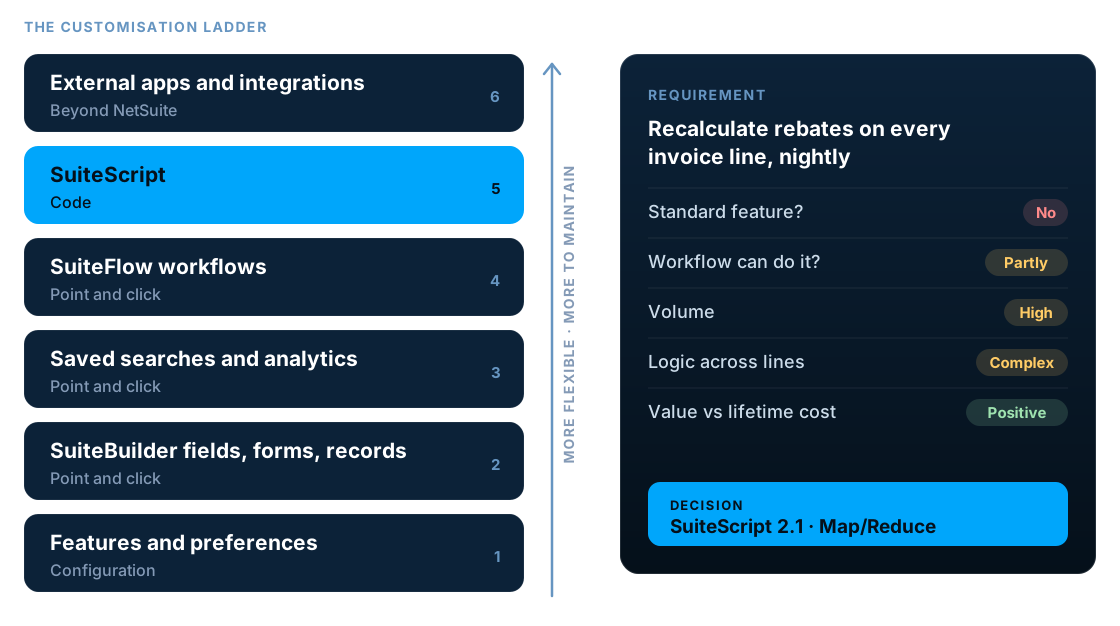
Think of NetSuite customisation as a ladder. Each step up gives you more flexibility, and more to build, test and maintain. Climb only as high as the requirement needs.
- 1Features and preferences. Switch on and set up what NetSuite already does.
- 2SuiteBuilder. Custom fields, forms, records and roles, without code.
- 3Saved searches and SuiteAnalytics. Reporting, alerts and dashboards.
- 4SuiteFlow workflows. Approvals, routing, notifications and simple automation.
- 5SuiteScript. Code for logic, volume, integrations and custom interfaces.
- 6External apps and integrations. Separate systems or middleware when NetSuite is not the right place.
When standard NetSuite features are enough
A surprising share of customisation requests can be met without code. Check these options before anything is scripted.
Extra data on a record
Custom fields, custom records and form layouts in SuiteBuilder.
Approvals and routing
SuiteFlow workflows with states, conditions and email notifications.
Reports and alerts
Saved searches, SuiteAnalytics workbooks, scheduled emails and dashboards.
Defaults and simple validation
Field defaults, mandatory fields and workflow conditions.
Role-based views
Custom roles, permissions, forms and centres for each team.
Common business processes
Native features such as approvals, revenue recognition or landed cost, often just switched on.
Sometimes the right answer is to adjust the process, not the system. If a custom build only preserves a habit from an old system, it is worth asking whether the habit is still needed.
When SuiteScript is the right choice
SuiteScript earns its place when a requirement has one or more of these characteristics.
Complex logic across lines and records
Calculations that read and update many transaction lines or related records, such as rebates, allocations or pricing rules.
High-volume processing
Nightly jobs over thousands of records, where Map/Reduce or scheduled scripts handle the volume within governance limits.
Integrations
RESTlets and outbound HTTPS calls that exchange data with e-commerce, logistics, banks or internal systems.
Custom pages and tools
Suitelets that give users a purpose-built screen, such as a bulk approval tool or a guided data-entry form.
Document generation
Branded PDFs and files rendered from NetSuite data, beyond what standard templates handle.
Gaps workflows cannot close
Rules that workflows can only partly handle, or that become fragile when built as many chained workflows.
Integration work is where SuiteScript and middleware meet. See our NetSuite integration services for connecting NetSuite to e-commerce, CRM, banking and logistics systems.
SuiteFlow vs SuiteScript
SuiteFlow and SuiteScript are not rivals. Many good solutions combine them: a workflow for approvals and status, with a workflow action script for the logic the workflow cannot handle.
| Consideration | SuiteFlow | SuiteScript |
|---|---|---|
| Who builds it | Administrators and analysts | Developers |
| Approvals and status routing | Strong fit | Possible, more effort |
| Line-level logic | Limited | Full control |
| High-volume batch processing | Not suited | Map/Reduce and scheduled scripts |
| Integrations and external calls | Limited | RESTlets and HTTPS |
| Custom user interfaces | No | Suitelets and client scripts |
| Maintenance | Visible in the UI | Needs code skills and version control |
A five-question decision framework
Run every customisation request through these questions, in order. Stop at the first one that resolves it.
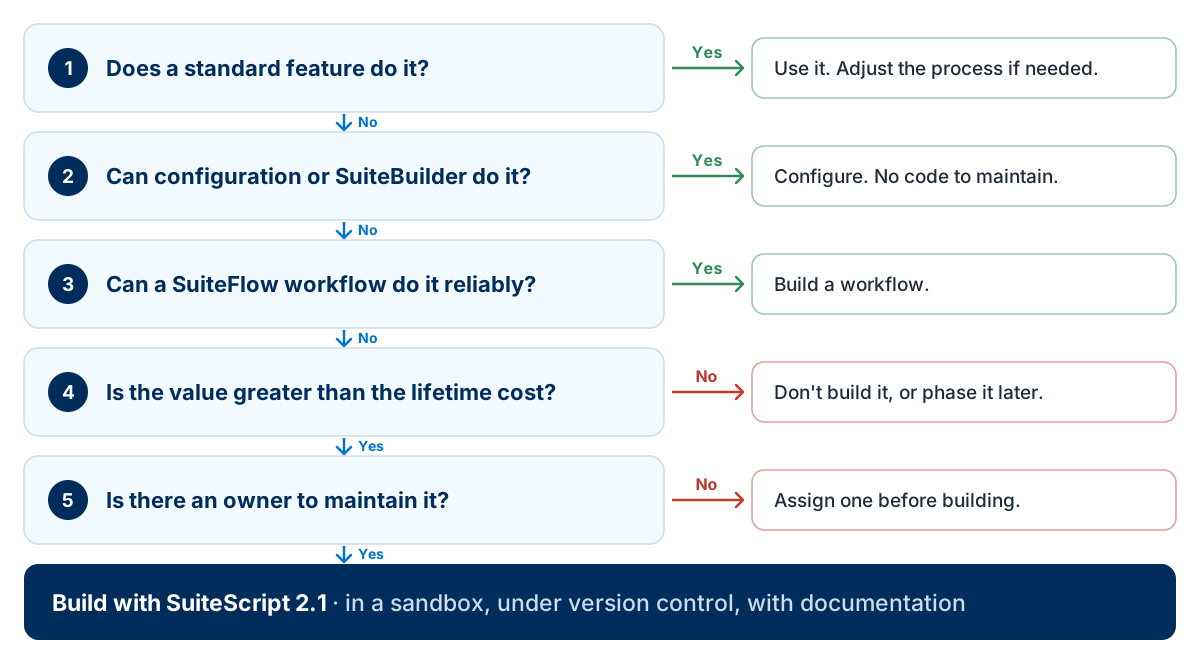
Does a standard feature do it? If yes, use it, and adjust the process if needed.
Can configuration or SuiteBuilder do it? If yes, configure it. There is no code to maintain.
Can a SuiteFlow workflow do it reliably? If yes, build a workflow that administrators can maintain.
Is the value greater than the lifetime cost? If no, don't build it, or phase it into a later release.
Is there an owner to maintain it? If no, assign one before building. Then build with SuiteScript 2.1, in a sandbox, under version control, with documentation.
SuiteScript script types and when to use them
| Script type | Runs | Typical uses |
|---|---|---|
| Client script | In the browser, on a form | Field validation, defaults and on-screen behaviour |
| User event script | On the server when a record loads or is saved | Validation, defaults and updating related records |
| Scheduled script | On a schedule or on demand | Batch jobs and periodic updates |
| Map/Reduce script | In parallel stages on the server | Large data volumes, reprocessing and imports |
| Suitelet | As a page or endpoint inside NetSuite | Custom screens, tools and wizards |
| RESTlet | When an external system calls it | Custom integration endpoints |
| Workflow action script | From inside a SuiteFlow workflow | Logic a workflow cannot do by itself |
| Mass update script | Against the results of a search | Controlled bulk changes |
| Custom tool script | When an AI client connected to NetSuite calls it | Exposing defined NetSuite actions to AI assistants |
Choosing the wrong type is a common cause of slow or failing scripts. For example, processing thousands of records in a user event script will hit governance limits that a Map/Reduce script is designed to handle.
Other types include portlets and installation scripts for SuiteApps. See Oracle's SuiteScript 2.1 script types for the full list and entry points.
SuiteScript governance limits
Governance is how NetSuite keeps one account's scripts from slowing the platform. Each API call costs a set number of usage units, and each script type has a maximum per execution. A script that exceeds it stops with an SSS_USAGE_LIMIT_EXCEEDED error.
| Script type | Usage limit |
|---|---|
| Client, user event and Suitelet scripts | 1,000 units per execution |
| RESTlet | 5,000 units per execution |
| Scheduled script | 10,000 units per execution |
| Map/Reduce script | Set per stage: 10,000 for getInputData and summarize, 1,000 per map call, 5,000 per reduce call |
Scripts also have execution time limits, separate from usage units. Oracle publishes the current figures in its governance best practices and Map/Reduce governance pages; check them when designing high-volume scripts, as limits can change between releases.
The lifetime cost of NetSuite customisation
The build is the visible part of the cost. Most of a script's cost arrives after go-live, which is why the decision framework weighs value against lifetime cost rather than build cost.
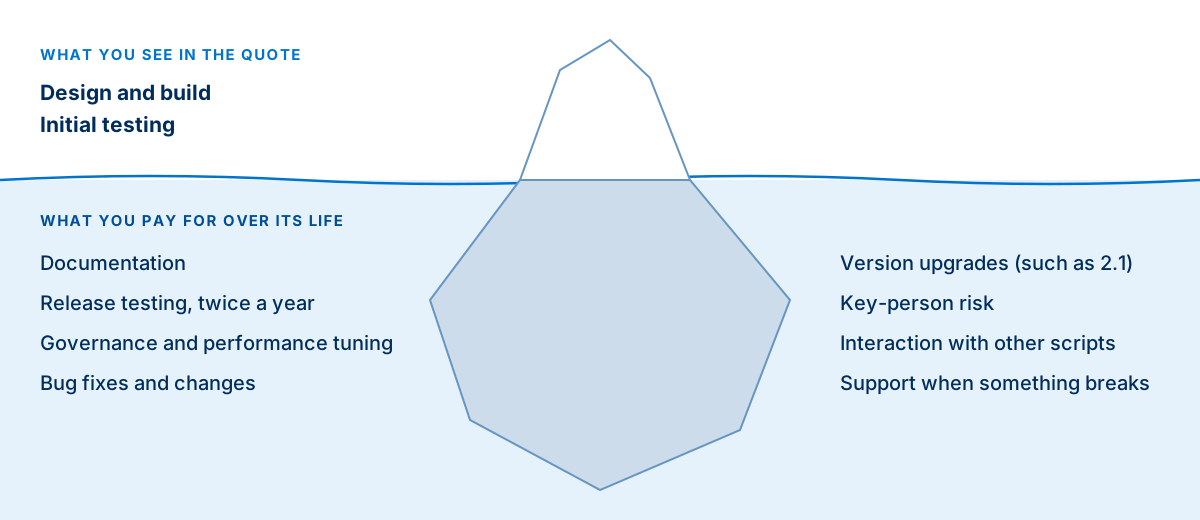
The current move to SuiteScript 2.1 is a good example. Accounts with many undocumented legacy scripts now face a migration project, while well-documented accounts can plan it calmly. Read our guide to the SuiteScript 2.1 migration for the timeline, or the SuiteScript 2.0 to 2.1 guide for what changes in the code.
SuiteScript development best practices
Write new code in SuiteScript 2.1
Use @NApiVersion 2.1 and modern JavaScript. It is the version Oracle is standardising on.
Keep it under version control
Manage scripts and objects with the SuiteCloud Development Framework and a Git repository, not by editing files in production.
Develop and test in a sandbox
Promote changes through sandbox testing with real scenarios before production.
Respect governance
Design for usage limits from the start: batch work, avoid loading records you only need to read, and use Map/Reduce for volume.
Use script parameters
Avoid hard-coding internal IDs, emails or thresholds. Parameters make scripts reusable and safer to change.
Handle errors and log clearly
Catch errors, log useful context and alert someone when a critical script fails.
Document the why
Record the business rule, owner and dependencies for every script, not just the code.
Review code before release
A second developer should review logic, performance and security before deployment.
Signs your NetSuite account is over-customised
If several of these sound familiar, a customisation review will usually pay for itself.
- Nobody can say what every deployed script does or who owns it
- Several scripts and workflows fire on the same record and event
- Saves are slow, or users see unexpected script errors
- Release testing is skipped because there is too much to check
- Scripts replicate features NetSuite now provides natively
- Legacy SuiteScript 1.0 or 2.0 is still running in production
A review inventories every script and workflow, identifies owners and dependencies, retires what is no longer needed and replaces custom code with native features where NetSuite has caught up. Our free NetSuite health check is a good place to start.
SuiteScript and AI
NetSuite has added generative AI to the platform, including the N/llm module, which lets server-side SuiteScript 2.1 send prompts to large language models. It opens up use cases such as summarising records, drafting text or classifying data inside NetSuite processes. According to Oracle's documentation, it is available only in certain regions and consumes NetSuite AI units, so check availability for your account.
In the other direction, custom tool scripts let AI clients connected to NetSuite call defined SuiteScript actions. AI coding assistants can also speed up SuiteScript development. The same rules still apply: treat generated code as a draft, review it for governance and security, test it in a sandbox and document it like any other script.
Frequently asked questions
What is SuiteScript?
SuiteScript is Oracle NetSuite's JavaScript-based scripting platform for extending NetSuite. Developers use it to add business logic, automate processes, build custom pages and create integration endpoints. SuiteScript 2.1 is the current version.
Is SuiteScript JavaScript?
Yes. SuiteScript is written in JavaScript and uses NetSuite-specific modules, such as N/record and N/search, to work with NetSuite data. SuiteScript 2.1 supports modern JavaScript syntax.
Can NetSuite be customised without code?
Yes, a great deal. SuiteBuilder adds custom fields, forms, records and roles, saved searches and SuiteAnalytics handle reporting, and SuiteFlow builds approval and routing workflows, all without code. SuiteScript is for the requirements these tools cannot meet reliably.
Should I use SuiteFlow or SuiteScript?
Use SuiteFlow for approvals, status routing, notifications and simple field updates that administrators can maintain. Use SuiteScript for line-level logic, high volumes, integrations, custom interfaces and anything a workflow can only partly handle. Many solutions combine both, with a workflow action script inside a workflow.
What is the difference between a Suitelet and SuiteScript?
A Suitelet is one type of SuiteScript. SuiteScript is the whole scripting platform; a Suitelet is a server-side script type that builds custom pages or backend endpoints inside NetSuite, alongside other types such as client, user event, scheduled, Map/Reduce and RESTlet scripts.
What are the SuiteScript script types?
The main types are client scripts, user event scripts, scheduled scripts, Map/Reduce scripts, Suitelets, RESTlets, workflow action scripts, mass update scripts and portlets, plus installation scripts and the newer custom tool scripts for AI clients. Each runs in a different context and suits different jobs.
What is SuiteScript governance?
Governance is NetSuite's system of usage limits. Each script type has an allowance of usage units per execution, and operations such as loading, saving or searching records consume units. For example, client, user event and Suitelet scripts get 1,000 units, RESTlets 5,000 and scheduled scripts 10,000, while Map/Reduce limits apply per stage. Well-designed scripts stay within these limits, often by using Map/Reduce for large volumes.
Does customisation make NetSuite upgrades harder?
NetSuite upgrades itself twice a year, so customisation does not block upgrades the way it can on-premise. It does add release testing, and poorly written or undocumented scripts are more likely to need fixes after a release.
Should new scripts use SuiteScript 2.1?
Yes. Oracle is moving accounts to SuiteScript 2.1 and expects legacy 1.0, 2.0 and 2.x to be removed in NetSuite 2028.2, so new development should use @NApiVersion 2.1.
Can SuiteScript use AI?
Yes. The N/llm module lets server-side SuiteScript 2.1 send prompts to large language models through NetSuite, for tasks such as summarising records, drafting text or classifying data. It is available only in certain regions and consumes NetSuite AI units, and its output should be checked like any generated content.
Do I need a NetSuite developer to customise NetSuite?
Not for configuration, SuiteBuilder or most SuiteFlow workflows, which an experienced administrator can build. You need a NetSuite developer for SuiteScript, integrations and anything involving governance, performance or code review.
How much does SuiteScript development cost?
It depends on the complexity of the logic, data volumes, integrations, testing and documentation required. Ask for estimates against a written requirement, and include ongoing maintenance and release testing in the comparison.
Discuss your SuiteScript requirements
LST Consultancy designs, builds and reviews SuiteScript for NetSuite accounts, from single scripts to integrations and Map/Reduce processing. We will tell you honestly when a workflow or a standard feature is the better answer.