
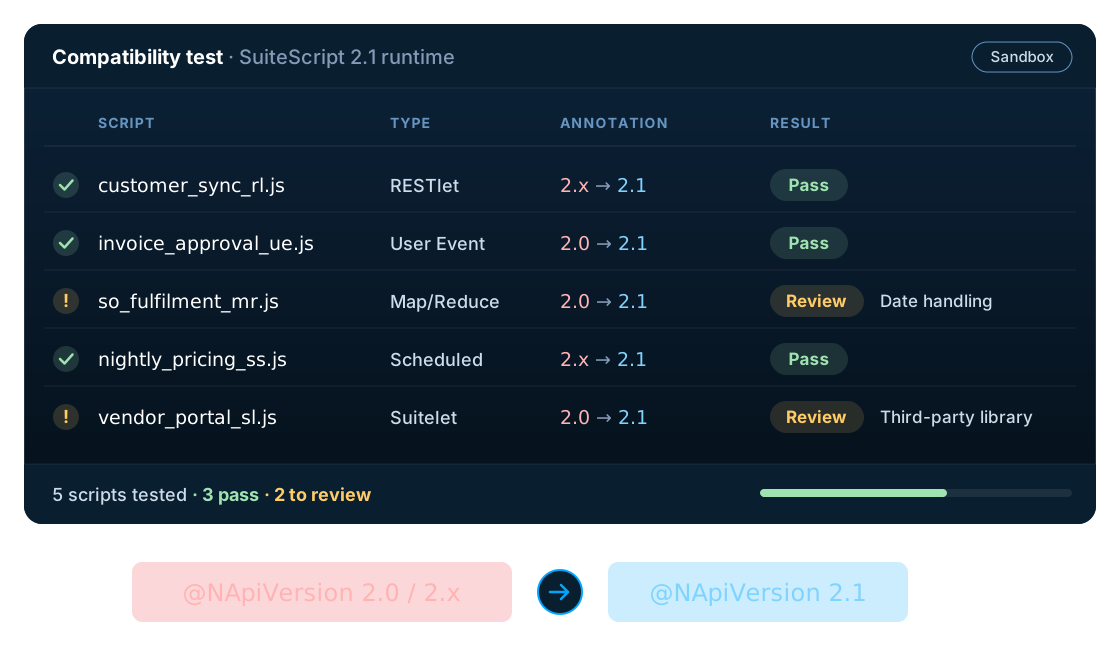
If your NetSuite environment is already using SuiteScript 2.0, you may assume that the move to SuiteScript 2.1 will be a simple version update.
It can be considerably simpler than a SuiteScript 1.0 migration, but it should still be treated as a compatibility and testing exercise.
Oracle is transitioning NetSuite customers toward SuiteScript 2.1 and expects legacy SuiteScript versions, including SuiteScript 2.0 and 2.x, to be removed in NetSuite 2028.2.
That means organizations using SuiteScript 2.0 should understand what is changing and start assessing their scripts before the deadline.
What is the difference between SuiteScript 2.0 and 2.1?
SuiteScript 2.0 and SuiteScript 2.1 share the SuiteScript API, but SuiteScript 2.1 uses a newer JavaScript runtime.
This distinction matters.
A script that works in SuiteScript 2.0 should not simply be assumed to behave identically under SuiteScript 2.1 without testing.
Oracle provides mechanisms that allow organizations to test SuiteScript 2.0 and 2.x scripts in the SuiteScript 2.1 runtime. That makes compatibility testing an important part of the migration process.
What about @NApiVersion 2.0 and 2.x?
@NApiVersion 2.0→@NApiVersion 2.1
Scripts on 2.0
Changing the annotation is only one part of the process. The script should be tested in the SuiteScript 2.1 runtime to identify any compatibility issues.
@NApiVersion 2.x→@NApiVersion 2.1
Scripts on 2.x
The 2.x annotation does not simply mean “2.1”. Include these scripts in the migration assessment.
Oracle's documentation explains the versioning behaviour and recommends moving affected scripts to SuiteScript 2.1.
What could break when moving from 2.0 to 2.1?
Most organizations will not encounter the same level of restructuring required for a SuiteScript 1.0 conversion. However, differences in the JavaScript runtime can expose compatibility issues. Potential areas to review include:
- JavaScript syntax
- Runtime behaviour
- Date handling
- Array and object behaviour
- Strict-mode behaviour
- Third-party libraries
- Custom modules
- Error handling
- API interactions
- Script dependencies
The actual impact depends on the code.
Which SuiteScript 2.0 scripts should you review?
Review all deployed scripts, particularly:
- User Event Scripts
- Client Scripts
- Suitelets
- RESTlets
- Scheduled Scripts
- Map/Reduce scripts
- Workflow Action Scripts
- Custom modules
- Integration scripts
Don't forget scripts that support external integrations. A RESTlet may look like a relatively small piece of code, but it can be part of a much larger integration architecture. Our NetSuite integration services cover the systems on the other side.
How to migrate SuiteScript 2.0 to 2.1
Step 1: Inventory
Create a list of all SuiteScript 2.0 and 2.x scripts.
Step 2: Identify critical scripts
Determine which scripts support financial, operational or customer-facing processes.
Step 3: Test in SuiteScript 2.1
Use a Sandbox environment to test the existing implementation under the 2.1 runtime.
Step 4: Identify compatibility issues
Document any runtime, syntax or dependency problems.
Step 5: Update the script
Where required, update the implementation and change the version annotation to
@NApiVersion 2.1.Step 6: Regression test
Test the complete business process, not just the script.
Step 7: Deploy
Once validated, deploy the updated script to production according to your organization's release process.
SuiteScript 2.0 → 2.1 compared with 1.0 → 2.1
These two migrations should not be treated as identical.
| Area | SuiteScript 1.0 → 2.1 | SuiteScript 2.0 → 2.1 |
|---|---|---|
| Programming model | Major change | Same general API model |
| Module architecture | Usually requires restructuring | Already using 2.x modules |
| Runtime | Legacy → modern | 2.0 → 2.1 |
| Code changes | Can be substantial | Often more limited |
| Compatibility testing | Important | Important |
| Dependency review | Important | Important |
| Business-process testing | Required | Required |
The actual effort still depends on the implementation.
Should you wait until 2028?
If you have a large number of SuiteScript 2.0 scripts, waiting until the final release can create unnecessary pressure. A better approach is to start with an inventory. You may discover:
- Scripts that are no longer needed
- Scripts that can be migrated quickly
- Scripts with significant dependencies
- Scripts that need additional testing
- Integrations that require coordination
Create a migration roadmap rather than treating the 2028.2 release as an emergency project.
SuiteScript 2.0 to 2.1 migration checklist
- Identify all SuiteScript 2.0 scripts
- Identify all
@NApiVersion 2.xscripts - Identify deployed scripts
- Identify critical business processes
- Identify integrations
- Test scripts using SuiteScript 2.1
- Identify compatibility issues
- Update scripts where required
- Change annotations to
@NApiVersion 2.1 - Regression test
- Deploy to production
- Monitor after deployment
How LST Consultancy can help
LST Consultancy's NetSuite development and SuiteScript services help organizations assess and transition existing SuiteScript 2.0 and 2.x customizations to SuiteScript 2.1. Our approach includes:
- 01AssessmentIdentify affected scripts and dependencies.
- 02Compatibility testingTest existing customizations using the SuiteScript 2.1 runtime.
- 03Code updatesMake the changes required for SuiteScript 2.1 compatibility.
- 04Regression testingValidate the business processes that depend on the scripts.
- 05Production migrationSupport controlled deployment of the updated customizations.
If you already have a large SuiteScript 2.0 implementation, you don't necessarily need to rewrite everything. The first step is to understand which scripts are affected and what testing is required.
Ready to plan your move to SuiteScript 2.1?
Contact LST Consultancy for a SuiteScript 2.1 migration assessment.