
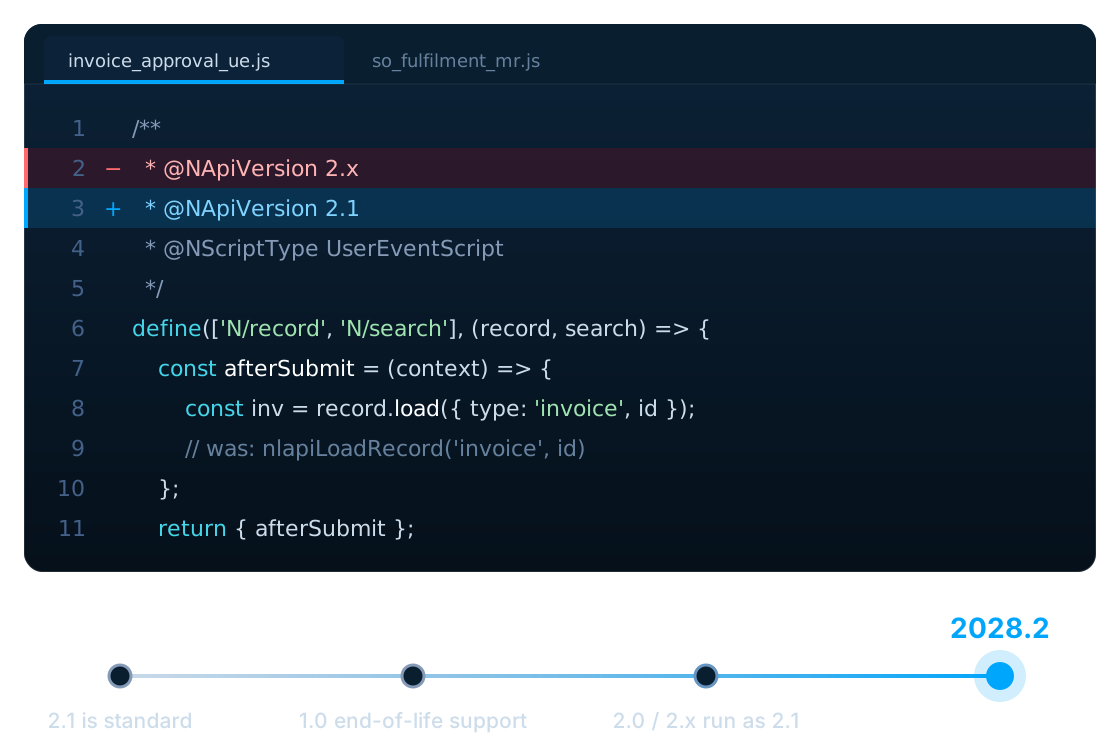
If your NetSuite account has been customized over the years, there is a good chance that some of your business processes are still running on older versions of SuiteScript.
That could include custom workflows, User Event Scripts, Client Scripts, Suitelets, RESTlets, Scheduled Scripts, Map/Reduce scripts, integrations, or other custom automation.
This is becoming increasingly important because NetSuite is transitioning customers to SuiteScript 2.1.
According to Oracle's current documentation, SuiteScript 2.1 is now the standard scripting model for new and existing NetSuite customizations. Oracle expects support for legacy SuiteScript versions and the @NApiVersion 2.0 and @NApiVersion 2.x annotations to be removed in NetSuite 2028.2.
For companies with years of NetSuite customizations, this is not something that should be left until the last minute.
Key takeaways
- SuiteScript 2.1 became NetSuite's standard scripting model in release 2026.2.
- SuiteScript 1.0 enters end-of-life support in 2027.1, with only critical issues covered.
- Oracle expects SuiteScript 1.0, 2.0 and
@NApiVersion 2.xto be removed in 2028.2. - 1.0 scripts need real rework; 2.0/2.x scripts mostly need runtime compatibility testing.
- Start with an inventory: some scripts need migration, some only testing, and some can be retired.
What is changing in NetSuite?
NetSuite has been moving its scripting platform toward SuiteScript 2.1.
The transition affects organizations that still have:
- SuiteScript 1.0 scripts
- SuiteScript 2.0 scripts
- Scripts using
@NApiVersion 2.x - Older customizations and automations that depend on legacy scripting versions
Oracle's current transition timeline is:
- 2026.2
SuiteScript 2.1 becomes the standard scripting model
- 2027.1
SuiteScript 1.0 enters end-of-life support (critical issues only)
- 2028.1
New accounts can no longer deploy SuiteScript 1.0 (existing accounts still can); SuiteScript 2.0/2.x run as 2.1 by default
- 2028.2
New and existing scripts must use SuiteScript 2.1
The exact impact on an individual account depends on its scripts, customizations, integrations and deployment configuration, so organizations should assess their own environments rather than assuming every customization needs to be rewritten.
Does this affect your NetSuite account?
The first question is simple:
Do you have legacy SuiteScript in your NetSuite environment?
If your company has been using NetSuite for several years, especially if the account has been heavily customized, it is worth checking. Look for scripts using:
@NApiVersion 1.0
@NApiVersion 2.0
@NApiVersion 2.x
These are the types of scripts Oracle recommends reviewing as part of the transition to SuiteScript 2.1.
You should also look beyond the script files themselves. A script may be connected to a business process that your finance, sales, procurement, warehouse or operations teams depend on every day.
Why SuiteScript 1.0 to 2.1 migration is more than changing a version number
One common misconception is that SuiteScript migration simply means changing the version number in the script. For SuiteScript 1.0, that is not the case.
SuiteScript 2.1 uses a modular architecture and a different programming model. Legacy SuiteScript 1.0 global functions generally need to be replaced with the appropriate SuiteScript 2.1 modules and methods.
A legacy 1.0 script might contain
nlapiLoadRecord()
nlapiSearchRecord()
nlapiSubmitRecord()
A 2.1 implementation typically uses
N/record
N/search
// and their module methods
There is also no guarantee that every SuiteScript 1.0 API has a direct one-to-one replacement.
Oracle's SuiteScript 1.0 to 2.1 API map specifically notes that some SuiteScript 1.0 APIs do not have a SuiteScript 2.1 equivalent. nlapiYieldScript and nlapiSetRecoveryPoint, for example, are usually replaced by redesigning the job as a Map/Reduce script.
That is why a proper SuiteScript 1.0 to 2.1 migration should include code review, dependency analysis and testing rather than a simple find-and-replace exercise.
What about SuiteScript 2.0?
The situation is different for SuiteScript 2.0. SuiteScript 2.0 and SuiteScript 2.1 share the SuiteScript API, but SuiteScript 2.1 uses a different JavaScript runtime.
This means that a SuiteScript 2.0 script may require less restructuring than a SuiteScript 1.0 script, but it still needs to be tested for compatibility.
Oracle provides account-level preferences, Execute SuiteScript 2.0 Server Scripts as 2.1 and Execute SuiteScript 2.x Server Scripts as 2.1 (under Setup > Company > Preferences > General Preferences), that let eligible 2.0 and 2.x server scripts run in the SuiteScript 2.1 runtime for compatibility testing. After successful testing, the script can be updated to use @NApiVersion 2.1.
SuiteScript 1.0 → 2.1
Can involve a substantial modernization of the code.
SuiteScript 2.0/2.x → 2.1
Can often be more straightforward, but compatibility testing is still important.
What NetSuite customizations should you review?
A migration assessment should not focus only on one type of script. Depending on your account, you may need to review:
- User Event Scripts
- Can affect transactions and records when users create, edit, delete or submit data.
- Client Scripts
- Can control behaviour on NetSuite forms and influence the user experience.
- Suitelets
- Custom Suitelets may provide internal applications, dashboards, forms or business processes.
- RESTlets
- Particularly important when NetSuite is connected to external applications or integrations.
- Scheduled Scripts
- Scheduled automation may be responsible for important background processes.
- Map/Reduce Scripts
- Can support large-volume data processing and complex automated jobs.
- Workflow Action Scripts
- Some business processes may rely on custom scripting connected to NetSuite workflows.
The exact migration requirement depends on the script version, script type, implementation, dependencies and business process involved.
How should you start a SuiteScript 2.1 migration?
We recommend approaching the migration as an assessment first and a coding exercise second.
Step 1: Create an inventory
Identify every script and customization that may be affected. Record:
- Script name
- Script ID
- Script type
- SuiteScript version
- Deployment
- Business process
- Dependencies
- Integration dependencies
- Business criticality
- Current owner
- Last usage or modification information
This gives you a complete picture before any code is changed.
Step 2: Identify business-critical scripts
Not every script deserves the same priority. A script supporting a critical order-to-cash process should be treated differently from an old script that is no longer being used.
Oracle also recommends prioritizing critical customizations, high-usage scripts, integrations and scripts with complex dependencies.
Step 3: Decide whether to migrate or retire
This is an important step that is often overlooked. During an assessment, you may discover scripts that are:
- No longer used
- Duplicated
- Replaced by standard NetSuite functionality
- Associated with an old integration
- No longer required by the business
There is little value in spending migration effort on a customization that the business no longer needs. Sometimes the best migration is to retire the customization.
Step 4: Convert or update the scripts
For SuiteScript 1.0, the migration may involve restructuring the code around SuiteScript 2.1 modules and rewriting portions of the implementation.
For SuiteScript 2.0 or 2.x, the process may focus more heavily on runtime compatibility, syntax, annotations and testing.
Each script should be treated according to its actual implementation rather than assuming every migration is identical.
Step 5: Test in Sandbox
Do not make a large-scale production change without testing. Test:
- Script execution
- Entry points
- Record operations
- Searches
- Sublist behaviour
- Error handling
- Integrations
- Governance usage
- Dependencies
- Deployment configuration
- Business-process results
For critical processes, compare the new SuiteScript 2.1 behaviour with the existing implementation.
Step 6: Deploy in phases
For larger NetSuite environments, it is generally safer to migrate groups of scripts rather than changing everything simultaneously.
Start with manageable customizations, validate the results, and then move toward more complex business-critical scripts.
How much does SuiteScript 1.0 to 2.1 migration cost?
There is no meaningful single price for a SuiteScript migration project. The cost depends on the size and complexity of the NetSuite environment.
For example, migrating ten simple scripts is very different from migrating ten scripts that support:
- Multiple integrations
- Complex workflows
- Custom records
- Large searches
- Transaction processing
- External APIs
- Scheduled automation
- Critical financial processes
A proper assessment should therefore happen before estimating the migration effort.
For companies with a large number of legacy customizations, a SuiteScript migration assessment can help establish:
- 1.Number of affected scripts
- 2.Complexity of each script
- 3.Dependencies
- 4.Business criticality
- 5.Required testing
- 6.Estimated migration effort
- 7.Recommended migration sequence
How long does a SuiteScript migration take?
Again, there is no universal timeline. A simple SuiteScript 2.0 to 2.1 update can be considerably different from a complex SuiteScript 1.0 rewrite. The timeline can depend on:
- Number of scripts
- Script type
- Code complexity
- Integrations
- Dependencies
- Testing requirements
- Availability of source code
- Sandbox availability
- Business-owner availability for testing
For that reason, we recommend performing an inventory and technical assessment before committing to a migration schedule.
NetSuite SuiteScript 2.1 migration checklist
Before the 2028.2 transition, your organization should consider the following checklist:
- Inventory all SuiteScript customizations
- Identify SuiteScript 1.0 scripts
- Identify SuiteScript 2.0 scripts
- Identify scripts using
@NApiVersion 2.x - Identify business-critical customizations
- Identify integrations
- Review script dependencies
- Identify obsolete scripts
- Decide which scripts should be retired
- Plan SuiteScript 1.0 to 2.1 conversions
- Test SuiteScript 2.0/2.x compatibility with 2.1
- Update scripts to
@NApiVersion 2.1 - Test in Sandbox
- Validate business processes
- Deploy in phases
- Monitor production after migration
- Maintain documentation for the migrated scripts
Should you wait until 2028?
If your NetSuite environment contains a large number of custom scripts, waiting until the final release is unlikely to make the project easier.
Migration projects often uncover dependencies that were not obvious when the customization was originally developed. The earlier you identify those dependencies, the more time you have to:
- Understand the existing customization
- Remove obsolete scripts
- Prioritize important business processes
- Test changes
- Resolve compatibility issues
- Schedule production deployments
The objective should not be to rewrite everything immediately.
Know what you have, understand what is affected, and create a controlled migration plan.
How LST Consultancy can help
At LST Consultancy, we work with NetSuite customizations, SuiteScript development and NetSuite integrations. For organizations preparing for the SuiteScript 2.1 transition, we can help with:
SuiteScript Assessment
Identify legacy SuiteScript and determine which customizations require attention.
SuiteScript 1.0 to 2.1 Migration
Review and modernize legacy SuiteScript 1.0 customizations for SuiteScript 2.1.
SuiteScript 2.0/2.x to 2.1 Transition
Assess existing SuiteScript 2.0 and 2.x scripts, test compatibility and update them where required.
Testing and Validation
Test migrated scripts and the business processes that depend on them.
Integration Review
Review scripts that interact with external systems, APIs and other NetSuite customizations.
Phased Migration
Help organizations prioritize and migrate their NetSuite customizations in manageable stages.
If your organization has been running NetSuite for several years and has accumulated a significant number of custom scripts, the first step is not necessarily rewriting code. The first step is understanding what you have and what will actually be affected.
Need help assessing your NetSuite environment?
Contact LST Consultancy for a SuiteScript 2.1 migration assessment.
Frequently asked questions
When does SuiteScript 1.0 stop being supported?
Oracle's current transition documentation states that SuiteScript 1.0 enters end-of-life support in NetSuite 2027.1, with only critical issues covered. Oracle expects legacy SuiteScript versions to be removed in NetSuite 2028.2.
When does SuiteScript 2.0 stop being supported?
Oracle currently states that SuiteScript 2.0 and 2.x need to transition to SuiteScript 2.1 before the 2028.2 release. From 2028.1, 2.0 and 2.x scripts run as SuiteScript 2.1 by default.
Does SuiteScript 2.x need to be migrated to 2.1?
Yes. Oracle specifically identifies scripts using @NApiVersion 2.x as part of the transition to SuiteScript 2.1.
Is SuiteScript 1.0 automatically converted to SuiteScript 2.1?
Not necessarily. SuiteScript 1.0 uses a different programming model, and some APIs do not have a direct one-to-one equivalent in SuiteScript 2.1. The converted implementation needs to be reviewed and tested.
Can SuiteScript 2.0 simply be renamed to SuiteScript 2.1?
Changing the annotation to @NApiVersion 2.1 is part of the transition, but the script should still be tested because SuiteScript 2.1 uses a different runtime.
How do I test a SuiteScript 2.x script in the 2.1 runtime?
Enable the Execute SuiteScript 2.x Server Scripts as 2.1 (or 2.0) preference under Setup > Company > Preferences > General Preferences, ideally in a sandbox first. Eligible server scripts then run as 2.1 without editing the file, so you can confirm behaviour before changing the annotation.
What happens to existing NetSuite workflows?
The impact depends on whether the workflow itself or associated custom scripts depend on legacy SuiteScript. Organizations should review workflow-related scripts and custom actions as part of their overall customization inventory.
Do all NetSuite customers need to rewrite their customizations?
Not necessarily. The first step is to identify which customizations use affected versions. Some scripts may need migration, some may require compatibility testing, and some obsolete scripts may be better retired.
Can LST Consultancy migrate SuiteScript 1.0 to 2.1?
Yes. LST Consultancy provides SuiteScript development and migration services, including assessment, SuiteScript 1.0 to 2.1 conversion, SuiteScript 2.0/2.x transition, testing and deployment support.
Sources
- Oracle NetSuite Help Center: Transitioning to SuiteScript 2.1 (release timeline)
- Oracle NetSuite Help Center: Enabling SuiteScript 2.1 at the account level
- Oracle NetSuite Help Center: Moving from SuiteScript 2.0 to SuiteScript 2.1
- Oracle NetSuite Help Center: SuiteScript 1.0 to SuiteScript 2.1 API map