
If your NetSuite account has been running for several years, there is a good chance that some of your business processes still depend on SuiteScript 1.0.
These scripts may be supporting important activities such as transaction processing, custom forms, workflows, integrations, scheduled jobs, or other NetSuite automations.
Oracle is transitioning NetSuite customers to SuiteScript 2.1, with legacy SuiteScript versions expected to be removed in NetSuite 2028.2.
For organizations still using SuiteScript 1.0, this means it is time to understand what is running in the account and create a migration plan.
What is SuiteScript 1.0?
SuiteScript 1.0 is the earlier scripting framework used to customize NetSuite.
Many organizations built significant amounts of business logic around SuiteScript 1.0 before SuiteScript 2.x became the modern development model.
A company may still have SuiteScript 1.0 running even if its newer NetSuite development is already using SuiteScript 2.0 or 2.1.
This is particularly common in long-running NetSuite implementations where customizations have been developed by different developers or implementation partners over several years.
Why migrate SuiteScript 1.0 to 2.1?
The objective is not simply to replace an old version number.
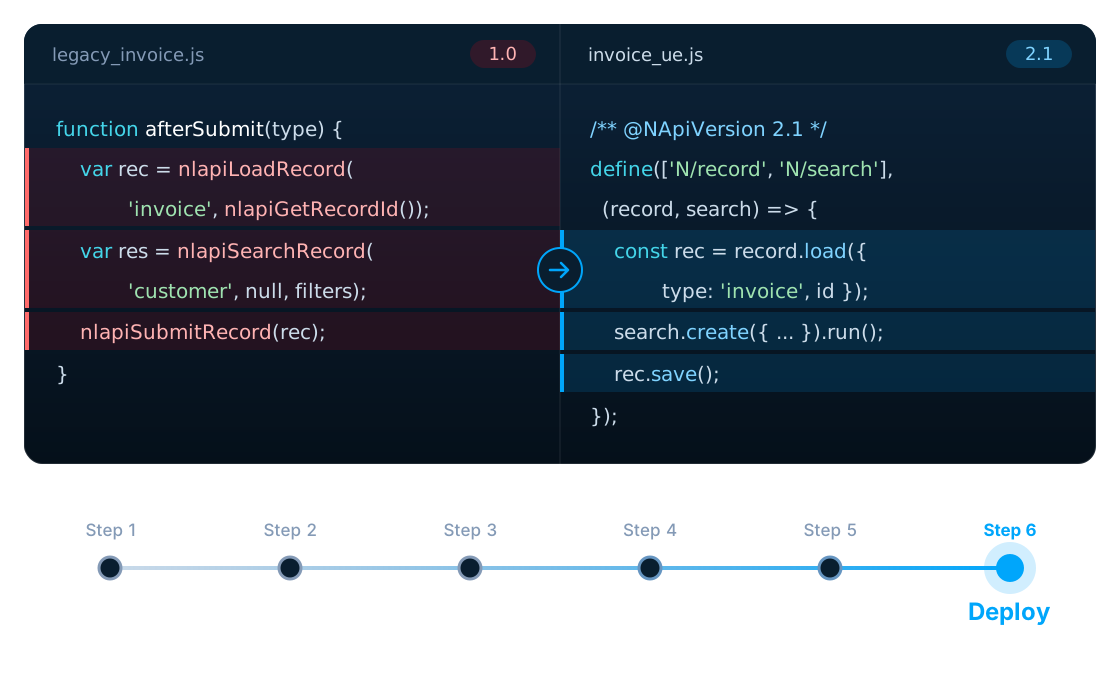
SuiteScript 2.1 uses a modular architecture and a modern JavaScript runtime. Migrating a SuiteScript 1.0 customization can therefore require changes to the way the code is structured and how NetSuite APIs are accessed.
Older SuiteScript 1.0 code may use
nlapiLoadRecord()
nlapiSearchRecord()
nlapiSubmitRecord()
A SuiteScript 2.1 implementation uses
N/record
N/search
// with the corresponding module methods
The migration therefore needs to consider the actual business logic, dependencies and behaviour of the existing script.
Is SuiteScript 1.0 automatically converted to 2.1?
Not always.
There is no universal one-click conversion process that can safely migrate every SuiteScript 1.0 customization.
Some SuiteScript 1.0 APIs have direct or relatively straightforward equivalents. Others may require a different implementation approach.
The more complicated the customization, the more important it becomes to understand what the script actually does before rewriting it.
Which SuiteScript 1.0 scripts should you review?
Your assessment should include all relevant script types, including:
- User Event Scripts
- Client Scripts
- Suitelets
- RESTlets
- Scheduled Scripts
- Map/Reduce-related customizations
- Workflow Action Scripts
- Mass Update Scripts
- Custom modules
- Scripts supporting integrations
The exact list will depend on your NetSuite environment.
The six migration steps
Step 1: Inventory your SuiteScript 1.0 customizations
Before writing replacement code, create an inventory. For each script, record:
- Script name
- Script ID
- Script type
- Deployment
- Business process
- Dependencies
- Integration dependencies
- Frequency of use
- Business criticality
- Current owner
- Availability of source code
This immediately tells you how large the migration actually is.
Step 2: Find obsolete scripts
Do not assume every old script needs to be migrated. A long-running NetSuite account often contains customizations that are no longer necessary. You may find scripts that:
- Support an old process
- Were replaced by standard NetSuite functionality
- Belong to a discontinued integration
- Are no longer deployed
- Duplicate another customization
Retiring an obsolete customization can be better than spending time converting it.
Step 3: Assess the complexity
Not every SuiteScript 1.0 migration requires the same amount of work. A simple script may contain a small amount of record processing. A complex script may involve:
- Multiple searches
- Transaction manipulation
- Custom records
- Workflows
- External APIs
- Other scripts
- Scheduled processing
- Complex business rules
These dependencies should be identified before estimating the migration effort.
Step 4: Rewrite the script for SuiteScript 2.1
The next stage is the actual conversion. This can involve:
- Replacing SuiteScript 1.0 APIs
- Introducing SuiteScript 2.1 modules
- Reworking entry points
- Updating record operations
- Updating searches
- Reviewing governance usage
- Updating error handling
- Reviewing dependencies
- Updating script annotations
The objective should be to preserve the business functionality while taking advantage of the modern SuiteScript architecture.
Step 5: Test in Sandbox
This is one of the most important stages. A script that compiles successfully is not necessarily a script that works correctly. Test the complete business process.
For example, if a User Event Script modifies a sales order, don't only test whether the script executes. Test:
- Creating the order
- Editing the order
- Saving the order
- Related workflows
- Searches
- Dependent scripts
- Integrations
- User experience
- Error scenarios
Step 6: Deploy gradually
For a large NetSuite account, avoid migrating everything at the same time. A phased approach can reduce risk. You might start with:
- Phase 1Low-complexity scripts
- Phase 2Internal automations
- Phase 3Medium-complexity customizations
- Phase 4Integration-related scripts
- Phase 5Business-critical scripts
The exact sequence should depend on your environment.
Common problems during SuiteScript 1.0 migration
- Hidden dependencies
- A script may depend on another customization that is not immediately obvious.
- Missing source code
- Sometimes the original developer or implementation partner is no longer available.
- Undocumented business logic
- The code may contain rules that nobody has documented separately.
- Integration dependencies
- A script may be communicating with an external system or API.
- Governance problems
- A rewritten script may behave differently in terms of governance usage.
- Business-process changes
- The original customization may have been written years ago, while the company's business process has changed.
These are reasons why migration should be treated as a technical and business assessment rather than just a coding task. Scripts that talk to other systems deserve particular care: see our NetSuite integration services.
How much does SuiteScript 1.0 to 2.1 migration cost?
There is no standard price because every NetSuite environment is different. The effort depends on:
- Number of scripts
- Complexity
- Script type
- Dependencies
- Integrations
- Documentation
- Testing requirements
- Business criticality
The most useful first step is therefore a migration assessment.
SuiteScript 1.0 to 2.1 migration checklist
- Identify all SuiteScript 1.0 scripts
- Record script types and deployments
- Identify dependencies
- Identify integrations
- Identify business-critical scripts
- Identify obsolete scripts
- Review source code
- Estimate migration complexity
- Convert scripts to SuiteScript 2.1
- Test in Sandbox
- Validate business processes
- Deploy in phases
- Monitor production
How LST Consultancy can help
LST Consultancy provides NetSuite development, customization and SuiteScript services. Our team can help organizations:
Identify legacy SuiteScript 1.0 customizations
Assess migration complexity
Convert SuiteScript 1.0 to SuiteScript 2.1
Review integrations and dependencies
Test migrated scripts
Support phased production deployment
If your organization has accumulated years of NetSuite customizations, the first step is to understand exactly what is running in your account.
A structured assessment can help you determine what should be migrated, what should be retired and what should be prioritized.
Need help with SuiteScript 1.0 to 2.1 migration?
Contact LST Consultancy for a NetSuite migration assessment.