
Quick answer
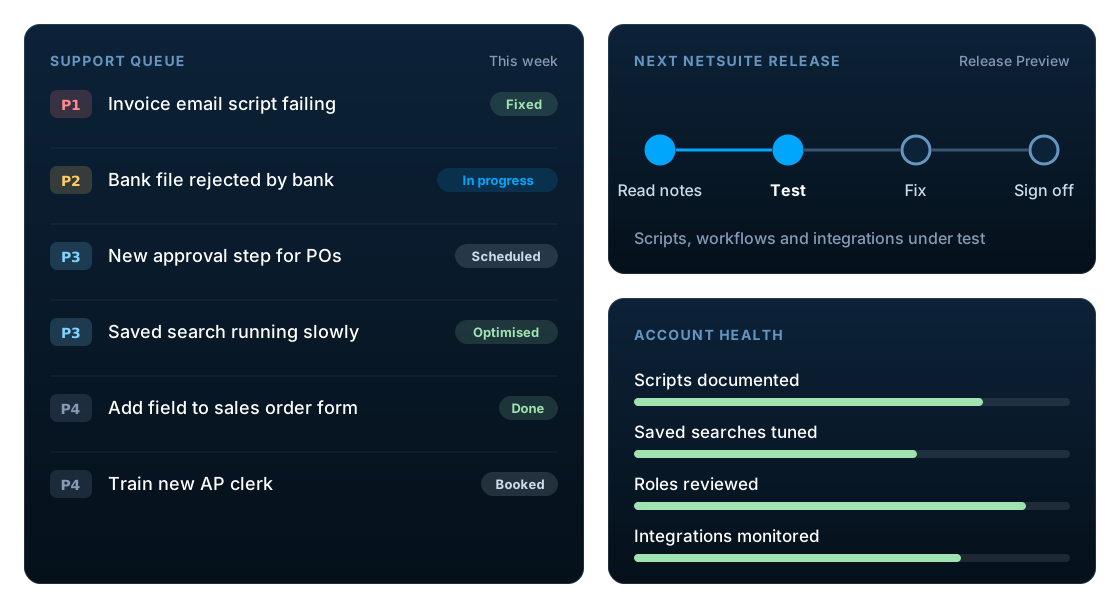
After go-live, NetSuite needs support at three levels: Oracle NetSuite support for platform issues, an internal administrator for day-to-day ownership, and a partner for configuration changes, scripts, integrations and release testing. Oracle's support excludes your own customisations, so plan intensive hypercare for the first weeks, then a steady-state model covering issue resolution, twice-yearly release testing, optimisation, documentation and ongoing development.
Key facts
- Oracle NetSuite support covers the platform. Oracle's support policy excludes customisations (including SuiteScript), first-level support and enhancement requests.
- Basic Support is included in every subscription, with a 2-hour response goal for critical (Severity 1) incidents, 24x7. Premium Support adds 24x7 cover for Severity 2 and response goals for all four severity levels.
- Basic Support allows 2 authorised support contacts and Premium Support allows 4. Only they can log cases with Oracle.
- NetSuite delivers two major releases a year, phased over several months, with a Release Preview account for testing against a snapshot of your data.
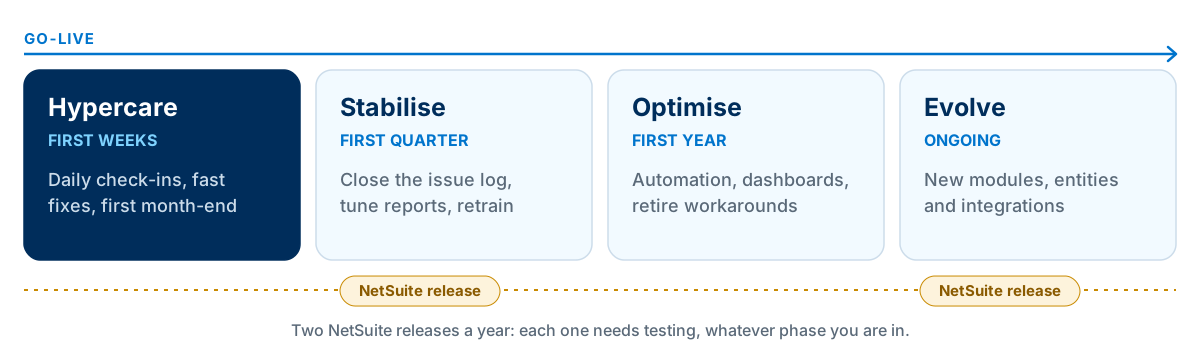
- Hypercare is the intensive support period in the first weeks after go-live, including the first month-end close.
Why NetSuite support after go-live matters
The weeks after go-live are when real transactions, real volumes and real exceptions meet the new system for the first time. Questions that never came up in testing appear on the first day of invoicing and again at the first month-end.
After that, the business keeps changing: new staff, new products, new customers, new countries. NetSuite itself changes twice a year. A NetSuite account without clear ownership slowly drifts, until people start working around it in spreadsheets.
The three layers of NetSuite support
Good NetSuite support is shared between three parties. Confusion about who handles what is the most common reason issues take too long to fix.
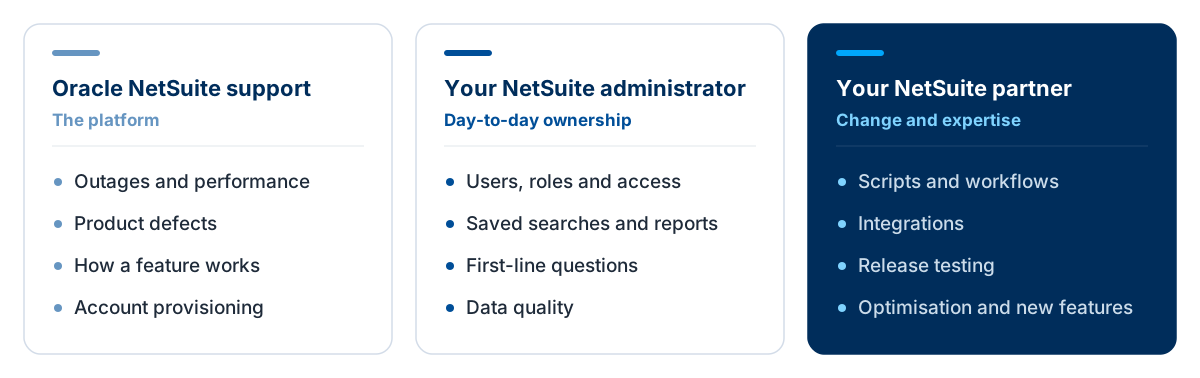
| Issue | Oracle support | Administrator | Partner |
|---|---|---|---|
| NetSuite is unavailable or slow for everyone | Yes | Report | Advise |
| A standard feature behaves unexpectedly | Yes | Triage | Advise |
| A user cannot log in or lacks access | No | Yes | If complex |
| A custom script or workflow fails | No | Triage | Yes |
| An integration stops syncing | Platform side only | Triage | Yes |
| A report or saved search is needed | No | Yes | If complex |
| A new process or module is needed | No | Request | Yes |
Day-to-day ownership usually sits with a named administrator. If you do not have one in-house, our NetSuite administration services can fill that role.
Oracle NetSuite support: Basic vs Premium vs ACS
Every NetSuite subscription includes Oracle's Basic Support. Premium Support is a paid upgrade, and Advanced Customer Support (ACS) is a separate Oracle service.
| Option | What it is | Often suits |
|---|---|---|
| Basic Support | Included with the subscription. Authorised contacts log incidents through SuiteAnswers, with 24x7 cover for critical (Severity 1) incidents. | Accounts with a strong internal administrator and partner |
| Premium Support | A paid upgrade: 24x7 cover for Severity 1 and 2, faster response goals, Severity 3 and 4 cases, and more authorised contacts. | Businesses where downtime is costly or operations run around the clock |
| Advanced Customer Support (ACS) | Oracle's separately contracted services for administration, guidance and optimisation, including issues outside standard support. | Businesses wanting Oracle-delivered administrative capacity |
NetSuite support response times
Oracle's support policy sets response time goals by severity. Severity 3 and 4 cases are only available with Premium Support.
| Severity | What it means | Basic Support | Premium Support |
|---|---|---|---|
| Severity 1 (Critical) | Production use is stopped or so badly affected that the business cannot reasonably continue | 2 hours, 24x7 | 1 hour, 24x7 |
| Severity 2 (Significant) | An important function is unavailable with no acceptable workaround | No response goal | 2 hours, 24x7 |
| Severity 3 (Less significant) | A workaround exists, a minor feature is unavailable, or a question about basic functionality | Not available | 8 hours |
| Severity 4 (Minimal) | Minimal impact on business operations | Not available | 2 business days |
Source: Oracle's NetSuite Hosting and Support Delivery Policy, effective 3 October 2025. These are response goals, not resolution times, and support bought before 1 December 2019 has different Severity 2 and 3 targets. Check the terms in your own contract.
Oracle support is not responsible for your own configuration, scripts or integrations. Oracle's policy excludes adaptations, configurations and modifications made by the customer or a third party, including SuiteScript, along with first-level support (which the customer provides) and enhancement requests. Those need an administrator, a partner or both.
How to raise a NetSuite support case
Only authorised support contacts can report incidents to Oracle: two on Basic Support and four on Premium Support. Cases are logged online through SuiteAnswers. Phone reporting is reserved for urgent incidents when SuiteAnswers is unavailable: Severity 1 on Basic, and Severity 1 and 2 on Premium.
Oracle asks for the following in every report, and including it all is the fastest route to a fix:
- Your NetSuite account (customer) ID
- Exact steps to reproduce the problem
- The exact wording of every error message
- What happened and what you expected
- Anything unusual about how it was found
- For Severity 1, a second point of contact
The same information speeds up any fix by your administrator or partner. Add the business impact, the records affected and screenshots, and log it in one shared place.
Hypercare: the first weeks after go-live
Hypercare is a period of intensive, fast-response support immediately after go-live. A good hypercare plan includes:
- Daily check-in with key users and a shared issue log
- Fast fixes for blocking issues in core processes
- Monitoring every integration and scheduled script
- Support through the first invoicing, payment and month-end cycles
- Quick reference guides and refresher sessions
- A clear exit point and handover to steady-state support
Agree the exit criteria in advance, for example a successful month-end close and no open critical issues, so that everyone knows when hypercare ends and steady-state support begins.
NetSuite support phases after go-live
Support needs change over the first year. The focus moves from fixing what blocks people, to stabilising, to improving, while every release still needs testing.
Managing NetSuite releases and upgrades
NetSuite delivers two major releases a year and upgrades accounts in phases over several months. You cannot skip an upgrade, but you can prepare for it. Each release cycle should follow four steps:
Read the release notes
Identify changes that touch the features, records and APIs your account uses.
Test in Release Preview
Run key processes, scripts, workflows and integrations in the preview account before your upgrade date.
Fix and adjust
Resolve anything that breaks, and decide which new features are worth adopting.
Sign off and communicate
Confirm results with process owners and tell users what changes for them.
Before each release, production account holders can request a Release Preview account. Its data is a snapshot of production, access starts with the Administrator role and can be extended to other testers, and Oracle advises logging in several weeks before your upgrade date to test.
Scripts on legacy SuiteScript versions need particular attention. Oracle expects SuiteScript 1.0, 2.0 and 2.x to be removed in NetSuite 2028.2; see our SuiteScript 2.1 migration guide.
Issue resolution: set priorities before you need them
Oracle uses its own severity levels, but most issues after go-live never reach Oracle. Agree internal priority levels and response targets with your administrator and partner before go-live, so every issue is not treated as urgent.
| Priority | Example | Typical approach |
|---|---|---|
| Critical | Nobody can invoice, ship or pay; a key integration is down | Immediate response and continuous work until resolved |
| High | A core process is impaired for a team, with no workaround | Same-day response and fix |
| Medium | A process works with a workaround; a report is wrong | Scheduled into the support queue |
| Low | Cosmetic changes, minor enhancements, how-to questions | Batched with planned work |
Optimisation: run a NetSuite health check
Once the account is stable, a periodic health check finds the quick wins that build up over time. Review these areas at least once a year:
Scripts and workflows
Inventory every customisation, retire unused ones and plan migration of legacy SuiteScript.
Saved searches and reports
Remove duplicates, tune slow searches and make sure management reports are trusted.
Roles and permissions
Review access against job roles and remove leavers and excessive permissions.
Integrations
Check error logs, retry rules, alerting and reconciliation for every connection.
Data quality
Find duplicates, incomplete records and inactive items that slow users down.
Licences and usage
Match user licences and modules to how the business actually uses NetSuite.
Want an outside view? Book a free NetSuite health check with our team.
Documentation that keeps NetSuite supportable
Documentation is what lets a new administrator, a new partner or an auditor understand the account. Keep it current for:
- Business process maps and who owns each process
- Configuration decisions and the reasons behind them
- Every script, workflow and integration: purpose, owner and dependencies
- Roles, permissions and approval rules
- Month-end and year-end procedures
- Support contacts, priorities and escalation routes
Ongoing development after go-live
Most improvements come after go-live, once people know the system. Manage them like a small product: one prioritised backlog, changes built and tested in a sandbox, releases on a predictable schedule and documentation updated with every change.
Before building anything new, check whether a standard feature or workflow can do it. Our guide on when to customise NetSuite with SuiteScript sets out a simple decision framework, and the NetSuite integration guide covers monitoring and error handling for connected systems.
Choosing a NetSuite support model
Oracle's support level is only part of the decision. The bigger choice is who handles first-level support, changes and releases.
| Model | Typically fits | Watch for |
|---|---|---|
| Internal team only | Large organisations with NetSuite administrators and developers in-house | Key-person risk and gaps in specialist skills |
| Ad hoc partner support | Stable accounts with occasional needs | Slower response and less familiarity with your account |
| Partner retainer | Most growing businesses: a set number of hours for support and improvements | Unused hours and unclear priorities |
| Managed service | Businesses wanting a partner to own administration and support end to end | Clear scope, service levels and reporting |
NetSuite managed services sit at the far end: a partner takes ongoing responsibility for administration and support under agreed service levels, covering user changes, issue resolution, release testing, integration monitoring and small enhancements.
Signs your current support model is not working
- Users keep spreadsheets alongside NetSuite
- The same issues come back after every release
- Nobody knows what a script does or who wrote it
- Integration errors are found by customers first
- Month-end takes longer than it did at go-live
- Enhancement requests sit in a backlog for months
If several of these sound familiar, or a project has stalled since go-live, see our NetSuite post-implementation support and recovery services.
Frequently asked questions
What does NetSuite support cover?
Oracle NetSuite support covers the platform: outages, performance, product defects and how standard features work. Oracle's support policy excludes configurations and modifications made by the customer or a third party, including SuiteScript, as well as first-level support and enhancement requests. Those are handled by your administrator and partner.
What is the difference between NetSuite Basic and Premium Support?
Basic Support is included with a NetSuite subscription. It gives 2 authorised contacts and a 2-hour response goal for critical (Severity 1) incidents, 24x7. Premium Support is a paid upgrade with 4 authorised contacts, 24x7 cover for Severity 1 and 2, and response goals of 1 hour, 2 hours, 8 hours and 2 business days for Severity 1 to 4.
What are NetSuite's support response times?
Under Oracle's support policy effective October 2025, Basic Support has a 2-hour response goal for Severity 1 incidents. Premium Support has goals of 1 hour for Severity 1, 2 hours for Severity 2, 8 hours for Severity 3 and 2 business days for Severity 4. These are response goals, not resolution times.
What is the NetSuite support phone number?
Oracle does not publish a general NetSuite support phone line. Cases are logged online through SuiteAnswers by authorised support contacts. Phone reporting is for urgent incidents when SuiteAnswers is unavailable: Severity 1 on Basic Support, and Severity 1 and 2 on Premium Support. Contact details are in the support area of your NetSuite account.
How do I raise a NetSuite support case?
An authorised support contact logs the case through SuiteAnswers in your NetSuite account. Include your account ID, exact steps to reproduce the problem, the wording of any error messages, what you expected to happen and the business impact. Basic Support allows 2 authorised contacts and Premium Support allows 4.
What is NetSuite ACS?
Advanced Customer Support (ACS) is Oracle NetSuite's separately contracted service for ongoing administration, guidance and optimisation of an account. Oracle can also use ACS or professional services for issues that fall outside standard support.
Will Oracle fix my custom scripts or integrations?
No. Oracle's support terms exclude adaptations, configurations and modifications made by the customer or a third party, including SuiteScript. Custom scripts, workflows and integrations are supported by your administrator, your NetSuite partner or the vendor of a third-party SuiteApp.
How often is NetSuite updated?
NetSuite delivers two major releases a year, rolled out to accounts in phases over several months. Before your account is upgraded, you can request a Release Preview account, based on a snapshot of your production data, to check that your processes, scripts and integrations still work.
What is hypercare in NetSuite?
Hypercare is the intensive support period immediately after go-live. It usually includes daily check-ins, fast fixes, integration monitoring and support through the first month-end close, before handing over to steady-state support.
Do I need a NetSuite administrator?
Most businesses benefit from a named internal administrator who manages users, roles, reports and first-line questions. Oracle expects the customer to provide first-level support. Smaller businesses sometimes combine a part-time internal owner with partner support.
What are NetSuite managed services?
NetSuite managed services are an arrangement in which a partner takes ongoing responsibility for administering and supporting your account, usually under agreed service levels: user and role changes, issue resolution, release testing, monitoring integrations and small enhancements.
How much does NetSuite support cost?
It depends on the model: Oracle support level, internal staff, and partner support as ad hoc hours, a retainer or a managed service. Base the decision on your account's complexity, change volume and how critical NetSuite is to daily operations.
Review your NetSuite support needs
LST Consultancy supports NetSuite accounts after go-live: issue resolution, release testing, SuiteScript and integration fixes, health checks and ongoing development, with coverage across time zones. We are certified to ISO/IEC 27001:2022 for information security.
Sources
Related reading
NetSuite SuiteScript: When to Customise Your ERP and When to Use Standard Features
NetSuite SuiteScript 2.1 Migration: What You Need to Know Before 2028.2
NetSuite Integration Guide: Connecting Your ERP with E-commerce, CRM and Business Systems
How to Choose the Right NetSuite Implementation Partner in Europe & the UK