
Quick answer
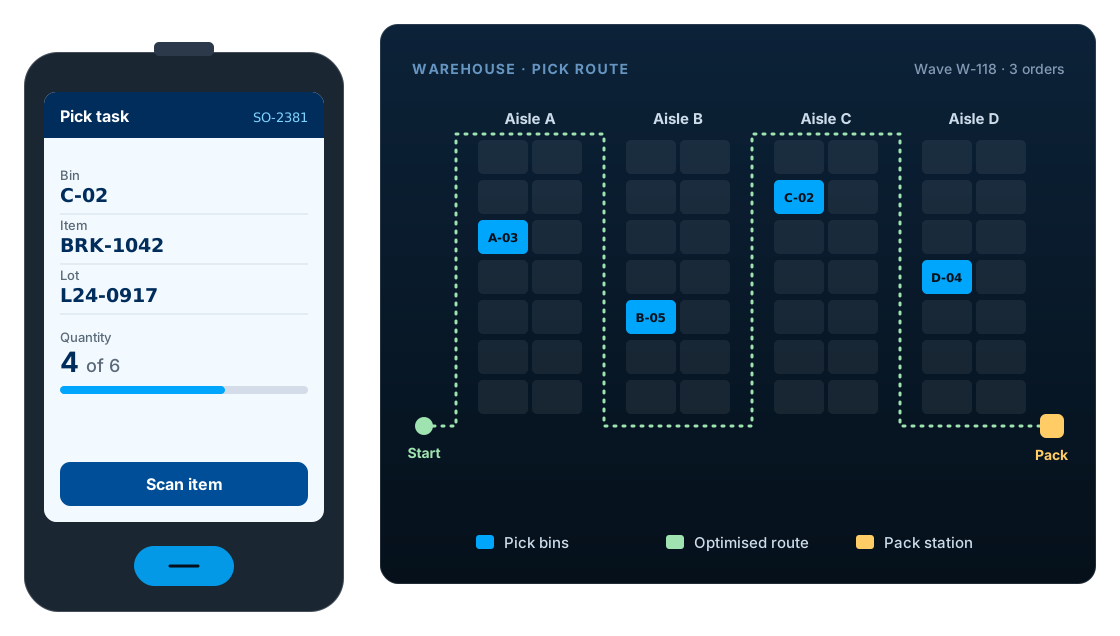
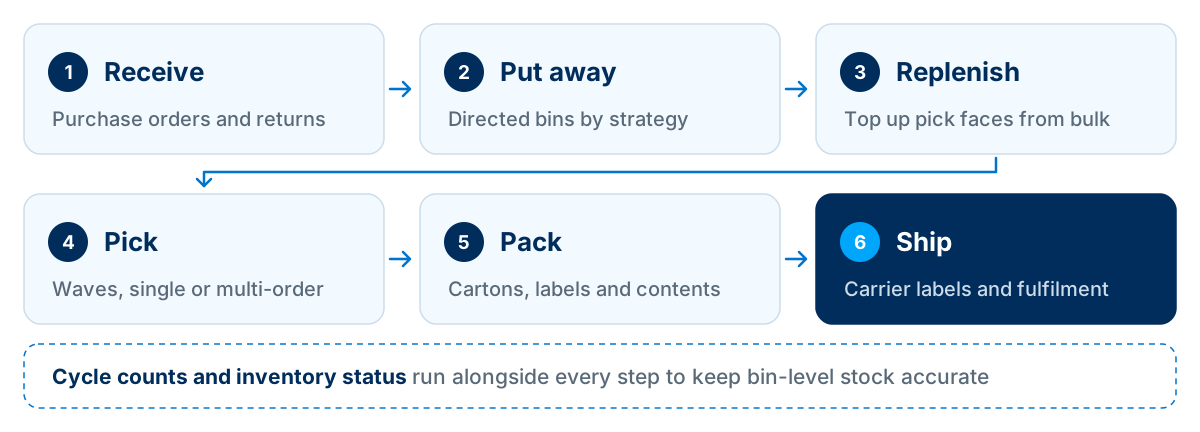
NetSuite WMS is Oracle NetSuite's native warehouse management capability. Warehouse staff use a mobile app on barcode scanners to receive, put away, pick, pack, ship and count stock, and every scan updates NetSuite's bin-level inventory in real time. It suits many growing warehouses already on NetSuite; very high-volume or automation-heavy sites may need an integrated specialist WMS.
Key facts
- NetSuite WMS runs inside NetSuite, so there is no separate warehouse database to keep in sync.
- Warehouse tasks run through the NetSuite WMS mobile app on handheld devices with barcode scanners, typically rugged Android units; Oracle now also supports recent iPads and iPhones.
- It is licensed as an add-on and builds on NetSuite inventory features such as multiple locations and bins.
- It supports directed putaway and picking, waves, licence plates, lot and serial tracking and cycle counts.
- Mobile processes can be configured, and SuiteScript can extend them where configuration is not enough.
What is NetSuite WMS?
NetSuite WMS (warehouse management system) is Oracle NetSuite's native warehouse capability. It directs receiving, putaway, picking, packing, shipping and counting through a mobile app on barcode scanners, and records every movement against NetSuite's inventory at bin level.
Is NetSuite a WMS or an ERP?
NetSuite is a cloud ERP. NetSuite WMS is an optional capability that runs inside it. That is the main difference from a standalone WMS: there is one inventory record, shared by the warehouse, sales, customer service and finance, rather than two systems kept in step by an integration.
NetSuite WMS vs NetSuite inventory management
Many businesses run their warehouse on NetSuite's inventory management for years before adding WMS. The difference is direction: inventory management records what happened, while WMS tells people what to do next.
| Capability | Inventory management | NetSuite WMS |
|---|---|---|
| Stock by location | Yes | Yes |
| Stock by bin | With bin management | Yes, with directed tasks |
| Barcode scanning on handhelds | Limited | Yes, through the mobile app |
| Directed putaway strategies | No | Yes |
| Pick strategies and wave release | No | Yes |
| Licence plates (pallets and cartons) | No | Yes |
| Replenishment of pick faces | Manual | Yes |
| Mobile cycle counts | Limited | Yes |
Exact capabilities depend on the NetSuite features and modules enabled in your account. See also our NetSuite inventory management services.
Key NetSuite WMS features
Receiving
Receive against purchase orders, transfer orders and returns on a scanner, with lot, serial and expiry captured at the dock.
Directed putaway
Putaway strategies suggest the right bin based on rules such as item, zone, bin type or available space, so stock goes where it can be found.
Bins and zones
Model the warehouse as zones, aisles and bins with bin types, so tasks are routed sensibly and stock is visible at bin level.
Picking strategies and waves
Release orders in waves, pick single or multiple orders at once and follow pick strategies that respect rotation rules such as FIFO or expiry.
Packing and shipping
Pack into cartons, print labels and pass shipment details to carriers, either through NetSuite's shipping features or an integration.
Replenishment
Trigger replenishment from bulk storage to pick faces when stock falls below set levels, before pickers run out.
Cycle counts
Count bins on a schedule from a scanner and post adjustments with approvals, instead of shutting the warehouse for a full stock-take.
Licence plates
Track pallets and cartons as licence plate numbers (LPNs), so a whole pallet can be received, moved or shipped in one scan.
Lot, serial and inventory status
Trace lots and serial numbers through every move, and use inventory status to keep quarantined or damaged stock out of picking.
Work order picking
For manufacturers, pick components for work orders and record completions so production and the warehouse share one stock picture.
With the Inventory Status feature enabled, the mobile app shows an item's status and prompts for it when stock is added or removed, which is how quarantined or damaged stock stays out of picking. See Oracle's Inventory Status on Mobile Devices.
Benefits of NetSuite WMS
Better inventory accuracy
Scanning replaces keying, and bin-level records replace guesswork, so the stock NetSuite shows is the stock on the shelf.
Faster, more consistent picking
Directed tasks and waves reduce walking and searching, and new staff can follow the scanner rather than memorising locations.
One system for warehouse and finance
Because WMS runs inside NetSuite, sales, customer service and finance see the same inventory as the warehouse, in real time.
Traceability
Lot and serial history from receipt to shipment supports recalls, warranty claims and customer audits.
Fewer integrations to maintain
A native WMS removes the inventory sync between ERP and a separate warehouse system, which is often a source of errors.
Room to grow
Add locations, zones or users as the business grows, within the same NetSuite account.
How NetSuite WMS fits together
NetSuite WMS has three layers: the devices on the warehouse floor, NetSuite itself, and the systems your warehouse exchanges data with.
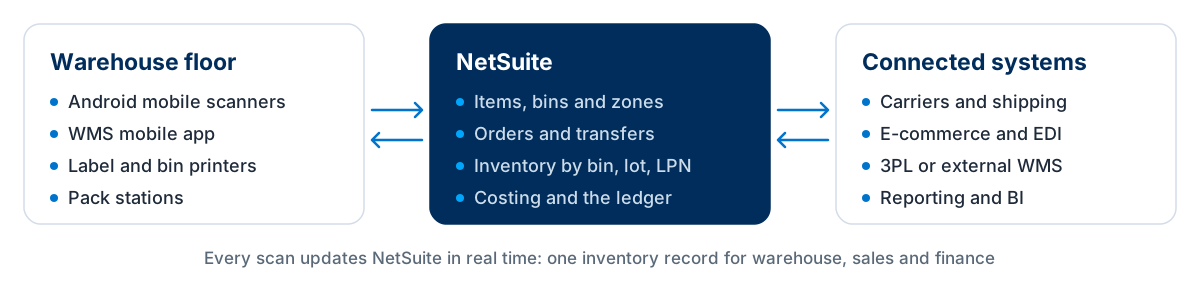
Hardware matters more than many projects expect. Oracle's mobile app requirements cover Android 7.0 or later and recent iPads and iPhones, with a barcode scanner, Wi-Fi and Bluetooth. Choose devices suited to your environment, such as cold stores, high racking or outdoor yards, and survey Wi-Fi before go-live. A scanner that drops connection in the back aisle will undo the benefits of directed picking.
Carriers, marketplaces and trading partners usually connect through NetSuite integrations; for retail and distribution partners that means NetSuite EDI integration.
When NetSuite WMS is the right fit, and when to consider alternatives
NetSuite WMS is a strong option for many growing warehouses already on NetSuite. It is not the only option.
| Option | Typically fits | Watch for |
|---|---|---|
| NetSuite inventory management only | Simple warehouses with low volumes and little need for directed tasks or scanning | Accuracy depends on manual processes |
| NetSuite WMS (native) | Growing warehouses on NetSuite that need scanning, bins, directed putaway and picking | Validate automation, very high volumes and specialist processes |
| Third-party SuiteApp WMS | Businesses wanting additional warehouse functionality while staying inside NetSuite | Separate licence and vendor roadmap |
| External WMS or 3PL, integrated | Automated, very high-volume or multi-client operations, or outsourced fulfilment | Integration design, monitoring and inventory reconciliation |
NetSuite WMS limitations to validate
Test these carefully if they apply to your operation:
- Warehouse automation such as conveyors, sortation or robotics, which usually needs a control system integration
- Very high order volumes or peak surges, which need performance testing with realistic data
- Labour management, slotting optimisation or yard management
- Multi-client 3PL billing and client-specific rules
Third-party SuiteApp WMS products, such as RF-SMART, and external WMS or 3PL platforms integrated with NetSuite are both established routes. The right choice depends on your volumes, processes and automation plans, not on which option has the longest feature list.
NetSuite WMS implementation considerations
Warehouse projects are won or lost on the floor. These eight steps cover what matters most.
Map your warehouse processes
Walk the floor and document how goods are received, stored, picked, packed and shipped today, including exceptions.
Design the bin and zone structure
Agree naming, bin types and zones before labelling. Changing them after go-live is disruptive.
Clean item data and barcodes
Every item needs reliable barcodes, units of measure and, where relevant, dimensions, lot and serial settings.
Survey hardware and Wi-Fi
Choose scanners and printers, and check Wi-Fi coverage in every aisle, freezer and yard area where scanning happens.
Configure putaway and pick strategies
Translate your real rules, such as FIFO, expiry, fast movers near dispatch, into strategies and test them with real orders.
Connect carriers and channels
Plan integrations for carriers, e-commerce, EDI and any 3PL, with error handling and monitoring.
Test on the warehouse floor
Run end-to-end scenarios with real devices, real labels and real staff, not only in a meeting room.
Plan cut-over and training
Count stock into bins, set opening balances, train each role on the scanner and agree support for the first weeks.
Item masters, barcodes and opening bin balances usually come from a legacy system, so plan NetSuite data migration alongside the warehouse design. Manufacturers should also read how NetSuite handles work orders and WIP.
What does NetSuite WMS cost?
NetSuite WMS is licensed as an add-on to your NetSuite subscription, and Oracle does not publish a price list. The licence is only part of the budget:
- NetSuite WMS licence (an add-on to your subscription)
- Mobile scanners and accessories
- Label and bin printers, labels and bin signage
- Wi-Fi improvements where coverage is weak
- Implementation, configuration and integrations
- Training, cut-over stock count and hypercare
For a full breakdown of subscription, implementation and running costs, see our guides to NetSuite implementation cost and NetSuite implementation cost in the UK.
What to test in a NetSuite WMS demo
Ask to see these scenarios on a real handheld, with your own items and bin structure where possible.
- 1.Receive a purchase order with lots and expiry dates, then put it away to a suggested bin.
- 2.Release a wave and pick several orders on one trip with a handheld.
- 3.Show replenishment from bulk storage to a pick face.
- 4.Receive and ship a full pallet using a licence plate.
- 5.Run a cycle count with a variance and show the approval.
- 6.Move damaged stock to a status that cannot be picked.
- 7.Pack an order, print a carrier label and show the shipment in NetSuite.
- 8.Show what happens on the scanner when Wi-Fi drops mid-task.
Frequently asked questions
What is NetSuite WMS?
NetSuite WMS is Oracle NetSuite's native warehouse management capability. It directs receiving, putaway, picking, packing, shipping and cycle counting through a mobile app on barcode scanners, updating NetSuite inventory in real time.
Is NetSuite a WMS or an ERP?
NetSuite is a cloud ERP. NetSuite WMS is an optional warehouse management capability that runs inside it, so the ERP and the warehouse share one inventory record.
What is the difference between NetSuite WMS and inventory management?
NetSuite inventory management tracks stock by item and location and supports bins. NetSuite WMS adds mobile barcode scanning and directed warehouse tasks, such as putaway strategies, wave picking, replenishment, licence plates and mobile cycle counts.
How much does NetSuite WMS cost?
NetSuite WMS is licensed as an add-on to your NetSuite subscription, and Oracle does not publish a price list, so the licence is quoted with the rest of your subscription. Budget also for scanners, printers, labels, Wi-Fi improvements, implementation, integrations and training, which often add up to more than the licence itself.
What hardware does NetSuite WMS need?
The NetSuite WMS mobile app runs on handheld devices with a barcode scanner. Oracle's current requirements list Android 7.0 or later, or recent Apple devices (iPadOS 18 or later, iPhone 13 or newer), a 1D barcode scanner, a touch screen of at least 4 inches, Wi-Fi and Bluetooth. You also need label and bin printers and reliable Wi-Fi wherever scanning happens. Requirements change, so confirm them before buying devices.
RF-SMART vs NetSuite WMS: which should I choose?
Both run inside NetSuite. NetSuite WMS is Oracle's native add-on; RF-SMART is a third-party SuiteApp with its own licence, mobile app and roadmap. The right choice depends on the processes you need, how much configuration each needs to fit them, and total cost. Ask both to demonstrate the same scripted scenarios on your own items and bins before deciding.
Can NetSuite WMS integrate with a 3PL or an external WMS?
Yes. NetSuite can exchange orders, receipts, shipments and inventory with a 3PL or an external WMS through integrations, and some businesses run NetSuite WMS in their own warehouses while a 3PL handles others. Design how inventory is reconciled between the systems, and how failed transactions are monitored, before go-live.
Can NetSuite WMS be customised?
Yes. Mobile processes can be configured, and SuiteScript can extend them where configuration is not enough. Keep customisation focused on genuine process gaps so it remains maintainable through NetSuite releases.
Does NetSuite WMS support lot and serial tracking?
Yes. NetSuite WMS supports lot and serial numbers through receiving, putaway, picking and shipping, including expiry-based picking where configured.
Should I use NetSuite WMS or a third-party WMS?
NetSuite WMS suits many growing warehouses already on NetSuite. Consider a third-party SuiteApp or an integrated external WMS if you need warehouse automation, very high volumes, labour management or multi-client 3PL billing.
Discuss your NetSuite WMS requirements
LST Consultancy helps businesses decide between native NetSuite WMS, SuiteApp options and integrated warehouse systems, then configure, extend and connect the right one. Tell us about your warehouse, volumes and channels.