
Quick answer
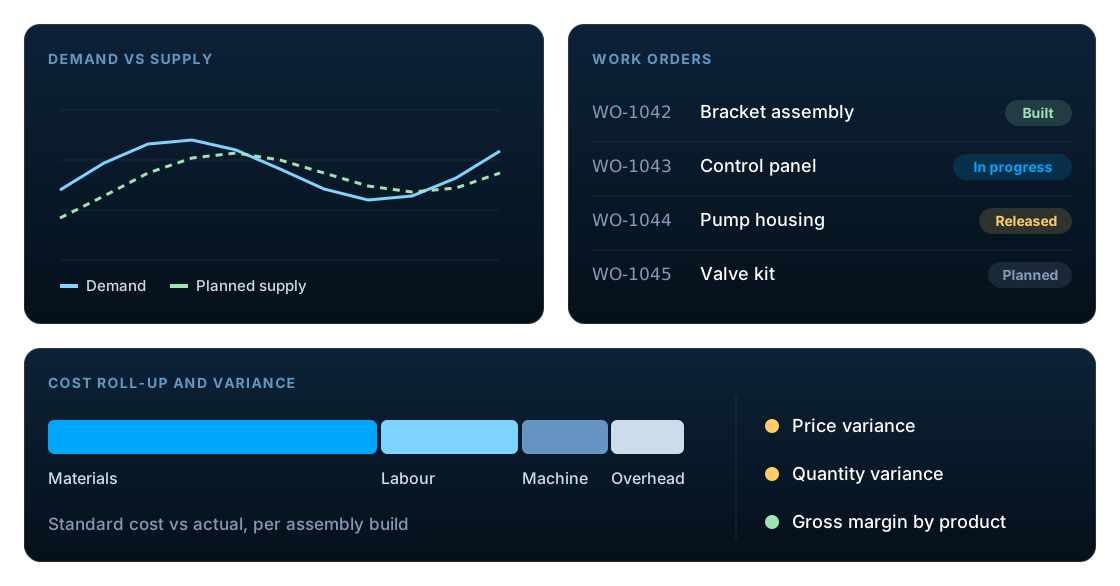
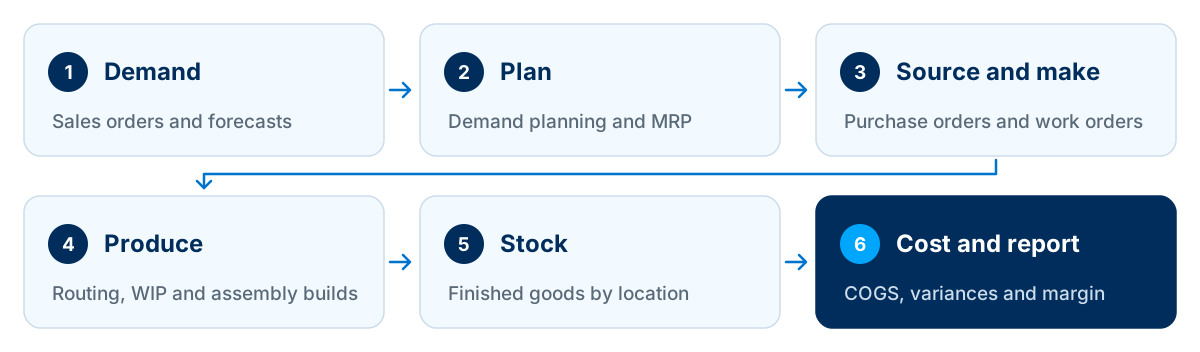
NetSuite helps manufacturers plan production and see true costs in one cloud system. Demand planning and MRP turn sales orders and forecasts into purchase and work orders; bills of materials, routings and work in process track production; and costing, variances and real-time reporting show margin by product, customer and entity. Fit depends on your type of manufacturing, so validate it against your own processes.
Key facts
- NetSuite is Oracle's cloud ERP. Finance, inventory, order management and manufacturing share one database.
- Core manufacturing in NetSuite is built on assembly items, bills of materials, work orders and assembly builds.
- Routings and work in process (WIP) track production operations, labour and machine time against each work order.
- Some capabilities, such as advanced shop-floor execution, production scheduling and quality management, may need additional modules or SuiteApps.
- Discrete and assembly manufacturers are usually the strongest fit. Process manufacturers with complex formulas should validate fit carefully.
Why planning and financial visibility break down in manufacturing
Most growing manufacturers reach a point where the systems that got them started stop keeping up. The signs are usually familiar:
- MRP runs in spreadsheets that one person understands.
- Stock-outs on critical components sit alongside excess stock elsewhere.
- Nobody is sure what a product really costs to make.
- Production, purchasing and finance work from different numbers.
- Month-end takes too long because WIP and inventory need manual adjustment.
The root cause is rarely one bad tool. It is that planning, production, inventory and finance live in separate places, so every decision depends on reconciling them first. A single system of record removes that reconciliation step.
What is NetSuite for manufacturing?
NetSuite for manufacturing is Oracle NetSuite's cloud ERP configured for production businesses. It connects demand planning, MRP, bills of materials, work orders, inventory and costing to the general ledger in one database, so production and finance work from the same live data.
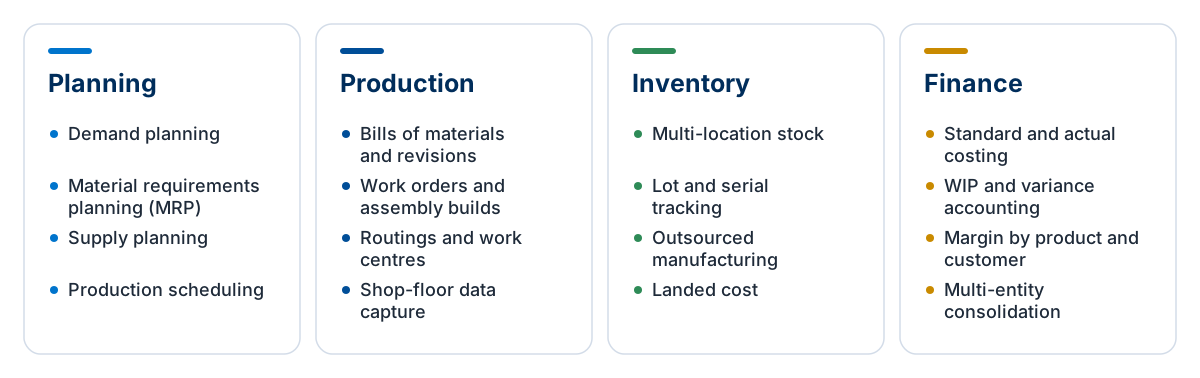
Oracle's own NetSuite Manufacturing overview describes the same span, from sales orders and planning through building goods and tracking work orders to releasing finished goods. For how we configure and extend it, see our NetSuite manufacturing services.
How NetSuite improves production planning
Planning is where most manufacturers feel the difference first. NetSuite plans from live orders, stock and bills of materials instead of last week's export.
Demand planning
Forecast demand from historical sales, open orders and seasonal patterns, item by item and location by location, so planning starts from realistic numbers.
Material requirements planning (MRP)
Compare demand with on-hand stock, open purchase orders and work orders, then generate suggested purchase and work orders to cover the gaps across multi-level bills of materials.
Work orders and production scheduling
Release work orders against available materials and capacity. More advanced scheduling across work centres is available, depending on the modules you license.
Outsourced manufacturing
When a contract manufacturer builds for you, manage the components you supply and the finished goods you receive in the same system as your own production.
Planning is only as good as the stock figures underneath it, so multi-location NetSuite inventory management is usually configured alongside MRP.
How NetSuite connects the shop floor
Good plans need accurate production data coming back. These capabilities link what happens on the floor to inventory and cost.
Bills of materials and revisions
Maintain multi-level bills of materials with effective dates and revisions, so engineering changes reach production and costing at the right time.
Routings and work centres
Define the operations, work centres, set-up time and run rates for each product. Routings drive both scheduling and the labour and machine elements of cost.
Work in process (WIP)
Record material issues and completed operations as production happens, so WIP balances on the balance sheet reflect what is actually on the floor.
Shop-floor data capture
Capture operation completions, quantities and scrap from tablets or mobile devices rather than paper travellers keyed in later.
Lot and serial traceability
Trace components forward to customers and finished goods back to supplier lots, which matters for recalls, warranty claims and regulated customers.
Quality
Inspections and quality checks can be built into production and receiving, either with Oracle's quality tools or a specialist SuiteApp.
In NetSuite, routings apply to work orders tracked as work in process, and each completed operation is costed against its cost template, which is what produces operation-level variances. See Oracle's Manufacturing Routing documentation for the set-up.
How NetSuite improves financial visibility for manufacturers
Financial visibility is the payoff. Because every production transaction posts to the same ledger, finance sees cost and margin as they happen rather than at month-end.
Costing methods
Choose the costing method that suits each item, such as standard, average or FIFO, with cost roll-ups from materials, labour, machine time and overhead.
WIP and variance accounting
Production postings flow straight into the general ledger. Variances between standard and actual cost appear as they occur, not weeks later.
Landed cost
Allocate freight, duty and other import charges to the items they belong to, so product cost and margin include the full cost of getting materials in.
Margin by product, customer and channel
Because sales, cost of goods sold and production share one database, margin analysis does not depend on exporting and reconciling data from several systems.
Dashboards and analytics
Role-based dashboards, saved searches and SuiteAnalytics workbooks give production, purchasing and finance the same live view of performance.
Multi-entity consolidation
With NetSuite OneWorld, groups with plants or sales companies in several countries can consolidate results across subsidiaries and currencies.
Manufacturing before and after NetSuite
| Area | Typical starting point | With NetSuite |
|---|---|---|
| Planning | MRP in spreadsheets, rebuilt every week | Planning runs on live orders, stock and bills of materials |
| Purchasing | Buyers chase shortages reactively | Suggested purchase orders based on planned demand |
| Production | Paper travellers keyed in after the fact | Work orders, routings and WIP recorded as work happens |
| Inventory | Stock figures differ between systems | One stock position by item, lot and location |
| Product cost | Estimated once a year in a spreadsheet | Cost roll-ups and variances visible each period |
| Month-end | Manual WIP and inventory adjustments | Production postings already in the ledger |
Which manufacturers is NetSuite a good fit for?
NetSuite is not the right answer for every manufacturer, and a good partner should tell you so. Use this as a starting point, then test your own processes in a scripted demo.
| Manufacturing type | Typical fit | What to know |
|---|---|---|
| Discrete and assembly | Usually a strong fit | Bills of materials, work orders, routings and WIP map naturally to assembled products. |
| Make-to-order and assemble-to-order | Good fit | Work orders can be linked to sales orders. Highly configurable products may need additional configuration tools. |
| Contract and outsourced manufacturing | Good fit | Outsourced manufacturing supports component supply to, and receipts from, contract manufacturers. |
| Batch and process (food, chemicals) | Validate carefully | Formulas, co-products, potency and shelf life may need specialist SuiteApps. Test with your own recipes. |
| Engineer-to-order and complex scheduling | Validate carefully | Project-based engineering, PLM and finite capacity scheduling often rely on integrations or add-ons. |
Weighing NetSuite against an on-premise alternative? Our NetSuite vs SAP Business One comparison covers where each tends to fit manufacturers.
NetSuite for UK and European manufacturers
Manufacturers in the UK and Europe often have requirements a generic demo will not show.
Multi-entity groups
UK manufacturers with Irish or European plants or sales companies can run them as subsidiaries in OneWorld, with intercompany and consolidation.
Currencies and imports
Buying components in EUR or USD and importing materials makes landed cost and currency revaluation part of accurate product costing.
VAT and Making Tax Digital
VAT on purchases, sales and imports needs correct tax configuration, with returns submitted under Making Tax Digital. Validate the set-up with your accountants.
Customer traceability requirements
Automotive, aerospace, food and medical customers often expect lot or serial traceability and documented quality checks.
For VAT, confirm returns can be filed through HMRC-recognised Making Tax Digital software. Budgeting a UK rollout? See what drives NetSuite implementation cost in the UK.
Implementing NetSuite for manufacturing: what to get right
Manufacturing implementations succeed or fail on data and process detail. These six areas deserve the most attention.
Clean item masters and bills of materials
Inaccurate bills of materials produce inaccurate plans and costs. Clean and validate them before migration.
Agree routings and standard costs
Set realistic run rates and overheads so that variances mean something from the first period.
Count stock and set opening WIP
Plan stock counts and opening WIP balances carefully. They are the starting point for every cost that follows.
Map the integrations
CAD or PLM, MES, EDI, e-commerce and warehouse systems all need agreed data flows and error handling.
Test end to end
Run demand through planning, purchasing, production, shipping and costing in a sandbox before go-live.
Phase advanced features
Go live with a solid core first, then add advanced scheduling, shop-floor execution or quality once the basics are stable.
Bills of materials, item masters and opening balances usually move from a legacy system, so plan NetSuite data migration and the integrations to CAD, MES, EDI and warehouse systems early.
Where standard features stop, SuiteScript and workflows can close specific gaps, such as custom costing rules, shop-floor screens or integrations. Customise only where the business case is clear.
Questions to ask in a NetSuite manufacturing demo
Ask to see your own scenarios, not a standard tour. These requests separate a real fit from a good presentation.
- 1.Run MRP on our own multi-level bill of materials and show the suggested orders.
- 2.Show an engineering change to a bill of materials and its effect on open work orders.
- 3.Record a partial completion with scrap against a routing operation.
- 4.Trace a finished-goods serial number back to its supplier lots.
- 5.Show standard cost against actual for a completed work order, with variances.
- 6.Show landed cost on an imported component and its effect on product margin.
- 7.Show how WIP appears on the balance sheet at month-end.
- 8.Show a contract manufacturer receiving components and returning finished goods.
Frequently asked questions
Is NetSuite good for manufacturing?
NetSuite is a strong fit for many discrete, assembly, make-to-order and contract manufacturers, because planning, production, inventory and finance share one cloud database. Process manufacturers with complex formulas, and engineer-to-order businesses with advanced scheduling needs, should validate fit carefully and may need specialist SuiteApps.
Is NetSuite an MRP or an ERP?
NetSuite is an ERP that includes MRP. Material requirements planning is one part of a system that also runs finance, inventory, order management, purchasing and reporting, so planning works from the same live data that drives the general ledger rather than from a separate MRP tool.
Does NetSuite have MRP?
Yes. NetSuite includes demand planning and material requirements planning, which compare demand with stock and open orders and suggest purchase and work orders across multi-level bills of materials. Confirm which planning features are included in your licence.
What does the NetSuite manufacturing module include?
Core NetSuite manufacturing covers assembly items, bills of materials and revisions, work orders and assembly builds, with routings, work centres and work in process for operation-level tracking. Demand planning, MRP, outsourced manufacturing and costing connect it to purchasing, inventory and finance. More advanced scheduling and shop-floor execution come from add-ons such as Advanced Manufacturing.
What is NetSuite Advanced Manufacturing?
NetSuite Advanced Manufacturing is an Oracle NetSuite SuiteApp for more complex production. It adds capabilities such as finite capacity scheduling, shop-floor execution and mobile data capture on top of core manufacturing. Check its current scope and licensing with Oracle NetSuite or your partner.
What is NetSuite Manufacturing Mobile?
NetSuite Manufacturing Mobile is a tablet and barcode-scanning tool for the shop floor, associated with Advanced Manufacturing. Operators use it to record material consumption, operation completions and production quantities as work happens, instead of keying paper travellers into the system later. Confirm availability and licensing for your account.
Can NetSuite handle process manufacturing?
NetSuite can support some batch and process manufacturing, but requirements such as formulas, co-products, by-products, potency and shelf life often need specialist SuiteApps. Test with your own recipes during a scripted demo.
Does NetSuite support lot and serial traceability?
Yes. NetSuite supports lot-numbered and serialised items, so you can trace components to finished goods and customers, and back again, for recalls, warranty and customer requirements.
How does NetSuite calculate manufacturing cost?
NetSuite rolls up cost from materials on the bill of materials and, where routings are used, labour, machine time and overhead from each operation. Depending on the costing method, it then records variances between expected and actual cost to the general ledger.
Can NetSuite manage contract manufacturers?
Yes. Outsourced manufacturing lets you supply components to a contract manufacturer and receive finished goods, keeping inventory, cost and purchasing in NetSuite.
How long does a NetSuite manufacturing implementation take?
It depends on the number of entities, plants and products, the quality of bills of materials and item data, integrations and how much advanced functionality is in the first phase. Many manufacturers phase the rollout, starting with core finance, inventory and production.
Explore NetSuite for manufacturing
LST Consultancy helps manufacturers assess fit, design and implement NetSuite, and build the SuiteScript and integrations that connect it to the shop floor. Share your products, plants and processes, and we will show you how NetSuite would handle them.