
Quick answer
NetSuite OneWorld is the multi-subsidiary edition of Oracle NetSuite. It lets a group run multiple legal entities, currencies and tax registrations in one account, with intercompany transactions, eliminations and real-time consolidated reporting. For European groups it replaces a separate ledger in each country, although local VAT, statutory reporting and e-invoicing still need country-by-country design and professional review.
Key facts
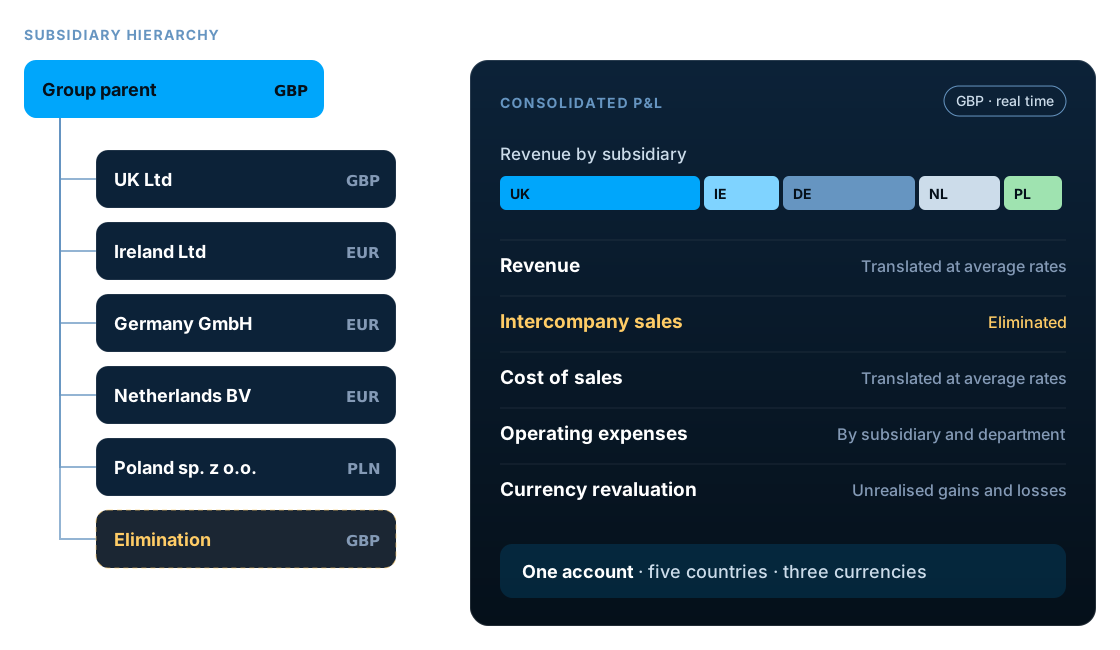
- OneWorld manages multiple subsidiaries in a parent-child hierarchy inside a single NetSuite account.
- Each subsidiary has its own base currency. Consolidated reports translate income statement accounts at average rates, balance sheet accounts at the period-end rate and equity at historical rates.
- Intercompany transactions can be paired between subsidiaries and eliminated on consolidation through an elimination subsidiary.
- Standard NetSuite, without OneWorld, is designed for a single legal entity, although it can still transact in several currencies.
- E-invoicing is already mandatory in Italy, Belgium and Poland, is phasing in across France and Germany, and arrives in the UK in April 2029.
What is NetSuite OneWorld?
NetSuite OneWorld is the edition of Oracle NetSuite built for groups with more than one legal entity. It runs every subsidiary, currency and tax registration in a single account, links intercompany transactions and produces consolidated financial statements in real time.
Instead of separate accounting systems in each country and a spreadsheet consolidation at month-end, group finance sees every entity in one place. Local teams still work in their own subsidiary, currency and, where needed, language.
That makes OneWorld a form of multi-entity accounting software, but with the rest of the ERP attached: inventory, order management, purchasing, CRM and e-commerce all run on the same subsidiary structure, so intercompany trading and group reporting come from the same transactions the business already records.
NetSuite OneWorld vs standard NetSuite
Standard NetSuite, sometimes called basic NetSuite, runs one legal entity. OneWorld adds the subsidiary layer on top of the same product.
| Area | Standard NetSuite | NetSuite OneWorld |
|---|---|---|
| Legal entities | One | Multiple subsidiaries in a hierarchy |
| Base currencies | One | One per subsidiary |
| Transaction currencies | Multiple, with the Multiple Currencies feature | Multiple |
| Intercompany transactions | Not applicable | Paired transactions and eliminations |
| Consolidated reporting | Not applicable | Real time, at any level of the hierarchy |
| Tax registrations | One company | Per subsidiary and country |
| Access control | By role | By role and subsidiary |
Do you need NetSuite OneWorld?
OneWorld is usually worth evaluating if any of these apply:
- You have, or plan, more than one legal entity
- Month-end consolidation happens in spreadsheets
- Intercompany balances do not agree and take days to reconcile
- Each country runs its own accounting system
- The board waits weeks for group results
- You are opening a new country and want it live quickly
A single company that simply trades in several currencies does not usually need OneWorld. Standard NetSuite supports multi-currency transactions within one legal entity.
How the OneWorld subsidiary hierarchy works
Subsidiaries sit in a parent-child hierarchy. Each one has its own base currency, address, tax registrations, fiscal calendar and accounting preferences. Results roll up from each subsidiary to any level above it, so a regional holding company can report its own consolidated view as well as the group.
Most groups also add an elimination subsidiary. It holds the entries that remove intercompany activity, so consolidated results show only trading with the outside world.
Core NetSuite OneWorld capabilities
Multi-currency and revaluation
Each subsidiary keeps its own base currency and transacts in others. Open balances in foreign currencies are revalued, with unrealised gains and losses posted automatically.
Consolidated exchange rates
Average, current and historical rates translate subsidiary results for consolidation, following the accounting treatment each account type needs.
Intercompany transactions
Intercompany sales and purchase orders, transfer orders and journal entries keep both sides of a transaction linked across subsidiaries.
Intercompany eliminations
An elimination subsidiary and automated elimination processes remove intercompany revenue, costs and balances from consolidated results.
Real-time consolidated reporting
Financial statements roll up through the hierarchy as transactions post, with drill-down from the group to the subsidiary and the transaction.
Shared records
Customers, vendors and items can be shared across subsidiaries, so a customer who buys from several group companies is one record.
Access by subsidiary
Roles can be restricted to specific subsidiaries, so local teams see their own entity while group finance sees everything.
Multi-book accounting
An optional add-on that keeps parallel books, for example local GAAP alongside IFRS or group GAAP, from the same transactions.
OneWorld sits on top of NetSuite's core financials; see our NetSuite financial management services for the wider finance set-up.
How NetSuite OneWorld consolidates a group
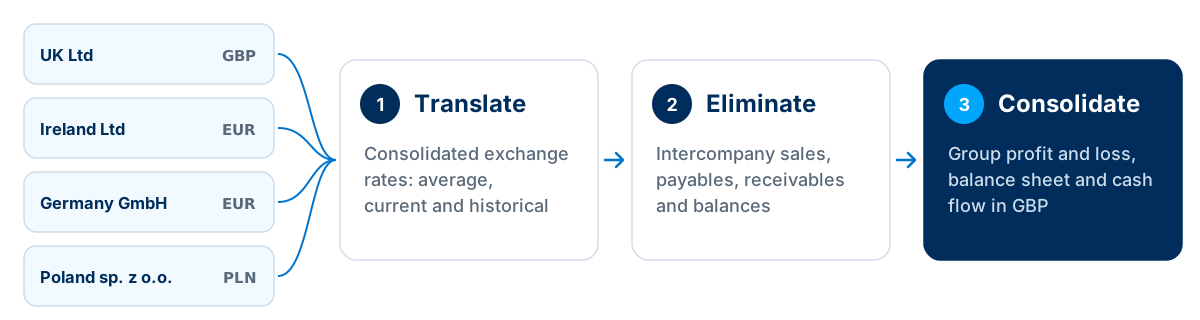
Because translation and elimination run inside NetSuite, consolidated reports are available as soon as transactions post. Month-end becomes a review of results rather than a rebuild of them.
Which exchange rate each account uses
NetSuite keeps a consolidated exchange rate table for every pair of parent and child subsidiaries with different base currencies, with three rate types per period. By default each account type uses one of them:
| Rate type | Used by default for | How it is calculated |
|---|---|---|
| Average | Income statement accounts | Weighted average of the exchange rates on the period's transactions |
| Current | Balance sheet accounts other than equity | The exchange rate in effect at the end of the period |
| Historical | Equity accounts and owners' investments | Weighted average for accounts set to the historical rate type |
Because the three rates differ, the consolidated balance sheet carries a cumulative translation adjustment (CTA): the cumulative foreign currency gain or loss on the group's net investment in each subsidiary. Oracle warns that changing rate types away from the defaults can cause discrepancies in consolidated reports, so agree the policy with your auditors before go-live.
European requirements to plan for
OneWorld gives every European subsidiary the same platform. What it cannot do is make every country's rules the same. Plan each of these layers for each country.
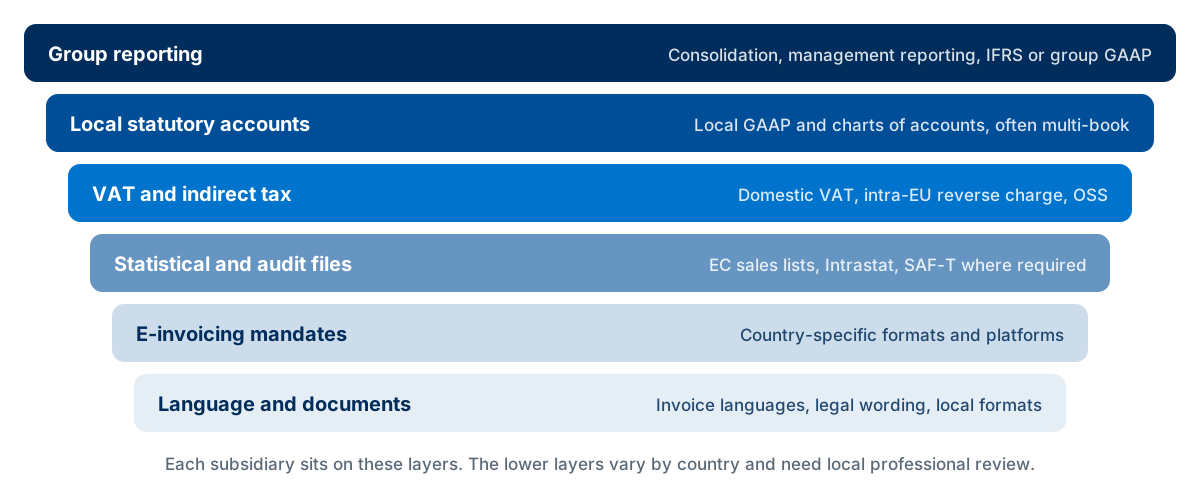
| Requirement | Why it matters | How it is typically handled |
|---|---|---|
| VAT and indirect tax | Domestic VAT, intra-EU reverse charge and One Stop Shop (OSS) rules for distance sales | Tax nexuses per subsidiary, tax codes and localisation SuiteApps |
| EC sales lists and Intrastat | Statistical and VAT reporting for intra-EU movements of goods | Localisation reports and accurate item and tax data |
| SAF-T | Standard audit files required by tax authorities in countries such as Poland, Portugal and Norway | Country-specific localisation, mapping and testing |
| E-invoicing mandates | Mandatory structured e-invoicing is live or arriving in several countries, on different timetables (see below) | Country-specific formats, often through an e-invoicing or Peppol provider integrated with NetSuite |
| Local statutory accounts | Local GAAP, charts of accounts and filing formats differ from group reporting | Account mapping, local reports or multi-book accounting |
| Languages and documents | Invoices and documents may need local languages and legal wording | Subsidiary-specific forms and translated templates |
| Banking | SEPA and local payment formats, plus bank statement imports | Electronic payment and bank integration per subsidiary |
E-invoicing timelines across Europe
E-invoicing is the requirement most likely to change during a OneWorld project. These are the main timetables as at November 2026:
| Country | E-invoicing requirement |
|---|---|
| Italy | Mandatory B2B e-invoicing through the SDI exchange system since January 2019 |
| Belgium | Mandatory B2B e-invoicing over Peppol from 1 January 2026 |
| Poland | KSeF mandatory for the largest taxpayers from February 2026 and most other businesses from April 2026, with the smallest following in 2027 |
| France | Phased from September 2026: every business must be able to receive e-invoices, and large and mid-sized companies must issue them. Smaller businesses issue from September 2027 |
| Germany | Every business must be able to receive e-invoices since January 2025. Issuing becomes mandatory in phases during 2027 and 2028 |
| United Kingdom | Structured, Peppol-based VAT e-invoicing for B2B and public-sector invoices from 1 April 2029, under HMRC's October 2026 roadmap |
| Cross-border EU | The EU's VAT in the Digital Age (ViDA) package brings e-invoicing and digital reporting for intra-EU B2B trade from July 2030 |
Country-specific rules change often. Treat these tables as a planning checklist, not tax advice. Confirm VAT, reporting and e-invoicing requirements for each country with local tax and accounting advisers, and check which localisation features Oracle currently supports.
UK groups with EU subsidiaries
Since Brexit, UK and EU subsidiaries follow separate VAT regimes, so trade between them needs its own tax treatment, customs data and documents. Northern Ireland is a further exception: for goods it still follows EU VAT rules, so a Northern Ireland entity or warehouse needs its own tax set-up.
The UK subsidiary also needs Making Tax Digital (MTD) VAT returns and, from April 2029, Peppol-based e-invoicing. A UK parent consolidating EU subsidiaries in GBP will typically report under UK GAAP or IFRS at group level while each EU entity files local accounts, which is where account mapping or multi-book accounting earns its keep.
If you are still choosing who will build it, see how to choose a NetSuite implementation partner in Europe.
Designing your NetSuite OneWorld structure
Getting the structure right at the start is far cheaper than restructuring later.
Map your legal entities
List every entity, its country, functional currency, tax registrations and ownership, including entities planned in the next few years.
Design the hierarchy
Reflect how you consolidate and report, including regional holding levels and an elimination subsidiary.
Agree a global chart of accounts
Use one group chart of accounts and map it to local statutory charts, rather than separate charts per country.
Set currency and rate policies
Decide rate sources, revaluation frequency, the rate type for each account and how consolidated exchange rates are maintained.
Define intercompany rules
Agree which transactions are intercompany, how they are priced, settled and netted, and who approves them.
Plan tax and localisation per country
Confirm VAT, reporting, SAF-T and e-invoicing needs for each country with local advisers before configuration.
Design roles and controls
Restrict access by subsidiary and role, and define approvals for intercompany and period close.
Test a full close
Run transactions, revaluation, eliminations and consolidated reports through a complete period in a sandbox.
Common NetSuite OneWorld mistakes
- Copying the legal structure blindly
- Design the hierarchy around how you report and consolidate, not only the shareholding chart.
- A chart of accounts per country
- Separate charts make consolidation and group reporting much harder. Map local needs to one global chart.
- Treating intercompany as an afterthought
- Unclear intercompany rules are the main cause of balances that never agree.
- Mixing rate types without a policy
- Changing an account's rate type away from the default without a reason causes balance sheet differences in consolidated reports.
- Assuming localisation is automatic
- Each country's tax, reporting and e-invoicing needs must be confirmed and tested, not assumed.
- Ignoring future entities
- A structure that only fits today's companies makes the next acquisition or new country harder.
- Skipping a full test close
- Revaluation and eliminations often reveal configuration gaps only at the first real month-end.
Upgrading to OneWorld or adding a new country
Upgrading an existing account
Existing NetSuite accounts can move to OneWorld. Review how current data, forms, saved searches, scripts and integrations will behave once subsidiaries exist, and test the change in a sandbox first.
Adding a new country
A well-designed OneWorld account makes a new subsidiary mostly a configuration task: currency, tax, localisation, bank, documents, roles and opening balances. Confirm licensing for the new country early.
Integrations need attention in both cases: each connected system must send the right subsidiary on every record. Our NetSuite integration guide covers how to plan and monitor them.
What does NetSuite OneWorld cost?
Oracle does not publish OneWorld prices. It forms part of your NetSuite subscription, and pricing can depend on factors such as the number of subsidiaries or countries. Ask for OneWorld and any country-related items to be listed separately in your quote, and budget for the design, localisation and testing work each country needs.
For the full budgeting picture, see NetSuite implementation cost in the UK.
Frequently asked questions
What is NetSuite OneWorld?
NetSuite OneWorld is the multi-subsidiary edition of Oracle NetSuite. It manages multiple legal entities, currencies and tax registrations in one account, with intercompany transactions, eliminations and real-time consolidated reporting.
What is the difference between NetSuite and NetSuite OneWorld?
Standard NetSuite, sometimes called basic NetSuite, is designed for a single legal entity. NetSuite OneWorld adds a subsidiary hierarchy, a base currency per subsidiary, intercompany transactions and eliminations, and consolidated reporting across the group.
Do I need NetSuite OneWorld for one company?
Usually not. A single legal entity can run on standard NetSuite, including multi-currency transactions. Consider OneWorld if you already have, or are planning, additional legal entities.
How do I know if my NetSuite account has OneWorld?
In a OneWorld account, transactions, customers and vendors carry a Subsidiary field, and administrators can see the subsidiary list at Setup > Company > Subsidiaries. A standard account has a single company record instead.
Does NetSuite OneWorld handle EU VAT?
OneWorld supports separate tax registrations and tax configuration per subsidiary and country, and localisation SuiteApps add country-specific reporting. Each country's VAT, OSS and reporting set-up should be confirmed with local tax advisers.
How does NetSuite OneWorld consolidate subsidiaries?
Subsidiary results roll up through the hierarchy. NetSuite translates them into the parent's currency using consolidated exchange rates, eliminates intercompany transactions and produces consolidated financial statements in real time.
Which exchange rates does NetSuite OneWorld use for consolidation?
By default, income statement accounts use the average rate, balance sheet accounts other than equity use the current (period-end) rate, and equity accounts use the historical rate. The difference between them appears as a cumulative translation adjustment (CTA) in consolidated balance sheets.
Can NetSuite OneWorld support local GAAP and IFRS?
Yes, through account mapping and local reports, or through the optional multi-book accounting add-on, which keeps parallel books such as local GAAP and IFRS from the same transactions.
Does NetSuite OneWorld support European e-invoicing?
E-invoicing formats and platforms differ by country, such as SDI in Italy, KSeF in Poland and Peppol in Belgium and the UK. They are usually handled through localisation SuiteApps or an e-invoicing provider integrated with each subsidiary. Confirm current support for each country before go-live.
Can I upgrade an existing NetSuite account to OneWorld?
Yes. Existing NetSuite accounts can be moved to OneWorld. Plan the change carefully, including subsidiary set-up, existing data, configuration, scripts and integrations, and test it in a sandbox first.
How much does NetSuite OneWorld cost?
Oracle does not publish OneWorld prices. It is licensed as part of your NetSuite subscription, and pricing can depend on factors such as the number of subsidiaries or countries. Ask for these to be listed separately in your quote.
Is NetSuite OneWorld multi-entity accounting software?
Yes. OneWorld is NetSuite's multi-entity edition: it combines multi-company accounting, intercompany management and consolidation with the rest of the ERP, including inventory, order management and CRM, in one account.
Discuss your multi-entity NetSuite setup
LST Consultancy helps groups design OneWorld subsidiary structures, intercompany processes and consolidation, and connect each subsidiary's banks, tax and local systems. We work alongside your local tax advisers on country-specific requirements.
Sources
Related reading
How to Choose the Right NetSuite Implementation Partner in Europe & the UK
NetSuite Implementation Cost in the UK: What Businesses Should Budget For
NetSuite Integration Guide: Connecting Your ERP with E-commerce, CRM and Business Systems
How NetSuite Helps Manufacturing Businesses Improve Planning and Financial Visibility