
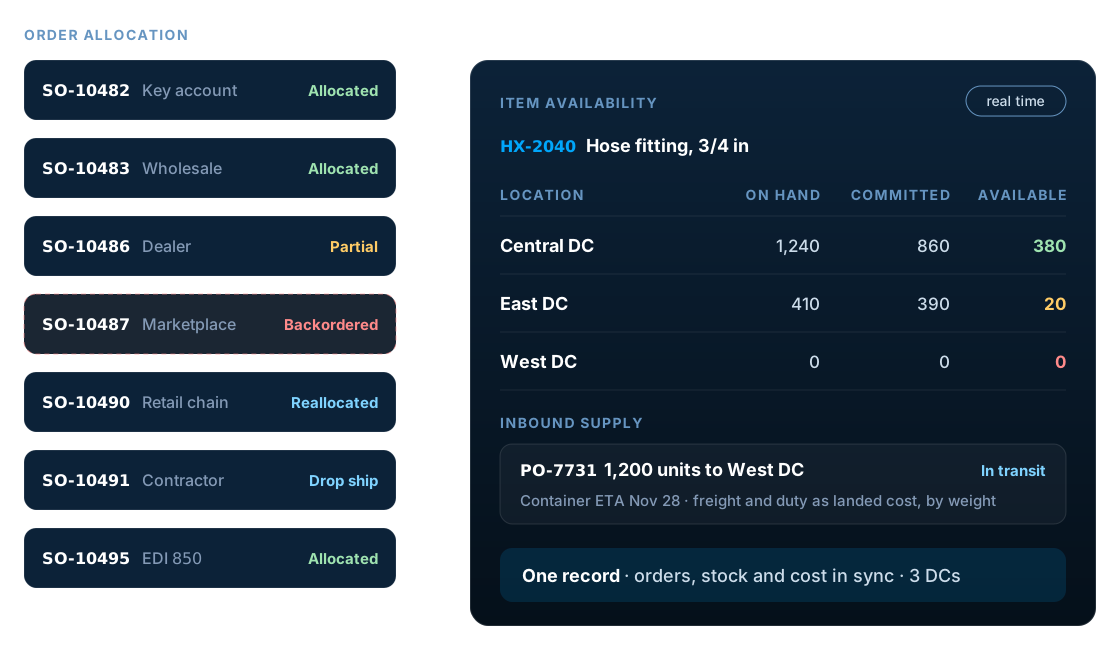
Quick answer
NetSuite for distribution suits wholesale distributors that hold stock in several locations, sell through more than one channel and want orders, inventory, purchasing and finance in one cloud ERP. Before you commit, test five areas against your own data: customer pricing, multi-warehouse inventory and allocation, warehouse execution, imports with landed cost, and EDI. Then confirm which features are standard, licensed extras or partner add-ons.
Key facts
- Customers can be assigned a price level, items can carry quantity pricing schedules, and customer-specific item prices override both (Oracle Item Pricing).
- Demand Planning requires Advanced Inventory Management and builds monthly, weekly or daily item demand plans using moving average, linear regression, seasonal average or sales forecast methods.
- Supply allocation can calculate in real time as orders are entered, on demand, on a schedule or through manual reallocation.
- Drop ship items go from vendor to customer and never enter inventory; special order items are received into stock first.
- Landed cost adds freight, duty and similar charges to item cost, allocated across receipt lines by weight, quantity or value.
What does NetSuite for distribution mean?
NetSuite for distribution means running a wholesale or distribution business on Oracle NetSuite: one cloud ERP for sales orders, customer pricing, inventory across warehouses, purchasing, fulfillment and accounting. Whatever industry packaging it is sold under, it is the same NetSuite platform configured with its order, inventory and supply chain features, plus WMS and partner SuiteApps where the operation needs them.
Distributors make their margin in the gaps between buying and selling: the price agreed with each customer, the true landed cost of each item, the stock held in each warehouse and the speed of each shipment. A distribution ERP has to keep all four in step. NetSuite does that by putting every transaction on one database, so a sales order, a purchase order, an item receipt and the general ledger update the same records as they happen.
The question for most distributors is not whether NetSuite can run distribution. It can. The question is whether its standard features cover your particular mix of pricing rules, warehouse processes and trading-partner requirements, and how much you will need to add on top.
Is NetSuite for distribution right for your business?
NetSuite usually fits a distributor where several of these apply:
- You hold stock in two or more warehouses or 3PLs
- Orders arrive from reps, EDI, a B2B portal or marketplaces
- Spreadsheets bridge your ERP, warehouse and accounting
- You import goods and need freight and duty in item cost
- You run, or plan, more than one legal entity
- You want a cloud ERP with no servers to maintain
It is a weaker fit when the business depends on specialized processes that NetSuite only reaches through add-ons or customization, such as catch weight food distribution, large rebate and chargeback programs, or route-based delivery with invoicing from the truck. Those can work well, but usually through a SuiteApp or partner product, so evaluate that product as carefully as NetSuite itself.
A very small distributor with one location, a handful of users and simple price lists may find NetSuite more system than it needs today. Compare the total cost over five years with your growth plans, not just the first-year subscription against your current accounting package.
Key NetSuite distribution capabilities to evaluate
These are the capabilities that decide whether NetSuite fits a distributor. Ask to see each one working with your own items, customers and locations, not the vendor's demo data.
Customer and quantity pricing
Price levels per customer, quantity breaks per item and customer-specific item prices for contract accounts, all held in the item's pricing matrix.
Multi-location inventory
Stock by warehouse, store or 3PL location, with transfer orders to move inventory between them and availability visible on every sales order.
Demand planning
Item demand plans by month, week or day from sales history or a sales forecast, driving replenishment suggestions. Requires Advanced Inventory Management.
Supply allocation
Allocation strategies commit on-hand stock and incoming purchase orders to sales orders, with alerts and reallocation when supply arrives late.
Drop ship and special orders
Approving the sales order lets NetSuite create the purchase order, shipping vendor-direct or receiving the goods into your warehouse first.
Landed cost
Freight, duty and other charges allocated to items by weight, quantity or value, so inventory cost and margin reflect what goods really cost.
Inbound shipments
Track vendor shipments from dispatch to receipt, account for in-transit inventory and apply landed cost to a whole shipment at once.
Lot and serial tracking
Lot numbers with expiration dates and near-expiry warnings, and serial numbers for one-to-one traceability and recalls.
Warehouse execution sits on top of these features. See our NetSuite inventory management services and the NetSuite WMS guide for scanning, bins and wave picking.
How a distribution order flows through NetSuite
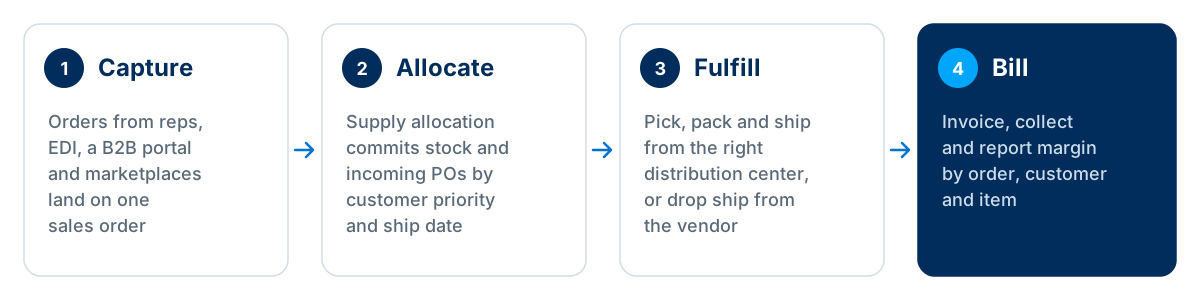
Because every step works on the same sales order, a customer service rep can see allocation, picking status, tracking and the invoice without switching systems, and finance sees revenue and margin as soon as the order ships.
Supply allocation is the step distributors most often under-test. According to Oracle's help, NetSuite can calculate allocations in real time as orders are entered, on demand from the allocation page, on a schedule, or manually through reallocation. Decide which mode fits your order volumes, and how often customers change ship dates, before it is configured.
Drop ship and special orders
Drop ship items never enter your inventory: the vendor ships straight to the customer, so stock counts and inventory asset accounts are unaffected. Special order items are bought for a specific order but received into your warehouse first. In both cases, approving the sales order lets NetSuite create the matching purchase order, and each item needs a preferred vendor and purchase price.
For the order desk itself, including holds, approvals and fulfillment rules, see our NetSuite order management services.
How NetSuite manages inventory across warehouses
With Multi-Location Inventory, every item carries quantities per location: on hand, committed, available, on order and in transit. Transfer orders move stock between distribution centers over time, with the fulfillment and the receipt recorded at each end, so stock in transit never drops off the books.
Demand planning and replenishment
Demand Planning builds item demand plans by month, week or day. Oracle lists four projection methods: moving average, linear regression, seasonal average and sales forecast. The plan then drives replenishment suggestions for purchasing. It requires the Advanced Inventory Management feature, so confirm that it is part of your edition.
It is statistical forecasting, not an advanced planning and scheduling system. In implementations we've run, it works well for steady, repeat-buy SKUs and needs manual overrides for promotional, seasonal-launch or project-driven demand.
Lot, serial and expiry tracking
Lot numbered items can carry an expiration date on each lot, NetSuite can warn users who sell a lot close to its expiry, and an item can be set so that every lot must have an expiry date. Serial numbers give one-to-one traceability for higher-value goods. Both matter for recalls in food, healthcare and industrial supplies.
How does NetSuite handle wholesale pricing?
Wholesale pricing in NetSuite starts with price levels. You set a price for each level on the item, then assign a level to each customer. Quantity pricing schedules add breaks by order quantity, and the item's pricing matrix holds every level and break together.
Customer-specific item prices sit on top. Oracle's documentation states that they override both the customer's general price level and any pricing group levels, which covers contract pricing for key accounts without a separate price list for each.
Test your hardest pricing rules first. Promotions, rebates, chargebacks, cost-plus contracts and price changes with an effective date are where distributors most often need scripting or a pricing SuiteApp. Bring real examples to the demo and ask to see them priced on a sales order.
Purchasing, landed cost and inbound shipments
Distributors that import need the full cost of getting goods into the warehouse, not just the supplier's price. NetSuite's landed cost feature adds freight, duty and similar charges to item cost. You enable it, mark the items that track landed cost, set up landed cost items and enter the charges on the transaction, allocating them by weight, quantity or value.
Inbound Shipment Management tracks goods from the vendor to your receiving location. It accounts for in-transit inventory, can transfer ownership once a shipment is marked In-Transit, and applies landed cost across a whole shipment rather than one purchase order at a time. With NetSuite WMS, the shipment can be received on a mobile device.
Purchasing approvals, vendor management and requisitions are covered in our NetSuite procurement services.
What NetSuite for distribution does natively, and what needs an add-on
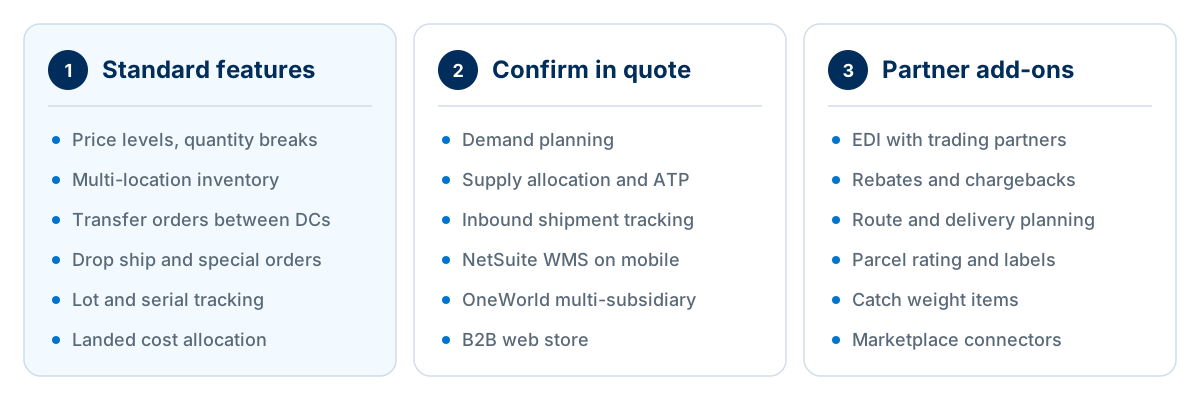
Use this split as a planning guide, not a licensing statement. Editions and bundles change, so confirm every line in your quote.
| Distribution need | How NetSuite handles it | What to verify |
|---|---|---|
| Contract and quantity pricing | Price levels, quantity pricing schedules and customer item prices | Promotions, rebates and effective-dated price changes |
| Multi-warehouse stock | Multi-Location Inventory and transfer orders | 3PL stock feeds and in-transit visibility |
| Order allocation | Supply allocation strategies, alerts and reallocation | Whether it is in your edition, and reallocation volumes |
| Forecasting | Demand Planning, with Advanced Inventory Management | Seasonal, promotional and new SKUs |
| Warehouse execution | NetSuite WMS or a partner WMS | Handhelds, bins, waves and packing rules |
| Imports | Landed cost and Inbound Shipment Management | Duty rules and the allocation method per item |
| EDI | An EDI partner or SuiteApp integrated with NetSuite | Each trading partner's documents and compliance rules |
| Traceability | Lot and serial numbered items | Expiry, first-expiry-first-out picking and recall reports |
EDI is the most common add-on for distributors that sell to large retailers. Our NetSuite EDI integration guide explains how documents flow, and our NetSuite integration services cover carriers, ecommerce and 3PL connections.
How to evaluate NetSuite for distribution: a step-by-step checklist
A scripted demo built around your own scenarios tells you far more than a standard product tour.
Map your order channels
List every way orders arrive, with volumes: reps, EDI, portal, marketplaces and phone. Make the demo cover the channels that carry most of your revenue.
Write down your pricing rules
Collect real price lists, contract prices, quantity breaks and promotions, and ask to see your three hardest examples priced on a live sales order.
Model your locations
List warehouses, 3PLs, showrooms and stock in transit, and agree how each one becomes a NetSuite location, or a bin inside one.
Script a short-supply scenario
Three customers want the same item and the next purchase order is late. Watch how allocation, alerts and reallocation decide who ships.
Walk the warehouse
Run receiving, put-away, picking and packing on a handheld, using your own bin layout, units of measure and carton rules.
Cost an import
Receive a container with freight and duty, then check the landed cost, the updated item cost and the margin on the next sale.
List integrations and add-ons
EDI, carriers, ecommerce, tax and any SuiteApps, each with an owner, a cost, a support model and a test plan.
Price five years, not one
Compare subscription, add-ons, implementation and support over five years against the cost of your current systems and manual work.
Score each step as works as standard, works with configuration, needs an add-on, or needs custom development. The pattern of those scores tells you more about fit, cost and risk than any feature checklist.
What we check first in distribution implementations
In implementations we've run for distributors, problems rarely come from missing features. They come from data and design decisions made too early or too late. These are the ones we look at first.
- Dirty item data
- Duplicate SKUs, inconsistent units of measure and missing weights break pricing, landed cost and shipping. Clean the item master before migration, not after.
- Allocation left on defaults
- Without an agreed allocation strategy, whoever orders first gets the stock and key accounts wait. Set priorities with sales before go-live.
- A location for everything
- Creating a location for every aisle, van or cage makes transfers and reporting heavy. Use bins inside a location where you can.
- Pricing rebuilt in code
- Scripting every legacy pricing exception adds maintenance for years. Simplify the rules first, then automate what is left.
- EDI started late
- Trading-partner testing takes time and retailers set their own deadlines. Start EDI alongside configuration, not after it.
- No cycle count plan
- Allocation is only as good as the stock figure behind it. Plan regular cycle counts from the first month.
The trade-off to settle early is how much to change your processes to fit standard NetSuite and how much to extend NetSuite to fit your processes. Standard features move forward with each NetSuite release; every script and custom record is something you retest at each one.
Running more than one legal entity as well? Read how NetSuite OneWorld handles subsidiaries and intercompany trading.
What does NetSuite for distribution cost?
Oracle does not publish NetSuite list prices. A distribution subscription usually combines the base platform, user licenses and the modules a distributor needs, such as advanced inventory, WMS or OneWorld, plus any partner SuiteApps for EDI or shipping. Implementation is a separate cost, driven mostly by the number of locations, integrations and the state of your data.
For licensing, see our guide to NetSuite ERP pricing, and for a first estimate of project cost, try the NetSuite implementation cost calculator.
Frequently asked questions
Is NetSuite good for wholesale distribution?
Yes, for most wholesale distributors with several locations, multiple sales channels and growth plans. NetSuite covers order management, customer pricing, multi-location inventory, purchasing, landed cost and accounting in one cloud system. Fit depends on how specialized your processes are, so test your pricing, allocation and warehouse scenarios in a scripted demo before you commit.
Can NetSuite manage multiple warehouses?
Yes. With Multi-Location Inventory, each item holds quantities per location, and transfer orders move stock between warehouses with fulfillment and receipt recorded at each end. Sales orders show availability by location, and supply allocation can commit stock from the right site. 3PL warehouses are usually set up as locations fed by an integration.
Does NetSuite support EDI for distributors?
NetSuite exchanges EDI documents such as purchase orders, advance ship notices and invoices through an EDI provider or SuiteApp integrated with the account. The provider handles translation and trading-partner connections, and NetSuite holds the resulting sales orders, fulfillments and invoices. Budget for testing each trading partner, because retailers have their own document rules.
Does NetSuite include a warehouse management system?
Oracle offers NetSuite WMS, which adds mobile receiving, put-away, picking, packing and cycle counting on handheld devices inside NetSuite. Whether it is included depends on your edition and quote. Distributors with very high volumes or automation sometimes use a partner WMS instead, integrated with NetSuite for orders and stock.
How does NetSuite handle backorders?
When stock is short, the sales order line keeps a backordered quantity, and supply allocation can commit incoming purchase orders to it. Order allocation alerts flag orders whose supply will arrive late, and planners can reallocate stock between orders. Customer service sees the expected ship date on the order rather than guessing.
Can NetSuite set different prices for each customer?
Yes. You assign a price level to each customer, add quantity pricing schedules for volume breaks, and set customer-specific prices for individual items. Oracle documents that customer item prices override both the customer's price level and any pricing group levels. Complex promotions or rebates may still need a SuiteApp or scripting.
Does NetSuite support drop shipping?
Yes. Drop ship items are shipped by the vendor straight to the customer and never enter your inventory. When the sales order is approved, NetSuite can create the matching purchase order. Each drop ship item needs a preferred vendor and purchase price. Special order items work the same way but are received into your warehouse first.
Can NetSuite track lot numbers and expiry dates?
Yes. Lot numbered items record each lot with an optional expiration date, and an item can be set so every lot must have one. NetSuite can warn users who sell a lot close to its expiry date. Serial numbered items give one-to-one traceability, which matters for recalls and warranty claims.
Is NetSuite suitable for food distribution?
It can be. Lot tracking, expiry dates, multi-location inventory and landed cost cover much of food distribution. Catch weight items, route-based delivery and some rebate programs usually need a SuiteApp or partner product, so evaluate those add-ons as carefully as NetSuite itself and include them in the demo script.
How long does a NetSuite implementation take for a distributor?
It is usually measured in months rather than weeks. Timelines depend most on the number of locations, the complexity of pricing, whether WMS and EDI go live at the same time, and the quality of item and customer data. Phasing WMS or EDI after the core go-live often shortens the first phase.
Test NetSuite against your distribution processes
LST Consultancy's NetSuite consultants help distributors script demos around their own pricing, allocation and warehouse scenarios, then implement NetSuite and connect WMS, EDI, carriers and ecommerce. Bring your hardest order and we'll show you how it runs.
Sources
- Oracle NetSuite Help: Item Pricing
- Oracle NetSuite Help: Demand Planning
- Oracle NetSuite Help: Supply Allocation Calculations
- Oracle NetSuite Help: Drop Shipment and Special Order Purchases
- Oracle NetSuite Help: Landed Cost Overview
- Oracle NetSuite Help: Using Inbound Shipment Management
- Oracle NetSuite Help: Lot Numbered Items
Related reading
NetSuite WMS Explained: Features, Benefits and Implementation Considerations
NetSuite EDI Integration: A Complete Guide for Businesses Looking to Automate B2B Transactions
NetSuite OneWorld for European Businesses: Multi-Subsidiary Management Explained
How NetSuite Helps Manufacturing Businesses Improve Planning and Financial Visibility