
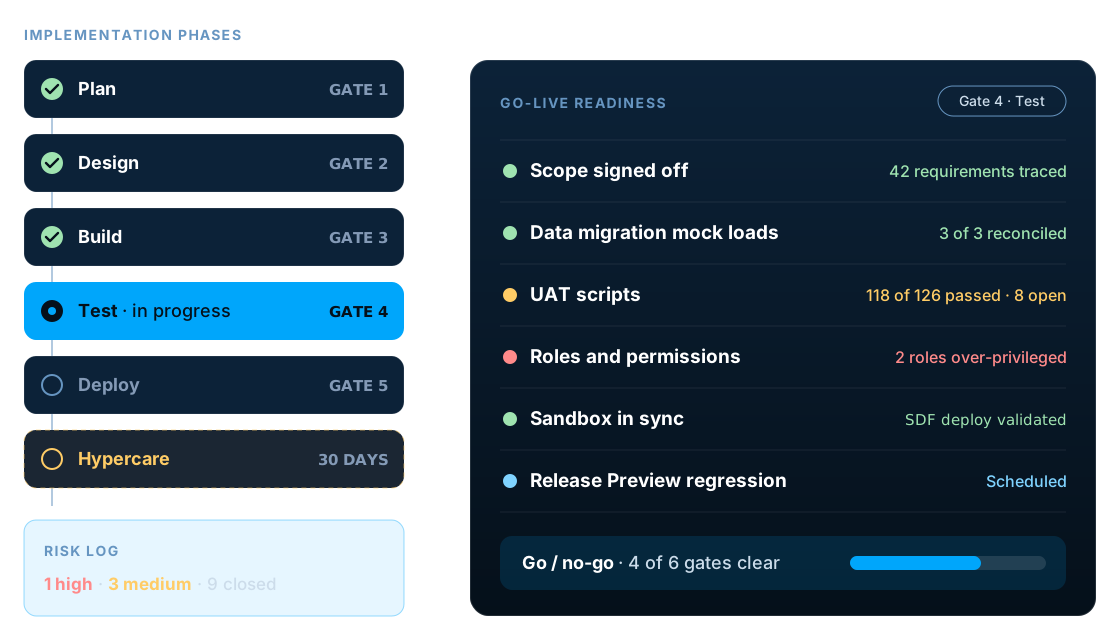
Quick answer
NetSuite implementation best practices come down to a few disciplines: set measurable goals and a named owner before configuration, adopt standard NetSuite processes before customizing, migrate and reconcile data in rehearsal loads, build in a sandbox and deploy through SDF, design least-privilege roles, test end to end on migrated data, and go live only against agreed go/no-go criteria.
Key facts
- A sandbox refresh copies production configuration, data and customizations into the sandbox and overwrites anything changed there, so unsaved sandbox work is lost (Oracle NetSuite Help).
- Some items are not copied to a refreshed sandbox, including token-based authentication tokens, SAML configuration and OAuth 2.0 authorized applications, so integrations need reconnecting after each refresh.
- NetSuite has two major releases a year, and Oracle provides a Release Preview account before each one so you can regression-test your customizations on the new version.
- Deploying an SDF account customization project replaces the matching custom objects in the target account, so changes belong in the project, not directly in production.
- The CSV Import Assistant accepts up to 25,000 records or 50 MB per import job (as of November 2026), so large migrations must be split and sequenced.
- Oracle advises giving the standard Administrator role only to people who need full access, with at least two administrators so one is always available.
What are NetSuite implementation best practices?
NetSuite implementation best practices are the habits that keep a NetSuite project on scope, on budget and usable after go-live: clear goals and ownership, standard processes before customization, disciplined data migration, controlled environments, least-privilege roles, realistic testing and a planned cutover.
None of them are secrets, and most project plans mention all of them. The difference between projects that go well and projects that need rescuing is whether each practice is checked before the project moves to its next phase, or quietly deferred because the timeline is tight.
This guide is organized around those checks. For each phase it names the mistake we see most often, why it happens and the evidence you should ask for before you agree to move on. If you want the phase-by-phase walkthrough itself, start with our overview of the five phases of a NetSuite implementation and come back here for the controls.
The phases are covered in 5 critical phases of a successful NetSuite ERP implementation, and our NetSuite implementation services page explains how we run them.
Why do projects skip NetSuite implementation best practices?
Mostly because each shortcut looks sensible on the day it is taken. A fixed go-live date, a fixed fee and a busy finance team all push in the same direction: defer the hard decision, configure something now and fix it in testing.
The cost of that deferral is not visible until later. A process decision skipped in design becomes a script in build, a defect in testing and a support ticket after go-live. The diagram below shows where each common mistake starts and the gate check that stops it.
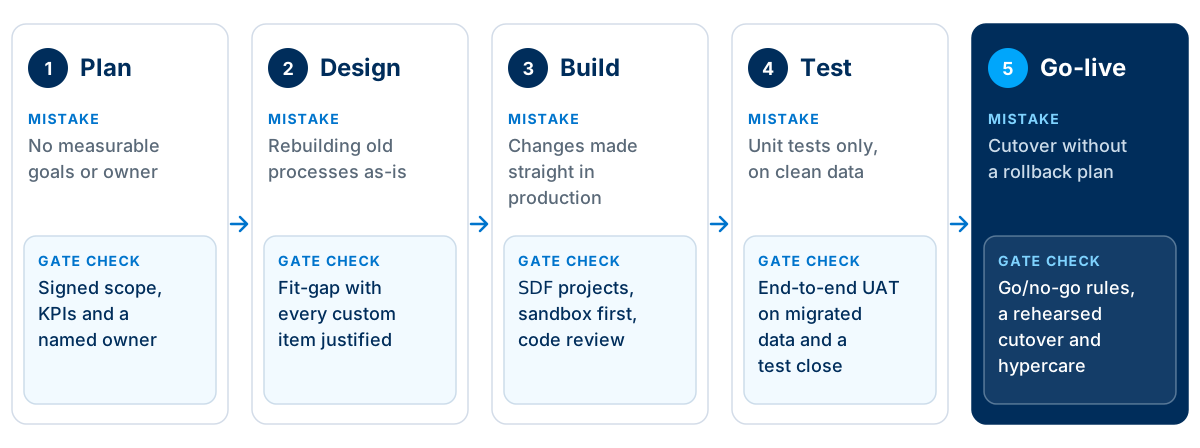
| Phase | Where it goes wrong | Check before moving on |
|---|---|---|
| Plan | Goals are vague, the business owner is part-time and scope is a list of modules rather than outcomes | Signed scope with measurable outcomes, a named owner and a realistic budget for internal time |
| Design | Workshops document how things work today and the design copies it, including the workarounds | A fit-gap analysis where every gap has a decision: change the process, configure, workflow or script |
| Build | Changes are made directly in production, scripts are untracked and nobody can say what changed when | Customizations live in SDF projects, are built in a sandbox and are reviewed before deployment |
| Test | Consultants test their own configuration on tidy sample records | End-to-end UAT by business users on migrated data, plus a full test month-end close |
| Go-live | Cutover is planned in the final week, with no rollback point and no support rota | Written go/no-go criteria, a rehearsed cutover and a staffed hypercare period |
Treat the right-hand column as the minimum evidence for each gate. If a partner cannot show it, the phase is not finished, whatever the plan says.
What are the most common NetSuite implementation mistakes?
These twelve come up again and again, in new implementations and in projects we are asked to review. Most are organisational rather than technical, which is why they are easy to underestimate.
- Starting without measurable goals
- If success means going live, every scope argument is won by whoever pushes hardest. Agree three to five measurable outcomes, such as days to close or order-to-cash time, and judge each design decision against them.
- Treating it as an IT project
- Finance, operations and sales own the processes NetSuite will run. Without their people on the project for real hours each week, consultants end up guessing at how the business works.
- Rebuilding legacy processes as they are
- Old systems leave behind workarounds that only made sense in that system. Copying them into NetSuite carries the cost of the workaround forward and loses what the standard process would have given you.
- Customizing before using the standard
- Every script and workflow has to be designed, tested, documented and retested at each release. Early customization also hides whether the standard process would have worked.
- Underestimating data migration
- Data is usually the longest task on the critical path. Cleansing, mapping, rehearsal loads and reconciliation need owners and dates from the first month, not the last.
- Building directly in production
- Changes made straight in production are hard to test, hard to reverse and easy to overwrite. Build in a sandbox, keep customizations in SDF projects and deploy them on purpose.
- Forgetting what a sandbox refresh does
- A refresh overwrites the sandbox with production and drops items such as integration tokens and SAML settings. Teams that refresh mid-build without preparing for it lose work and break integrations.
- Giving everyone Administrator
- It is the quickest way to stop permission errors in testing, and it means you have never tested the real roles. Users then hit permission errors on day one.
- Testing only the happy path
- Returns, partial shipments, credit holds, foreign currency and period-end are where configuration gaps hide. Test them with real users on migrated data.
- Leaving integrations to the end
- E-commerce, banking, payroll and CRM connections change how records are created. Design them with the core process, or late surprises force rework of fields and forms.
- Cutting training to save budget
- Users who learn NetSuite on go-live day fall back to spreadsheets. Role-based training on your own processes, in a sandbox with your own data, costs far less than weeks of poor adoption.
- No plan for hypercare and upgrades
- The first month-end and the first NetSuite release after go-live both test the build. Plan support, owners and regression testing before you switch over.
The sections below take the most expensive of these in turn and set out what good looks like.
How do you set scope and goals before configuration starts?
Write down what the business needs to be different after go-live, measure where it is today, and give one senior person the authority to say yes or no to scope changes. Configuration should not start until that exists.
A scope that lists modules, such as financials, inventory and CRM, tells the team what to switch on but not what problem to solve. A scope built from outcomes, such as closing the books in five working days instead of twelve, gives every later design decision a test it can be measured against.
Before the design phase starts, make sure you have:
- Three to five business outcomes, each with a baseline and a target
- A business owner who can make decisions, not only attend meetings
- Named process leads from finance, operations and sales
- A list of what is out of scope for phase one, in writing
- Integrations and reports needed on day one, with owners
- A budget for internal time as well as consulting fees
The last item is the one most often missed. Consulting fees appear in the budget; the weeks your finance and operations people spend in workshops, cleansing data and testing usually do not, and that is where timelines slip.
If the scope is still forming, a short NetSuite consultation before you sign an implementation contract is cheaper than discovering gaps mid-build.
When should you customize NetSuite instead of changing the process?
Customize only when the standard process cannot meet a requirement that genuinely sets your business apart, and only after configuration and workflow options have been ruled out. Everything else should adopt the standard.
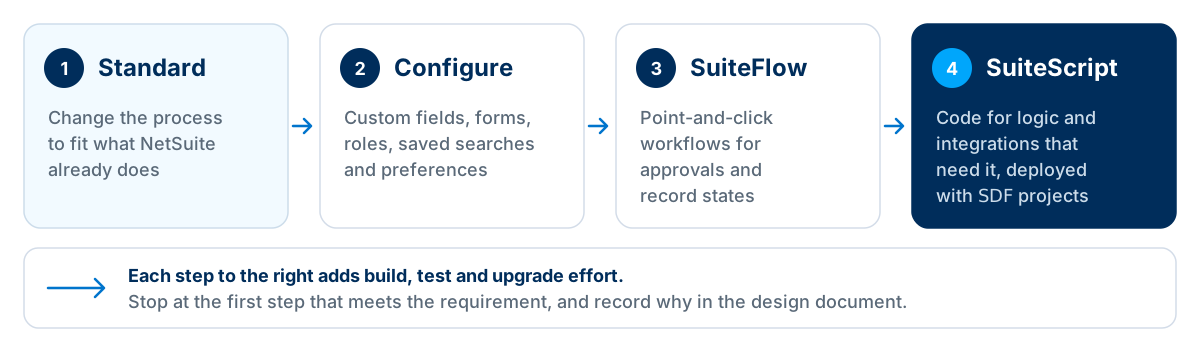
NetSuite's standard processes reflect how thousands of companies run order-to-cash, procure-to-pay and record-to-report. When a requirement does not fit, the first question is whether the requirement is really about how your business competes or only about how the old system worked.
Configuration, such as custom fields, forms, saved searches and role settings, is cheap to build and survives upgrades well. SuiteFlow workflows suit approvals and record states without code. SuiteScript is the right tool for complex logic and integrations, but each script adds design, testing, documentation and regression effort at every release for as long as you run NetSuite.
The control that makes this stick is simple: every customization in the fit-gap analysis needs a written reason and an owner who agreed to it. Reviews then become quick, because anything without a reason is a candidate to remove.
For the detailed trade-offs, see when to customize NetSuite with SuiteScript and when to use standard features.
How should you plan NetSuite data migration?
Start data work in the first month, load in a fixed order, rehearse the full load at least twice in a sandbox, and reconcile every rehearsal to signed-off reports from the legacy system.
Data is where implementation timelines most often slip, because cleansing depends on business people and reconciliation exposes problems nobody knew about. The load order matters too: transactions cannot load until the lists, entities and items they reference exist and are correct.
| Load | Typical records | Check before the next load |
|---|---|---|
| Setup and lists | Subsidiaries, chart of accounts, currencies, tax codes, departments, classes, locations | Signed off by finance before any transaction loads |
| Entities | Customers, vendors, employees, contacts | Duplicates merged, addresses and terms validated |
| Items | Inventory, non-inventory, service and assembly items, price levels | Units, costing method and accounts agreed per item type |
| Open transactions | Open sales and purchase orders, open invoices and bills | Totals match the legacy aged reports |
| Balances and history | Opening trial balance, inventory quantities and values, summarized history | Trial balance and stock valuation reconcile to the penny |
Plan file sizes as well as order. As of November 2026, Oracle's help states that the CSV Import Assistant accepts up to 25,000 records or 50 MB per import job, and some record types have lower limits, so large customer, item or transaction files have to be split, sequenced and tracked.
Our NetSuite data migration checklist covers cleansing and mapping in detail, and our NetSuite data migration services handle the extraction, loads and reconciliation.
How should you use sandbox and Release Preview accounts?
Build and test in a sandbox, keep every customization in an SDF project under source control, deploy to production on purpose, and use the Release Preview account to regression-test before each NetSuite upgrade.
Sandbox account
A copy of production for building and testing. A refresh replaces it with a fresh copy of production, so save in-progress customizations to an SDF project or bundle before you activate the refreshed sandbox.
Release Preview account
Offered before each of NetSuite's two major releases a year. It holds a snapshot of production on the new version, so you can rerun your key processes and scripts before the upgrade reaches you.
SDF projects
File-based definitions of your custom records, fields, forms, workflows and scripts, kept in source control. Deploying a project replaces the matching objects in the target account, so it is the single source of truth.
Production
Only receives changes that have been built in a sandbox, tested and approved. Ad hoc changes here are the main reason sandboxes and production drift apart.
A sandbox refresh is destructive. Oracle's help explains that a refresh copies production into the sandbox and overwrites what was there, and that customizations made after you request the refresh are lost on activation unless you preserve them first. Token-based authentication tokens, SAML configuration and OAuth 2.0 authorized applications are not copied, so integrations stop working until they are reconnected. Avoid requesting a refresh close to a scheduled upgrade, because a refresh that has not finished when the upgrade starts fails.
In practice this means agreeing a refresh calendar at the start of the project, tied to milestones such as the start of UAT and the final cutover rehearsal, and telling everyone who builds or integrates when it will happen.
SDF matters for the same reason. Oracle documents that deploying an account customization project replaces the matching custom objects in the target account. That is exactly what you want when the project is the source of truth, and exactly what causes lost work when someone has changed the same object directly in production.
How should you design NetSuite roles and permissions?
Design roles around jobs, keep the Administrator role for the few people who need it, give integrations their own limited roles, and run user acceptance testing in the real roles.
Design roles from jobs
Start from the tasks each job performs, such as AP clerk, warehouse picker or sales manager, and customize a standard role for each rather than granting permissions one user at a time.
Keep Administrator rare
Give the standard Administrator role only to the people who need full access, with at least two for cover. Use a custom role with Core Administration Permissions for narrower admin work.
Separate integration roles
Each integration gets its own user or role with only the permissions it needs, so a compromised token or a faulty script has a limited reach and an audit trail you can follow.
Test as the real role
Run UAT logged in with the production roles, not as an administrator. Permission errors found in testing cost minutes; found on go-live day they stop orders and payments.
Roles are also where segregation of duties is enforced. If one role can create a vendor, enter a bill and approve the payment, auditors will ask about it. It is far easier to design that separation from the start than to unpick it after users have learned to rely on broad access.
Our NetSuite administration services include role design and periodic access reviews after go-live.
How do you test a NetSuite implementation properly?
Test in layers: the implementation team proves the configuration works, business users prove they can run their processes end to end on migrated data, and finance proves a full month-end close.
| Test | What it proves | Who runs it |
|---|---|---|
| Unit and configuration | Each field, form, workflow and script does what the design says | Implementation team |
| System and integration | Records flow correctly between NetSuite and connected systems, including errors and retries | Implementation team with system owners |
| User acceptance (UAT) | Real users can run their day-to-day processes end to end, in their own roles | Business process leads and users |
| Data reconciliation | Migrated balances, open items and stock agree with the legacy system | Finance and operations |
| Test close | A full month-end, including revaluation, accruals and reporting, works | Finance team |
| Regression | Nothing that worked before broke after a change or a NetSuite release | Implementation or support team |
UAT scripts should come from the processes in scope, not from the configuration that was built. A script that says "create a sales order" tests a screen; a script that says "take a phone order for a customer on credit hold, ship part of it from the second warehouse and invoice in euros" tests the business.
Keep the scripts after go-live. They become the regression pack you rerun in the Release Preview account before each NetSuite upgrade and after every significant change.
What should a NetSuite go-live checklist include?
A go-live checklist should cover the decision, the freeze, a rehearsed cutover, the legacy cut-off, final data, integrations, access and hypercare. These are the eight steps we plan for on every project.
Agree go/no-go criteria
Write down what must be true to go live, such as UAT pass rate, open defects by severity and reconciled mock loads, and who makes the call.
Freeze configuration
Stop non-critical changes two to three weeks before cutover so testing reflects what will go live.
Rehearse the cutover
Run the full cutover plan at least once in a sandbox, timing each step and noting every manual fix.
Plan the legacy cut-off
Set the last transaction date in the old system, who stops entering what, and how in-flight orders are handled.
Load and reconcile final data
Load closing balances, open transactions and stock, then reconcile to signed-off legacy reports before users log in.
Switch on integrations in order
Enable each integration deliberately, check the first records it creates and keep a way to pause it.
Confirm roles and access
Check that every user can log in with the right role, and that temporary administrator access has been removed.
Staff hypercare
Name who answers questions, who triages defects and who can approve fixes for at least the first month-end.
The go/no-go decision is the step most often treated as a formality. Agree the criteria weeks in advance, while nobody is under pressure, and give the business owner, not the implementation partner, the final say.
After hypercare, ongoing support takes over; see what to do after a NetSuite go-live for the options.
What we check first on a struggling NetSuite project
In implementations we have run and projects we have been asked to review, the warning signs show up in the same few places. When a project is late or users are unhappy, these are the questions we ask in the first week.
- 1.Is there a signed scope, and does the current build match it?
- 2.How many scripts and workflows exist, and does each have a documented reason?
- 3.Do sandbox and production match, and where does the source of truth for customizations live?
- 4.Has a full mock data load been reconciled, or only sample records?
- 5.Have business users tested in their own roles, or has testing been done as an administrator?
The trade-offs are real. Cutting customization can mean users change how they work, which needs management support. Running a second mock load can move the go-live date by a couple of weeks. In our experience both are cheaper than the alternative, which is going live on time and spending the next six months fixing it.
The most common failure mode we see is not a single bad decision but a project with no gates at all: build, test and data run in parallel to the end, and problems surface together in the last fortnight. Restoring gates, even late, usually stabilizes a project faster than adding people to it.
If you are already live and things are not working, our NetSuite project recovery services start with exactly these checks, and a free NetSuite health check is a low-risk way to get an independent view.
Frequently asked questions
How long does a NetSuite implementation take?
It depends on scope more than company size. A single-entity company using mostly standard processes needs far less time than a multi-subsidiary group with warehouses, integrations and heavy customization. Ask for a plan that names the critical path, usually data migration and integrations, and treat any timeline that does not show internal time and test cycles with suspicion.
What is the most common reason NetSuite implementations fail?
In our experience, it is rarely the software. Projects struggle when goals are vague, business people are not given time for the project, and customization replaces process decisions. Those three problems then surface late as data issues, failed UAT and poor adoption, which is why they look like technical failures.
How much internal time does a NetSuite implementation need?
More than most companies budget. Process leads from finance, operations and sales need regular time for design workshops, data cleansing, testing and training, and that time peaks during UAT and cutover. Plan backfill for key people rather than asking them to fit the project around a full day job.
Can we go live on NetSuite in phases?
Yes. Many companies go live with core financials and order-to-cash first, then add modules such as warehouse management, advanced manufacturing or additional subsidiaries later. Phasing lowers risk, but each phase needs its own testing, data plan and cutover, and temporary integrations between NetSuite and legacy systems can add cost.
What is a fit-gap analysis in NetSuite?
A fit-gap analysis compares each business requirement with what NetSuite does as standard. Each requirement is marked as a fit, a fit with configuration, or a gap. Every gap then needs a decision: change the process, use a workflow, write a script or add a SuiteApp. It is the main control against over-customization.
Do we need a NetSuite sandbox account?
For anything beyond a very simple implementation, yes. A sandbox lets you build and test customizations, rehearse data loads and train users without touching production. Sandboxes are licensed separately, so confirm in your quote how many you have and plan when each will be refreshed.
What happens to our customizations when NetSuite upgrades?
NetSuite upgrades every account to each new release, and your customizations stay in place. Changes in the new version can still affect scripts, workflows or integrations. Use the Release Preview account to rerun your key processes before your upgrade date, and keep a regression test list for exactly this purpose.
How much historical data should we migrate to NetSuite?
Usually less than people expect. Most companies migrate master data, open transactions and opening balances, plus summarized history for reporting. Full transaction history is slow, expensive to reconcile and often better kept in an archive or the legacy system in read-only mode. Agree the rule with finance and your auditors.
What is hypercare after a NetSuite go-live?
Hypercare is a short, intensive support period straight after go-live, usually covering at least the first month-end close. The implementation team stays close to users, fixes defects quickly and watches integrations and data. It ends with a planned handover to ongoing support, with known issues and owners documented.
How can we tell whether our NetSuite project is going off track?
Watch for scope that keeps growing without a change log, UAT dates that move while build continues, customizations without a documented reason, and mock data loads that have not been reconciled. Any one of these is worth a direct conversation with your partner; two or more usually justify an independent review.
Get your NetSuite implementation right the first time
LST Consultancy's certified NetSuite consultants plan, build and rescue implementations with clear phase gates, disciplined data migration and SDF-based change control. Talk to us before you sign, or when a project needs a second opinion.
Sources
- Oracle NetSuite Help: Refreshing Sandbox Accounts
- Oracle NetSuite Help: Data That is Not Copied from Production to Sandbox
- Oracle NetSuite Help: The Release Preview Account
- Oracle NetSuite Help: SuiteCloud Development Framework
- Oracle NetSuite Help: The Administrator Role
- Oracle NetSuite Help: Select a File for Import (CSV Import Assistant limits)
Related reading
5 Critical Phases of a Successful NetSuite ERP Implementation
NetSuite Data Migration: A Practical Checklist Before Moving Your Business Data
NetSuite SuiteScript: When to Customise Your ERP and When to Use Standard Features
How to Choose the Right NetSuite ERP Implementation Partner (USA, UAE & Australia)