
Quick answer
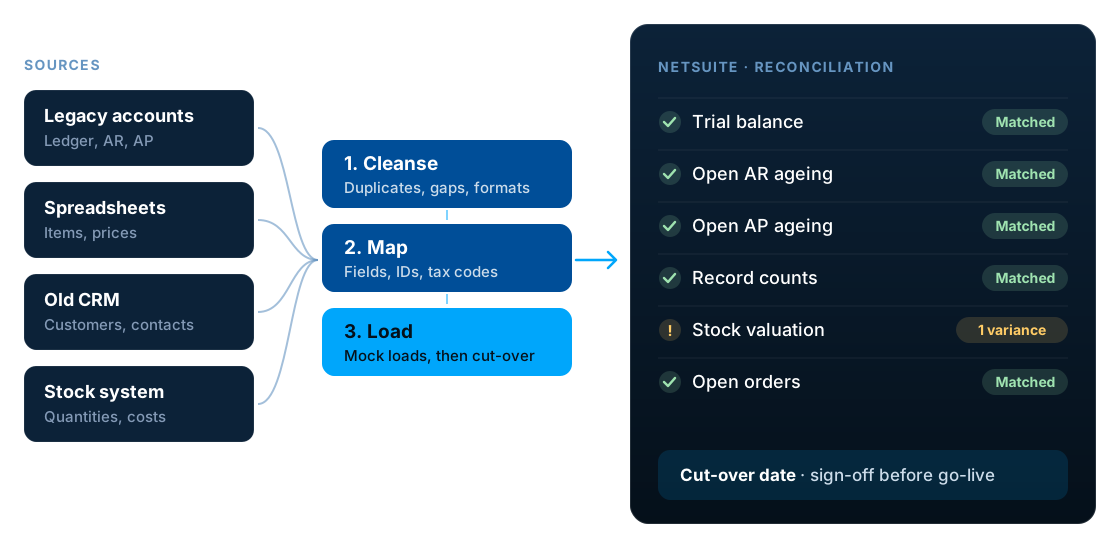
A NetSuite data migration moves master data, open transactions and opening balances from legacy systems into NetSuite. Do it in six stages: plan what to migrate, cleanse the data, map it to NetSuite, load it in the right order through repeated mock loads, reconcile every load against the source, and run a controlled cut-over with sign-off. Most problems come from poor data quality and skipped reconciliation, not from the import tools.
Key facts
- Most businesses migrate master data, open transactions and opening balances, not their full transaction history.
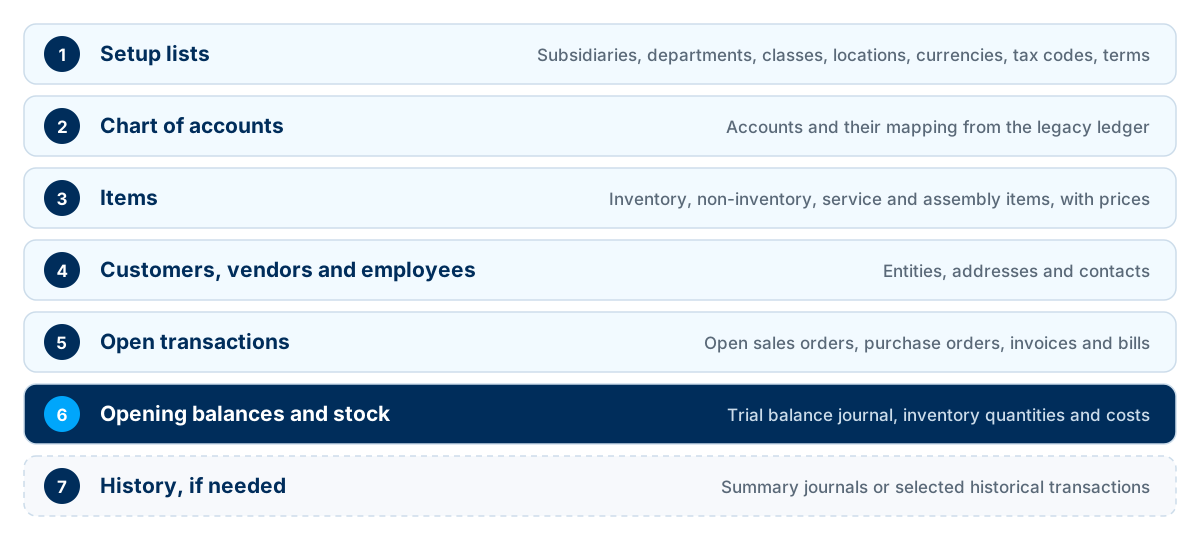
- Data loads in dependency order: setup lists, accounts, items and entities before the transactions that use them.
- NetSuite's CSV Import Assistant handles many record types, up to 25,000 records or 50 MB per import job. Complex or high-volume loads may use SuiteScript or web services.
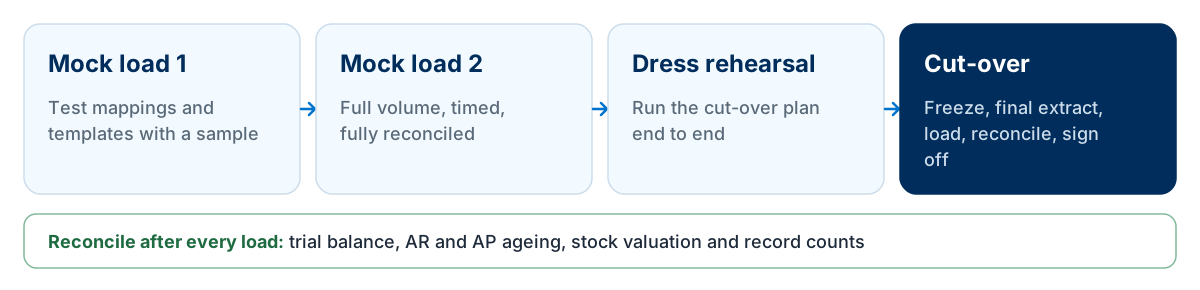
- At least two mock loads, fully reconciled, should come before the final cut-over.
- Reconciliation compares the trial balance, AR and AP ageing, stock valuation and record counts with the source system.
What is NetSuite data migration?
NetSuite data migration is the process of extracting data from legacy systems, cleansing and transforming it, loading it into NetSuite and proving that it is complete and accurate before go-live.
It is one of the most underestimated parts of any NetSuite implementation. The import itself is rarely the hard part. The hard part is deciding what to move, cleaning it and proving it is right.
What data should you migrate to NetSuite?
| Data | Examples | Usually migrated |
|---|---|---|
| Setup lists | Subsidiaries, departments, classes, locations, currencies, tax codes, payment terms | Configure or import |
| Chart of accounts | Accounts mapped from the legacy ledger | Always |
| Items | Inventory, non-inventory, service and assembly items, prices | Active items only |
| Entities | Customers, vendors, employees, contacts, addresses | Active records only |
| Open transactions | Open sales orders, purchase orders, customer invoices, vendor bills | Always |
| Opening balances | Trial balance at cut-over, inventory quantities and costs | Always |
| Historical transactions | Closed invoices, orders and journals from prior years | Case by case |
A new system is a chance to leave clutter behind. Inactive customers, discontinued items and closed transactions rarely need to come with you.
Historical data: how much to bring across
Historical transactions are the biggest scope decision in most migrations. Choose the lightest option that still meets your reporting, audit and customer service needs.
| Option | Benefits | Trade-offs |
|---|---|---|
| Opening balances only | Simplest, fastest, cleanest start | No prior-year detail in NetSuite |
| Monthly summary balances | Year-on-year reporting in NetSuite without the detail | Cannot drill into old transactions |
| Selected history | Detail where it matters, such as customer sales history | More mapping and testing |
| Full transaction history | Everything in one place | Highest cost, risk and effort |
| Archive outside NetSuite | Detail kept for audit and enquiries | A separate place to look |
Data cleansing: start before the project does
Data cleansing almost always takes longer than planned, so start early.
Remove duplicates
Merge duplicate customers, vendors and items before migration, not after.
Retire inactive records
Leave behind customers, vendors and items with no recent activity and no open balances.
Fill the gaps
Complete missing VAT numbers, addresses, payment terms, item units and costs.
Standardise formats
Make names, country codes, phone numbers and dates consistent.
Agree the rules
Decide which record wins in a duplicate, and who signs off each data set.
Assign owners
Give each data area, such as customers or items, a business owner responsible for its quality.
Data mapping: from legacy fields to NetSuite
Mapping documents exactly how each legacy field becomes a NetSuite field. A good mapping document covers:
- Every legacy field mapped to a NetSuite field, or deliberately dropped
- Legacy IDs kept as external IDs, so records can be matched and updated
- Old account codes mapped to the new chart of accounts
- Tax codes, currencies, payment terms and units of measure translated
- Custom fields defined in NetSuite before loading
- Transformation rules written down, such as splitting or combining fields
The right load order for NetSuite data
Records must exist before other records refer to them. Load in dependency order, or imports will fail on missing references.
NetSuite data migration tools
| Tool | How it works | Best for |
|---|---|---|
| CSV Import Assistant | NetSuite's built-in tool for importing records from CSV files with saved field mappings, up to 25,000 records or 50 MB per import job | Most master data and many transaction types |
| SuiteScript | Custom scripts, often Map/Reduce, that create records with your own logic. Scripted CSV imports keep the 25,000-record limit | Complex transformations or very high volumes |
| Web services or integration platforms | SuiteTalk APIs or tools such as Celigo moving data system to system | Repeatable loads or data still changing in a live source |
| Journal entries | Opening and summary balances posted as journals | Trial balances and summary history |
Most projects use the CSV Import Assistant for the bulk of the data, with scripts or integrations only where volume or transformation logic demands it. Check Oracle's list of supported record types before you plan, and see our NetSuite integration guide for the API options.
Migrating opening balances
Opening balances are where finance teams most need to be confident. A typical approach:
Open customer invoices
Loaded individually so they can be collected, aged and reported by customer.
Open vendor bills
Loaded individually so they can be paid and aged by vendor.
Inventory
Quantities and costs loaded by item and location, so stock valuation matches.
Remaining balances
Posted as an opening journal at the cut-over date, using clearing accounts that net to zero.
Clearing accounts should be zero after every load. A balance left in a clearing account means something is missing or duplicated.
Mock loads and testing
Never let go-live be the first full load. Repeated mock loads turn the migration into a rehearsed, timed and predictable process.
Test migrated data in real processes, not only in reports: raise an order for a migrated customer, receive against a migrated purchase order and pay a migrated bill.
Reconciliation: prove the data is right
| Check | What should match |
|---|---|
| Trial balance | Every account balance at cut-over matches the legacy ledger |
| Accounts receivable | Open invoices and ageing match by customer |
| Accounts payable | Open bills and ageing match by vendor |
| Inventory | Quantities and valuation match by item and location |
| Record counts | Customers, vendors, items and open orders all accounted for |
| Spot checks | Users review sample records they know well |
Record every reconciliation result and have finance sign it off. That evidence is valuable for auditors as well as for the go-live decision.
Cut-over planning
- Agree the cut-over date, ideally at a month-end
- Freeze changes to master data in the legacy system
- Close the legacy period and take the final extract
- Load and reconcile in the agreed sequence
- Hold a go or no-go decision with named approvers
- Keep the legacy system read-only for reference
The dress rehearsal tells you how long each step takes, so the cut-over plan can be scheduled hour by hour rather than hoped for.
The complete NetSuite data migration checklist
Use this checklist to plan and track every stage of your migration.
Plan
- List every source system and data owner
- Decide what to migrate and what to leave behind
- Choose the historical data approach
- Agree the cut-over date
- Define reconciliation and sign-off criteria
- Plan the number of mock loads
Cleanse
- Remove duplicate customers, vendors and items
- Retire inactive records
- Fill missing tax, address and payment data
- Standardise names and formats
- Get each data set signed off by its owner
Map
- Map every field to NetSuite or drop it on purpose
- Keep legacy IDs as external IDs
- Map account codes, tax codes and currencies
- Create custom fields before loading
- Document transformation rules
Load and test
- Load in dependency order
- Run at least two full mock loads
- Time each load to plan the cut-over window
- Test real processes on migrated data
- Fix issues in the source, not by hand in NetSuite
Reconcile
- Match the trial balance
- Match AR and AP ageing
- Match inventory quantities and valuation
- Check record counts
- Have users spot-check familiar records
Cut over
- Freeze legacy master data
- Take the final extract after period close
- Load, reconcile and document results
- Make the go or no-go decision
- Keep legacy data accessible read-only
UK data migration considerations
VAT codes and Making Tax Digital
Map legacy VAT codes carefully and plan cut-over around VAT periods. Under HMRC's digital links rules, a CSV import or API transfer is an acceptable link, but copy-and-paste or re-keying VAT data between systems is not.
Keep legacy records for six years
HMRC generally requires VAT records to be kept for at least six years. Whatever history you leave out of NetSuite still needs to be archived and accessible for that period.
Common source systems
UK businesses often move from Sage, Xero or QuickBooks. Each exports data differently, so test extracts early.
GDPR
Do not migrate personal data you no longer need, and apply your retention rules before loading.
Multi-currency balances
Foreign currency balances need both transaction and base currency amounts to reconcile correctly.
Moving from Sage specifically? See our Sage data migration services.
Common NetSuite data migration mistakes
- Migrating everything
- Moving inactive and duplicate data brings old problems into the new system.
- Cleansing too late
- Data cleansing takes longer than expected. Start it before the project, not just before cut-over.
- Only one test load
- The first load always surfaces surprises. Plan at least two full mock loads.
- Fixing data by hand in NetSuite
- Manual fixes are lost at the next load. Correct the source or the transformation instead.
- Ignoring import limits
- Large files that break the CSV import limits fail or crawl. Split loads into chunks and time them in mock loads.
- Skipping reconciliation
- Unreconciled opening balances undermine trust in NetSuite from the first day.
- No clear ownership
- Finance, operations and IT each assume someone else is checking the data.
Data migration also has a major effect on budget. See NetSuite implementation cost in the UK for how it fits into the wider project, and our NetSuite support guide for what happens after go-live.
Frequently asked questions
What data should I migrate to NetSuite?
Most businesses migrate setup lists, the chart of accounts, active items, customers, vendors and employees, open transactions and opening balances. Full transaction history is optional and decided case by case.
Should I migrate historical transactions to NetSuite?
Often not in full. Common options are opening balances only, monthly summary balances for comparative reporting, selected history such as customer sales, or archiving history outside NetSuite. Weigh reporting needs against cost and risk, and keep archived records for as long as tax rules require.
How do I import data into NetSuite?
NetSuite's CSV Import Assistant imports many record types from CSV files using saved field mappings. Complex or high-volume migrations may also use SuiteScript, SuiteTalk web services or an integration platform.
What is the NetSuite CSV import limit?
Oracle's NetSuite help sets a limit of 25,000 records or 50 MB per CSV import job, and for a multiple-file upload all files combined must stay under those limits. Split larger data sets into smaller jobs.
In what order should data be loaded into NetSuite?
Load setup lists first, then the chart of accounts, items, and customers, vendors and employees, followed by open transactions, opening balances and inventory, and finally any historical data. Records must exist before transactions refer to them.
How do I migrate opening balances into NetSuite?
Opening balances are usually posted as a journal entry at the cut-over date, with open customer invoices and vendor bills loaded individually so they can be paid and aged. Inventory quantities and costs are loaded by item and location, then everything is reconciled to the legacy trial balance.
How many test migrations do I need?
Plan at least two full mock loads before cut-over, each fully reconciled, plus a dress rehearsal of the cut-over itself. Complex projects may need more.
Can I migrate from Sage, Xero or QuickBooks to NetSuite?
Yes. Data from Sage, Xero, QuickBooks and other systems can be extracted, cleansed, mapped and loaded into NetSuite. Test the extracts early, because each system exports data in its own structure.
How long should I keep legacy data after moving to NetSuite in the UK?
HMRC generally requires VAT records to be kept for at least six years, and records for other taxes may need to be kept longer. Archive the legacy system or its data so it stays accessible for that period.
Who is responsible for data cleansing?
The business owns its data, so each data area should have a business owner who cleanses and signs it off. A partner provides templates, tools, validation and the load itself.
Plan your NetSuite data migration
LST Consultancy plans and runs NetSuite data migrations: templates, mapping, CSV and scripted loads, mock loads, reconciliation and cut-over. Tell us which systems you are moving from and how much history you need.
Sources
Related reading
NetSuite Implementation Cost in the UK: What Businesses Should Budget For
NetSuite Support and Maintenance: What to Do After Go-Live
NetSuite Integration Guide: Connecting Your ERP with E-commerce, CRM and Business Systems
NetSuite OneWorld for European Businesses: Multi-Subsidiary Management Explained