NetSuite Plaid Integration – Enhancing Financial Efficiency

Simplify your financial transactions with NetSuite and Plaid Integration.

Auto import bank transactions, reduce manual data entry and receive real-time bank balances and cash flows straight from NetSuite.

Salesforce Google Sheets integration dashboard – CRM Data Sync by LST Consultancy

What is NetSuite Plaid Integration?

NetSuite Plaid Integration establishes a direct connection between your financial institutions and Oracle NetSuite through Plaid's secure API. This integration facilitates the real-time synchronization of bank transactions, account balances, and account details, reducing the need for manual input and speeding up reconciliation processes within the NetSuite platform.

What is CRM Data Sync – bi-directional Salesforce and Google Sheets synchronization

Key Features of NetSuite Plaid Integration

Flexible sync modes for Salesforce Google Sheets integration

Automatic Bank Transaction Import

Use Plaid's/transactions/get API to import data from 12,000+ financial institutions—no manual data entry.

Intelligent field mapping for Salesforce to Google Sheets data sync

Real-Time Bank Balances

Follow daily cash position with daily bank balance updates and make better informed business decisions using the cash position analysis tool.

Conflict resolution settings in CRM Data Sync for Salesforce Google Sheets

Auto-Reconciliation Tools

Automatically reconcile bank transactions to NetSuite GL records—reducing time to reconcile by up to 80%.

Secure and scalable architecture for CRM data synchronization

Secure & Scalable Architecture

100% built-in NetSuite SuiteScript 2.1 – no middleware, 3rd party platforms or external servers.

CRM Data Sync advanced upsert feature for Salesforce records

Native NetSuite Deployment

NetSuite Plaid Integration runs all its processes within NetSuite, leveraging Suitelets, RESTlets, and Map/Reduce developing techniques.

OAuth 2.0 authentication for Salesforce Google Sheets connector

OAuth & TBA Authentication

Supported OAuth and Token Based Authentication for security and compliance.

How Does NetSuite Plaid Integration Work?

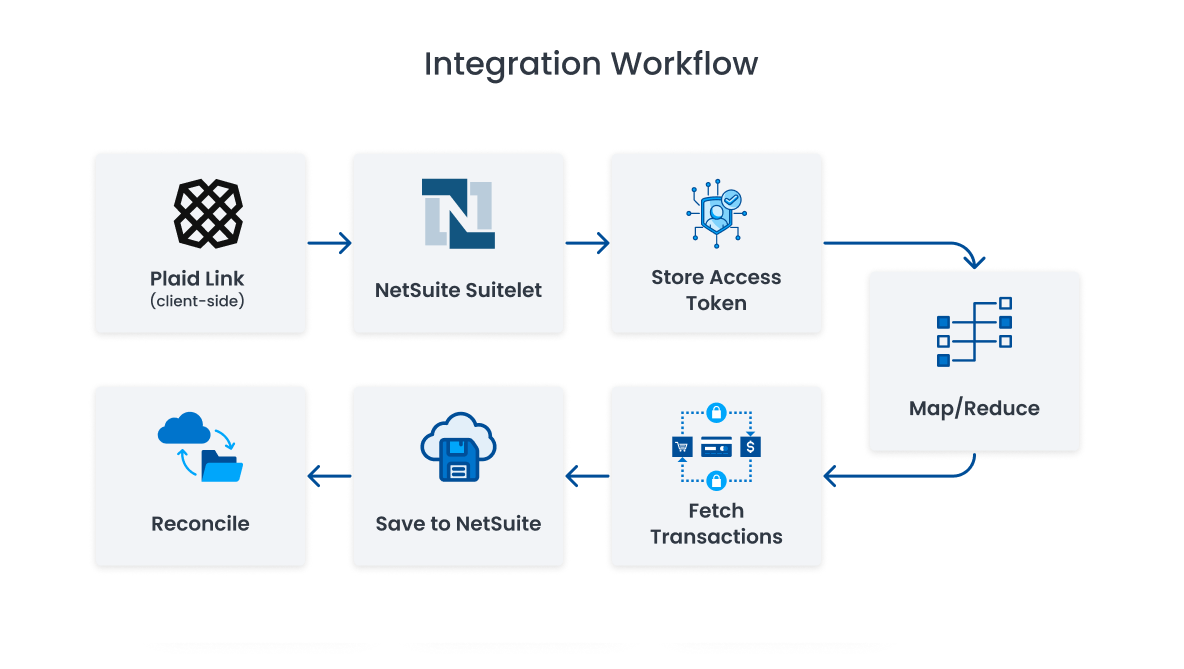
NetSuite Plaid Integration Flow Chart

Our Step-by-Step Process

Step 1 – Connect Salesforce and Google accounts with OAuth 2.0

User Connects Bank via Plaid Link

Finance users securely connect their bank accounts through Plaid's client interface.

Step 2 – Map Salesforce objects to Google Sheets tabs

Access Token Stored in NetSuite

The access token is securely saved in a custom record inside NetSuite.

Step 4 – Reconciliation and insights in CRM Data Sync

Automated Transaction Sync

Scheduled Map/Reduce scripts fetch and save bank transactions into NetSuite.

Reconciliation & Insights

Reconciliation & Insights

Use NetSuite dashboards and saved searches to handle reconciliation, unmatched transactions, and cash reports.

100% NetSuite Native – No Middleware Required

NetSuite Plaid Integration is entirely native to NetSuite, unlike other connectors.

  • No more Node.js, Java, or .NET servers are needed
  • Built with SuiteScript 2.1
  • Easy maintenance, speedy deployment, and safe performance

Benefits of Using NetSuite Plaid Integration

Eliminate manual exports with Salesforce Google Sheets integration

Automated Bank Feeds

No more manual uploads—Plaid automatically pulls transactions into NetSuite.

Improve data accuracy across Salesforce and Google Sheets

Real-time Cash Visibility

Finance teams gain immediate access to cash flow and bank balances.

Enable real-time reporting with live Salesforce data in Google Sheets

Faster Reconciliation

Match transactions more quickly and reduce month-end close time by 80%.

Reduce operational delays with automated CRM data sync

Increased Accuracy

Tokenized syncing and process-driven automation reduce mistakes and boost consistency.

Empower non-technical users with CRM Data Sync sidebar interface

Multi Bank & Currency Support

Works flawlessly across multiple departments and systems.

Scale Salesforce Google Sheets sync with bulk processing of 10000 plus records

Built for NetSuite

Operates entirely within your NetSuite account without external platforms or dependencies.

Enable real-time reporting with live Salesforce data in Google Sheets

Faster Reconciliation

Match transactions more quickly and reduce month-end close time by 80%.

Scale Salesforce Google Sheets sync with bulk processing of 10000 plus records

Built for NetSuite

Operates entirely within your NetSuite account without external platforms or dependencies.

Who Should Use NetSuite Plaid Integration?

This solution is ideal for:

  • Finance teams that use NetSuite and are weary of CSV uploads
  • Companies looking to automate their cash flow visibility
  • SaaS, eCommerce, and service-based companies that use multiple bank accounts
  • Any organization requiring multi-bank, multi-currency or multi-subsidiary financial consolidation

Let's Talk About NetSuite Plaid Integration

Are you interested in integrating NetSuite Plaid for your business? Here’s what we offer:

  • 1-2 weeks for full deployment
  • Pre-build SuiteApp/Bundles for quick deployment
  • End-to-End training  and creating a Dashboard

Contact us now to schedule a free demo and start automating your bank feeds and reconciliation.

CRM Data Sync by LST Consultancy – Salesforce Google Sheets integration

Frequently Ask Question

Plaid provides software that enables applications to connect and access this financial data; it supports more than 12,000 banks across the United States, Canada, U.K. and Europe, which include most of the major banks, along with credit unions and digital wallets.


Yes. Plaid secure API powers it, and all tokens reside within the NetSuite platform using custom records. OAuth and TBA (Token-Based Authentication)

No, NetSuite Plaid Integration is 100% native to NetSuite – No Node. Js, Java, or .NET is required.

With setup, testing, and training, most of our deployments only take 1 week – 2 weeks.