
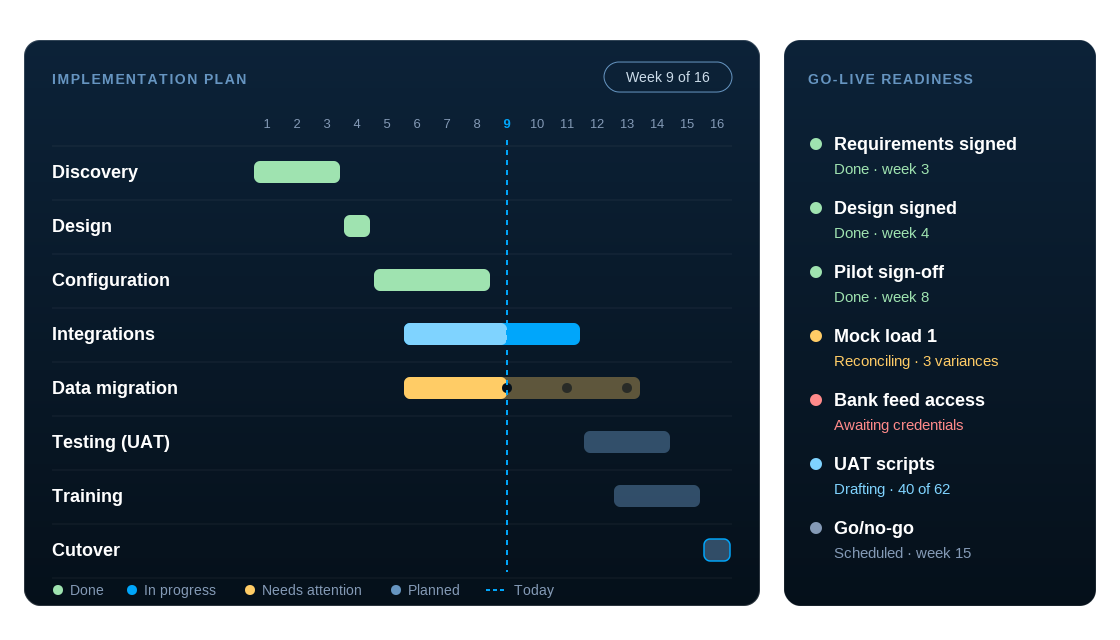
Quick answer
A NetSuite implementation timeline for a typical single-company, mid-market project runs about 16 weeks: discovery and design in weeks 1–4, configuration, integrations and customization in weeks 5–11, data migration rehearsals alongside them, testing and training in weeks 12–15, and cutover in week 16, followed by 30–90 days of hypercare. Multi-subsidiary rollouts take 9–18 months.
Key facts
- Oracle NetSuite's own implementation guide allows 2–4 weeks for discovery and requirements, 1–2 weeks for the roadmap, 3–5 weeks for configuration and 2–4 weeks for user acceptance testing.
- NetSuite's cost guide puts a simple single-entity project at 8–14 weeks, most mid-market projects at 4–11 months and global multi-subsidiary rollouts at 9–18 months.
- Oracle plans go-live as a one-week cutover followed by 30–90 days of hypercare support.
- The CSV Import Assistant accepts up to 25,000 records or 50 MB per import job (as of November 2026), so large data loads are split into sequenced batches.
- NetSuite has two major releases a year and upgrades customers in phases over a few months, with a Release Preview account available before each release.
- Oracle says SuiteSuccess can take a company from contract to live in as few as 100 days, a vendor figure for a standardized scope.
What is a NetSuite implementation timeline?
A NetSuite implementation timeline is the dated plan that takes a company from signed contract to live use of NetSuite. It sequences discovery, design, configuration, integrations, data migration, testing, training and cutover, shows which run in parallel, and sets the exit criteria each phase must meet before the next one starts.
Most published timelines stop at phase names and a total number of months. That is useful for a budget conversation but not for running a project. The plan that actually protects a go-live date works at the level of weeks, names who does each task on both the partner's side and yours, and treats the customer-side work (decisions, data cleansing, testing) as first-class tasks rather than assumptions.
This guide sets out that week-level view for a typical project. For the services side of the same journey, see our NetSuite implementation services, and for the mistakes that most often derail each phase, read our guide to NetSuite implementation best practices.
How long does a NetSuite implementation take?
Between two and eighteen months, depending mainly on the number of legal entities, integrations and customizations. Oracle's own figures give these bands:
| Project type | Typical duration | What drives it |
|---|---|---|
| Simple, single entity | 8–14 weeks | Standard processes, few integrations, light customization, clean data |
| SuiteSuccess, standardized scope | As few as 100 days (Oracle's figure) | Industry leading-practice configuration accepted largely as delivered |
| Mid-market | 4–11 months | Several integrations, inventory or manufacturing, approval workflows and scripts |
| Global, multi-subsidiary | 9–18 months | Several countries, currencies and tax regimes, intercompany, often rolled out in phases |
For context across the whole ERP market, Oracle's implementation guide cites Panorama Consulting's 2026 ERP report, which found a median project timeline of nine months across 170 organizations. That figure covers every ERP vendor, including much larger suites, so treat it as a ceiling check rather than a NetSuite benchmark.
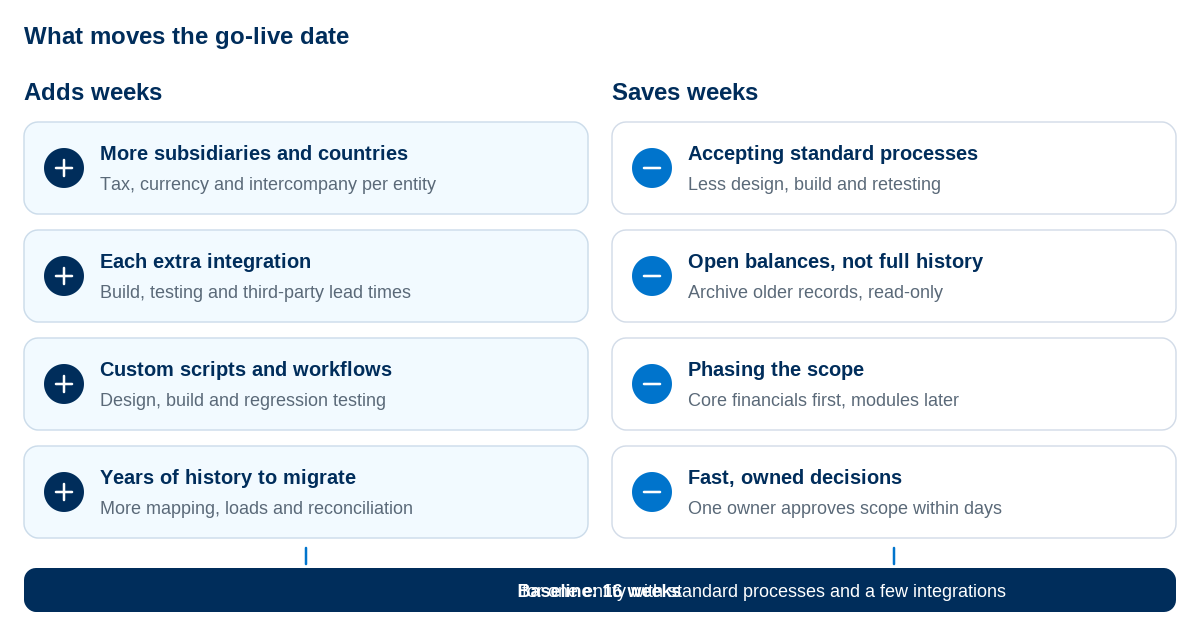
The rest of this guide uses a 16-week plan for one legal entity with mostly standard processes, a handful of integrations and a few years of open balances to migrate. It sits between Oracle's simple and mid-market bands, and it is the shape we see most often. It is our planning model, not an Oracle figure: your scope will stretch or compress it.
To turn your own scope into a budget as well as a duration, try the NetSuite implementation cost calculator.
NetSuite implementation timeline: week by week
Here is the 16-week plan in one view. Workstreams overlap deliberately: integrations and data migration start while configuration is still under way, and training begins before testing ends.
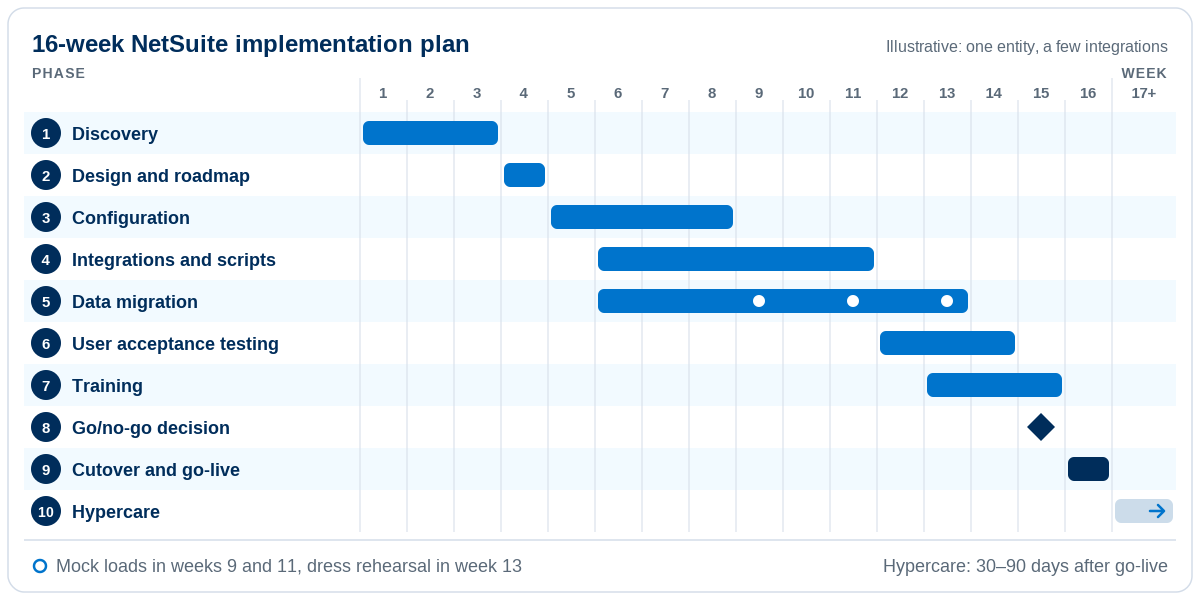
The table adds what each phase asks of your team and the exit criteria that should be met before the plan moves on. If an exit criterion is missed, the honest response is to move the dates, not to start the next phase anyway.
| Weeks | Phase and work | What your team does | Exit criteria |
|---|---|---|---|
| 0 | Pre-kickoff. Contract signed, accounts provisioned, project team and steering group named, kickoff booked | Name a project owner and process owners and block their calendars | Named team and an agreed go-live target |
| 1–3 | Discovery. Workshops for order-to-cash, procure-to-pay, record-to-report, inventory and reporting; systems, integrations and data sources inventoried | Process owners attend workshops and share reports, documents and sample data | Signed requirements and a fit-gap list |
| 4 | Design and roadmap. Solution design, chart of accounts and segments, integration specifications, data migration plan, test strategy, cutover date | Finance decides the chart of accounts, segments and how much history to migrate | Signed design, frozen scope and a dated plan |
| 5–8 | Configuration. Company set-up, accounting periods, tax, items, pricing, roles, forms, approvals and saved searches; a walkthrough of configured processes in week 8 | Review configured processes each week and start cleansing data | Conference room pilot signed off |
| 6–11 | Integrations and customization. Build and unit-test integrations and scripts in a sandbox, deployed through the SuiteCloud Development Framework | System owners provide API access, credentials and test data | Each integration and script passes its system test |
| 6–13 | Data migration. Extract, cleanse and map; mock load 1 in week 9, mock load 2 in week 11 and a dress rehearsal in week 13, each reconciled | Own the cleansing and sign off every reconciliation | Rehearsal loads reconcile to the source system |
| 12–14 | User acceptance testing. End-to-end scenarios on migrated data, defect triage and retesting | Key users run the test scripts: the heaviest weeks for your team | No open critical defects and UAT signed |
| 13–15 | Training. Role-based training, train-the-trainer sessions and quick-reference guides | Every user completes training for their role | Users trained and their access tested |
| 15 | Go/no-go. Cutover plan rehearsed, criteria reviewed, freeze dates confirmed | The steering group makes the decision | Go decision recorded |
| 16 | Cutover. Final data loads, opening balances and open transactions, integrations switched on, legacy system made read-only | Finance reconciles balances and users start transacting | Live, balanced and transacting |
| 17–28 | Hypercare. Daily issue triage, first month-end close support, tuning and handover to support | Report issues and run the first close in NetSuite | First close complete and support handed over |
What happens in weeks 1 to 4: discovery and design?
Weeks 1 to 3 turn how your business works today into signed requirements, and week 4 turns those requirements into a design and a dated plan. Oracle allows 2–4 weeks for discovery and 1–2 weeks for the roadmap, so four weeks is a realistic middle.
Weeks 1 to 3: discovery workshops
Week 1 opens with the kickoff: goals, scope, governance, the project calendar and access to the NetSuite account. The workshops follow, usually grouped by end-to-end process so that the people who hand work to each other sit in the same room:
Record to report
Chart of accounts, segments such as departments, classes and locations, accounting periods, close tasks and the reports finance and the board need.
Order to cash
Quotes, sales orders, pricing, fulfillment, invoicing, collections and how customers and orders arrive from other systems.
Procure to pay
Requisitions, purchase orders, approvals, receipts, vendor bills and payment runs, including who approves what and at which limits.
Inventory and operations
Items, locations, costing method, stock movements and, where relevant, assemblies, work orders or warehouse processes.
Alongside the workshops, the team inventories every system that will connect to NetSuite and every source of data that will move into it. By the end of week 3 you should have a requirements document and a fit-gap list that marks each requirement as standard NetSuite, configuration, a SuiteApp or custom development.
Week 4: solution design and roadmap
Design week fixes the decisions that are expensive to change later: the chart of accounts and segments, subsidiary structure if there is more than one entity, item and costing set-up, approval rules, integration specifications, the data migration plan, the test strategy and a cutover date. Scope is frozen at sign-off, and anything new after that point goes through change control.
If you run more than one legal entity, the subsidiary design adds time in this phase; our guide to NetSuite OneWorld and multi-subsidiary management explains what has to be decided.
What happens in weeks 5 to 11: configuration, customization and integrations?
The build runs as three overlapping workstreams. Configuration takes weeks 5 to 8, in line with Oracle's 3–5 week range, while integrations and customization start in week 6 and finish by week 11.
Configuration, weeks 5 to 8
Week 5 covers company set-up, accounting periods, the chart of accounts and tax. Week 6 adds items, pricing, customers and vendors as templates, roles and permissions. Week 7 builds forms, approval workflows, saved searches and reports. Week 8 is the conference room pilot: process owners walk through real scenarios in the configured account and confirm it matches the signed design.
Integrations and customization, weeks 6 to 11
Oracle allows 3–6 weeks each for customization and integrations, and they normally run in parallel with configuration. Each integration moves through specification, build, unit test and system test in a sandbox. Scripts and custom objects are built in SuiteCloud Development Framework projects, so they can be deployed to production as a controlled package rather than edited live.
Integrations are the workstream most exposed to outside parties. Our NetSuite integration services start the access requests for connected systems in discovery, which is usually the difference between a week 11 finish and a week 14 one.
Protect sandbox work. Oracle notes that refreshing a sandbox replaces its contents with a copy of production and that a refresh cannot be cancelled once requested. Save configuration and scripts in SDF projects before any refresh, and schedule refreshes around test cycles rather than in the middle of them.
When does data migration happen in the timeline?
Data migration runs from week 6 to week 13, alongside the build, and it is the workstream most likely to decide whether week 16 holds. Oracle's guide allows 2–4 weeks for migration but notes it often runs in parallel; in practice the cleansing that feeds it starts much earlier.
The rhythm is extract, cleanse, map and load, repeated. Mock load 1 in week 9 proves the mappings work. Mock load 2 in week 11 loads a full, recent extract and reconciles it to the source. The dress rehearsal in week 13 runs the cutover sequence end to end, timed, so you know how long the real thing will take. Each load is reconciled and signed off by your data owner.
Volume shapes the schedule too. The CSV Import Assistant accepts up to 25,000 records or 50 MB per import job, as of November 2026, so a large transaction history has to be split into batches and loaded in dependency order: lists and entities first, then items, then open transactions.
The less history you move, the shorter this phase becomes. Many companies migrate open balances and one or two years of transactions, and keep older records searchable in a read-only archive such as our NetSuite data archival solution, which stores historical records outside NetSuite for reference. An archive is not a backup, so plan backups separately. For the full checklist, see our NetSuite data migration guide or our NetSuite data migration services.
Weeks 12 to 15: testing, training and the go/no-go decision
Weeks 12 to 14 are user acceptance testing on migrated data, weeks 13 to 15 are training, and week 15 ends with the go/no-go decision. Oracle allows 2–4 weeks for UAT and 2–3 weeks for training, so this plan uses the shorter end of both and overlaps them.
UAT is where your key users run end-to-end scenarios, such as an order from quote through fulfillment, invoice and cash receipt, or a purchase from requisition to payment, using the data from mock load 2. Defects are logged, prioritized, fixed and retested within the same window. Testing on clean demo data instead of migrated data is the most common way to pass UAT and still fail go-live.
Training is role-based: a warehouse user learns receiving and picking, an accounts payable clerk learns vendor bills and payment runs. Train-the-trainer sessions prepare key users to support colleagues, and every user should log in with their own role before go-live so that permission problems surface in week 15, not on day one.
The go/no-go meeting checks written criteria agreed weeks earlier: UAT signed with no open critical defects, the dress rehearsal reconciled, users trained, integrations tested end to end, support arrangements in place and the cutover plan rehearsed. If a criterion fails, the steering group moves the date.
What happens in go-live week and hypercare?
Week 16 is the cutover itself, which Oracle plans as a one-week activity, followed by 30–90 days of hypercare. The cutover follows the same sequence as the dress rehearsal:
Confirm the go decision and freeze
Record the steering group's decision and freeze configuration and master data changes in both the legacy system and NetSuite.
Close the legacy period
Post the final transactions in the old system and produce the closing trial balance and open item reports.
Load the final data
Load master data changes since the rehearsal, then open receivables, payables, open orders and inventory quantities.
Load and reconcile opening balances
Load the trial balance and reconcile it account by account to the legacy closing balances, with finance signing off.
Switch integrations on
Point connected systems at production NetSuite and check the first live orders, payments and syncs end to end.
Go live and lock the old system
Users start transacting in NetSuite and the legacy system becomes read-only for reference.
Start hypercare
Run a daily triage stand-up, fix issues by priority and support the first month-end close.
Hypercare is the period of intensive support straight after go-live. The first two weeks bring the most issues, mostly permissions, forms and edge cases in integrations. The first month-end close in NetSuite is the real test, and a plan should keep hypercare running until at least that close is complete, then hand over to ongoing support.
For what comes after hypercare, see NetSuite support and maintenance after go-live, or our NetSuite post-implementation support if your project is already live and struggling.
How much time does your team need to give each week?
More than most companies expect. The partner configures and builds, but only your people can make decisions, cleanse data and accept the system. These are the roles every plan needs on the customer side:
Project owner
Chairs a weekly status meeting and a steering group every two to four weeks, and approves or rejects scope changes within days rather than weeks.
Finance lead
Owns the chart of accounts, tax and close design, signs off data reconciliations and runs the first month-end close in NetSuite.
Process owners
Sales, purchasing and operations leads who attend discovery workshops, review configured processes and nominate testers.
Data owner
Cleanses customer, vendor and item records, decides what is retired and signs off each mock load against the source system.
System owners
Provide access to e-commerce, CRM, banking and other connected systems, and arrange vendor sandboxes for integration testing.
Key users
Run user acceptance testing on migrated data and become the first line of help for colleagues after go-live.
As a planning assumption from the projects we run, not an Oracle figure: process owners spend the most time in discovery and UAT, often two or three half-days a week in those phases, while the project owner and finance lead are needed every week from kickoff to the first close. The data owner's peak comes in weeks 6 to 13.
What makes a NetSuite implementation timeline slip?
Timelines rarely slip because configuration takes longer than planned. They slip at the hand-offs between the project team and the rest of the business:
- Late chart of accounts decisions
- Oracle's own cost guide names unanswered chart of accounts questions as a common reason design runs long. Everything downstream waits on it.
- Scope added after design sign-off
- Each new requirement re-opens configuration, testing and training. Park it for a post-go-live phase unless it blocks go-live.
- Data cleansing started late
- Cleansing depends on business people, not the project team. Starting it in week 10 almost guarantees a failed rehearsal.
- Third-party integration dependencies
- API access, credentials and vendor sandboxes have their own lead times. Request them in discovery, not when the build starts.
- Testers not released from day jobs
- UAT squeezed around normal work runs at half speed and finds defects late. Backfill or reduce testers' workload for those weeks.
- Go-live set by the calendar, not readiness
- A date chosen for a license renewal or a board meeting, without go/no-go criteria, pushes unready systems live.
- Clashing with close or the upgrade window
- Going live during year-end, a peak season or your NetSuite release upgrade adds risk for no benefit.
- Sandbox work lost in a refresh
- Oracle notes that a sandbox refresh replaces the sandbox's contents and cannot be cancelled once requested. Keep build work in SDF projects first.
The upgrade window deserves a specific note. NetSuite has two major releases a year and upgrades accounts in phases over a few months. Check your account's scheduled upgrade date during design, keep cutover clear of it, and use the Release Preview account to regression-test scripts and integrations on the new version.
What we check first when a timeline is at risk
In implementations we've run, the earliest warning sign is rarely a red status report. It is a quiet week: no decisions closed, no data loaded, no test access confirmed. These are the five questions we ask first when a plan looks shaky.
- Are decisions waiting on someone?
- List every open design question with an owner and a date. A plan with ten undated open questions is already late.
- Has data been loaded yet?
- If the first mock load has not run by the middle of the build, the go-live date is a guess.
- Do integrations have test access?
- Confirm each connected system has credentials and a sandbox, not just a specification.
- Are testers named and released?
- Named people with time blocked in the UAT weeks, not “the finance team”.
- Is there a written go/no-go list?
- Measurable criteria agreed in advance, so the decision in week 15 is a check rather than a debate.
The trade-off is always the same three levers: scope, date and people. Cutting UAT to save the date is the false economy we see most; the defects it would have found arrive in the first month-end instead, when they cost more to fix. Moving low-value scope to a second phase, or adding testers for two weeks, protects the date far more safely.
A useful rule of thumb from our own projects: if the dress rehearsal does not reconcile by the end of week 13, add at least two weeks rather than hoping the real cutover goes better. It almost never does.
Can you shorten a NetSuite implementation timeline?
Yes, mostly by reducing scope and decision time rather than by working faster. The options that reliably take weeks out of a NetSuite implementation timeline are:
- Accept NetSuite's standard processes wherever they work, and customize only where the business genuinely differs.
- Migrate open balances and recent history, and archive the rest read-only.
- Phase the scope: core financials and order-to-cash first, then additional modules.
- Give one project owner authority to approve scope changes within days.
- Start data cleansing and integration access requests in week 1.
SuiteSuccess is Oracle's packaged route to speed: industry leading-practice configuration that Oracle says can take a company from contract to live in as few as 100 days. That figure is a vendor target for companies willing to adopt the packaged processes largely as delivered, not a typical outcome for a heavily customized scope.
See NetSuite SuiteSuccess for small businesses for when that model fits, and our NetSuite implementation cost breakdown for how timeline choices change the budget.
Frequently asked questions
Can a small business go live on NetSuite in under three months?
Yes, when the scope is genuinely simple. Oracle puts a simple single-entity project at 8–14 weeks, and says SuiteSuccess can reach go-live in as few as 100 days. That depends on accepting standard processes, migrating open balances rather than years of history, keeping integrations to a minimum and having people available for testing.
When should we start if we want to go live on January 1?
Work backwards from the date. A 16-week plan with a four-week contingency means kicking off by early August. Remember that January 1 means your first NetSuite close is a year-end close, so many companies prefer to go live a month or a quarter later and close the old year in the legacy system.
Is it better to go live at the start of a month or a quarter?
The start of an accounting period is usually best, because opening balances are clean and the legacy system closes a full period. A quarter start gives an even cleaner cut for reporting. Avoid the first day of a period that is also your peak trading season or the start of your fiscal year if your team is stretched.
Does NetSuite's twice-yearly upgrade affect our go-live date?
It can. NetSuite has two major releases a year and upgrades accounts in phases over a few months. Check your scheduled upgrade date, avoid going live in the same weeks, and use the Release Preview account to regression-test your scripts and integrations on the new version before your production account is upgraded.
How many test cycles should a NetSuite project plan for?
Plan at least two mock data loads plus a dress rehearsal, one conference room pilot after configuration, system testing of each integration and script, and one full UAT cycle with time to retest fixes. Larger projects add a second UAT cycle or a parallel payroll or close test before go-live.
What is a conference room pilot in a NetSuite project?
A conference room pilot is a structured walkthrough of the configured system with the people who will use it. Process owners follow real scenarios, such as an order from quote to cash, and confirm the configuration matches the signed design before integrations, data and testing build on top of it.
Should we run the old system and NetSuite in parallel after go-live?
Full parallel running doubles everyone's workload and is rarely worth it for cloud ERP. A better approach is a reconciled cutover: rehearse the data loads, reconcile opening balances, keep the old system read-only for reference and run a short parallel check only on high-risk outputs such as payroll or tax returns.
Does the timeline include integrations with other systems?
It should. Oracle's guide allows 3–6 weeks for integrations, usually running alongside configuration. Each integration needs a specification, build, system test and an end-to-end test in UAT. Integrations that depend on a third party's API access or sandbox are the ones most likely to move the date.
How long does a NetSuite reimplementation take?
A reimplementation of an existing NetSuite account is often shorter in discovery, because processes and data already live in NetSuite, but it can take longer in testing, since existing scripts, saved searches and integrations must be reviewed and regression-tested. Plan it phase by phase, like a new project.
Who owns the project plan, the partner or the customer?
Both. The implementation partner builds and maintains the plan and runs the project day to day, but the customer owns the decisions, the data, the testing and the go/no-go call. A plan that only the partner can update usually hides the customer-side tasks that cause delays.
Get a realistic NetSuite timeline for your scope
LST Consultancy's certified NetSuite consultants build week-by-week plans with exit criteria for every phase, including the work your own team needs to do. Tell us about your entities, integrations and data, and we'll show you where the weeks go.
Sources
- Oracle NetSuite: The Complete NetSuite Implementation Guide: Timeline, Scope, and What to Expect
- Oracle NetSuite: Breaking Down NetSuite Implementation Costs by Phase
- Oracle NetSuite Help: Refreshing Sandbox Accounts
- Oracle NetSuite Help: General CSV File Conventions (CSV Import Assistant limits)
- Oracle NetSuite Help: The Release Preview Account